WordPress has a built-in sticky post feature that can push selected posts to the top of a list. In one theme project, we needed something conceptually similar for categories: certain child categories had to appear at the top of a parent category view.
WordPress does not provide a native featured-category feature, but it can be implemented cleanly with a bit of code.
Add a featured-category setting in WordPress
Sticky post information is stored in the wp_options table and can be retrieved with get_option( 'sticky_posts' ). We can use the same general idea for categories: add a custom field to the category edit screen, then save the selected featured categories into an option.
In the screenshot below, the field labeled “Mark this category as featured” is a custom taxonomy field. There are many ways to build that UI, so the article focuses on the saving logic.
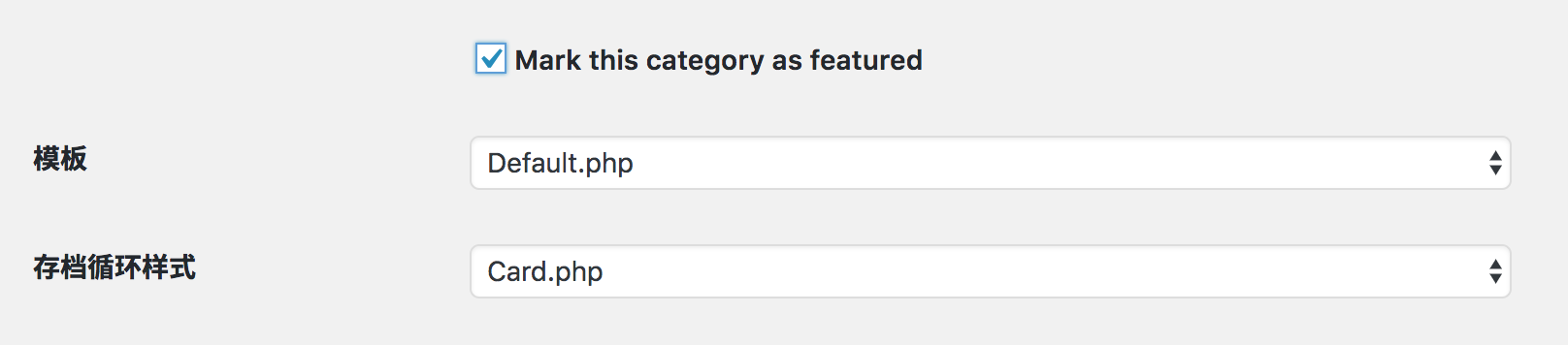
When the category is saved, we also save its featured state into wp_options. Hooking this logic to edited_category is enough.
add_action( 'edited_category', function ( $term_id, $tt_id ) {
    // Read the submitted featured state.
    $is_featured = isset( $_POST['_featured'] );

    // Load the current featured category IDs.
    $featured_terms = get_option( 'featured_term', [] );

    // Add or remove the current term ID as needed.
    if ( $is_featured ) {
        $featured_terms[] = $term_id;
        $featured_terms   = array_unique( $featured_terms );
    } else {
        $featured_terms = array_diff( $featured_terms, [ $term_id ] );
    }

    update_option( 'featured_term', $featured_terms );
}, 10, 2 );
Retrieve the featured categories on the front end
Once the featured category IDs are saved, retrieving them is very simple. The following code loads the featured categories directly. If you want the inverse behavior, replace include with exclude.
$featured_terms = get_option( 'featured_term' );
$terms = get_terms( [
    'taxonomy' => 'category',
    'include'  => $featured_terms,
] );
The same pattern is not limited to categories. Tags and custom taxonomies can be given a similar “featured” behavior too. This is a good example of how flexible the WordPress hook system is when you use it carefully.