When building WordPress news themes or CMS themes, we often need to mark posts for special positions. In one of our projects, for example, we used custom fields to mark posts as featured on the homepage or featured inside a category.
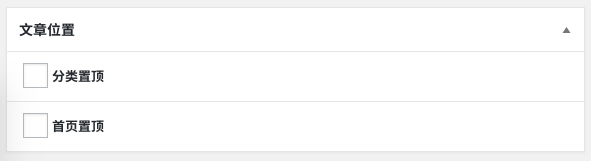
That setup makes it easy to mark a post, but removing those flags later can be annoying. If you want to clear the featured state, you might have to find the post, open the edit screen, uncheck the box, and save it again. Even counting how many featured posts exist becomes awkward.
In an earlier article we showed how to add a dropdown filter to the post list. But if the admin list could instead display clickable links similar to the default post status filters—and even show the number of matching posts—that would be much more convenient.
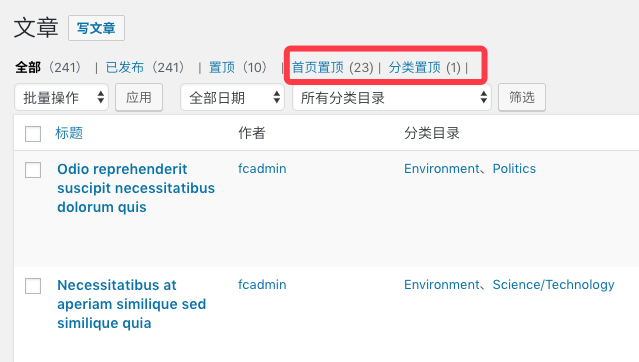
WordPress has filters that make this possible. The following is the basic implementation.
Step 1: Add filter links for category-featured and homepage-featured posts
This first step only adds the links to the post list view. By itself, clicking them does nothing yet. We still need to modify the admin query in the next step.
add_filter( 'views_edit-post', function ( $views ) {
    $views[] = '<a href="' . add_query_arg( 'position', '_featured_in_category' ) . '">Category featured</a>';
    $views[] = '<a href="' . add_query_arg( 'position', '_featured_in_home' ) . '">Homepage featured</a>';

    return $views;
} );
Step 2: Add a meta query to the admin post list query
Based on the query string added by the custom links above, we can add conditions to the admin post list query and filter the results accordingly.
add_filter( 'parse_query', function ( $query ) {
    global $pagenow;

    if ( is_admin() && 'edit.php' === $pagenow && ! empty( $_GET['position'] ) ) {
        $position = $_GET['position'];

        $query->query_vars['meta_key']   = $position;
        $query->query_vars['meta_value'] = 'yes';
    }
} );
Finally, count the matching posts
Once the first two steps are in place, filtering already works. The next helper function counts how many posts have a given meta_key set to yes. You can use that count to display the number next to the custom admin filter links added in the first step.
/**
 * Count posts assigned to a given position.
 *
 * @param string $position
 *
 * @return int
 */
function wprs_count_position_post( $position ) {
    global $wpdb;

    return (int) $wpdb->get_var(
        $wpdb->prepare(
            "SELECT COUNT( DISTINCT wp_posts.ID )
             FROM wp_posts
             INNER JOIN wp_postmeta ON ( wp_posts.ID = wp_postmeta.post_id )
             WHERE wp_postmeta.meta_key = %s
             AND wp_postmeta.meta_value = 'yes'
             AND wp_posts.post_status = 'publish'",
            $position
        )
    );
}
Beyond this, you could also make the featured-position fields editable directly from the post list or from Quick Edit to make the workflow even faster. That is outside the scope of this article, but it is a logical next step if your editors rely on these flags heavily.