WooCommerce variable products support many common options by default, including SKU, price, stock quantity, product image, dimensions, and weight. In most cases, those options are enough to run a standard store. But sometimes they are not enough. For example, if an ecommerce site stores products in different warehouses across the country, we may need to add a “storage location” field to each variation so we can handle products and orders more effectively. I have not researched whether other open-source ecommerce systems support this easily, but in WooCommerce custom development this is very simple to implement.
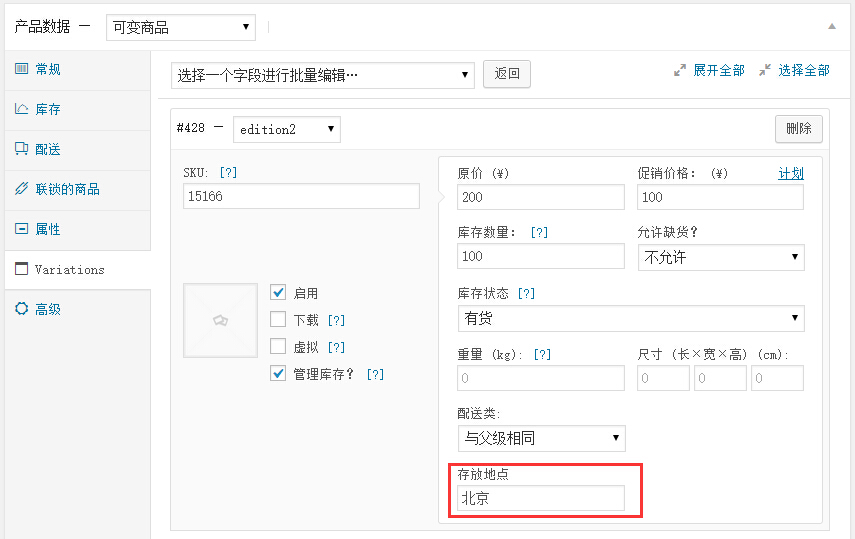
Add a custom field to WooCommerce variable products
Place the following code in the functions.php file of the WooCommerce theme you are currently using.
function variable_fields( $loop, $variation_data ) {
?>
 <tr>
   <td>
     <div>
       <label><?php _e( 'Storage location', 'woocommerce' ); ?></label>
       <input type="text" size="5" name="my_custom_field[<?php echo $loop; ?>]" value="<?php echo $variation_data['_my_custom_field'][0]; ?>"/>
     </div>
   </td>
 </tr>
<?php
}

function variable_fields_js() {
?>
<tr>    <td>       <div>         <label><?php _e( 'Storage location', 'woocommerce' ); ?></label>         <input type="text" size="5" name="my_custom_field[' + loop + ']" />       </div>    </td> </tr><?php
}

function variable_fields_process( $post_id ) {
 if (isset( $_POST['variable_sku'] ) ) :
   $variable_sku = $_POST['variable_sku'];
   $variable_post_id = $_POST['variable_post_id'];
   $variable_custom_field = $_POST['my_custom_field'];
   for ( $i = 0; $i < sizeof( $variable_sku ); $i++ ) :
      $variation_id = (int) $variable_post_id[$i];
      if ( isset( $variable_custom_field[$i] ) ) {
        update_post_meta( $variation_id, '_my_custom_field', stripslashes( $variable_custom_field[$i] ) );
     }
   endfor;
 endif;
}
Read the custom field from a WooCommerce variation
The custom field we added is ultimately just a standard WordPress custom field, so when reading it we can simply use get_post_meta.
global $product;
$available_variations = $product->get_available_variations();

foreach ($available_variations as $prod_variation) :
    $post_id = $prod_variation['variation_id'];
    $post_object = get_post($post_id);
    $my_custom_field = get_post_meta( $post_object->ID, '_my_custom_field', true);
end foreach;
As a WordPress ecommerce plugin, WooCommerce provides a very rich and flexible set of extension points, which makes secondary development and customization very convenient. If you need a custom WooCommerce theme or plugin, you can contact WordPress Zhiku directly.