The WP User Frontend plugin is a powerful tool that allows you to add registration and login forms, as well as post submission pages, to your website via simple shortcodes. Many developers use this plugin to build front-end submission systems or subscription-based content platforms because of its flexibility and ease of use.
WP User Frontend also includes a built-in user dashboard (the “My Account” page), where users can manage their submitted posts, view their subscriptions, and edit their profile details.
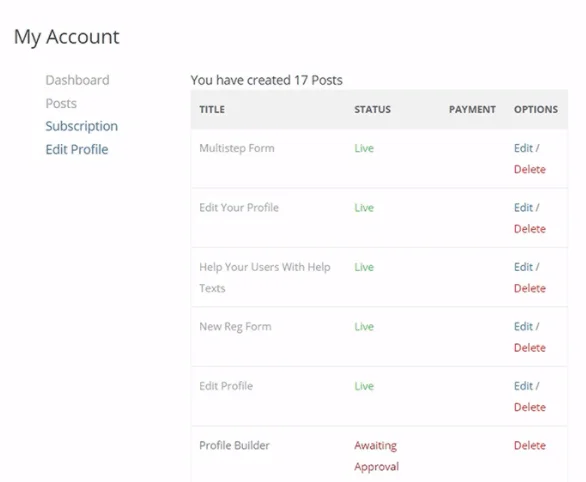
While the default tabs are useful, complex websites often require additional functionality. Fortunately, WP User Frontend provides hooks that allow us to add custom pages and tabs to the user dashboard, enabling us to tailor the experience to our specific needs.
1. Adding a Custom Menu Item to “My Account”
First, we need to add a new menu item to the navigation list on the left side of the “My Account” page. We can do this using the wpuf_account_sections filter.
add_filter('wpuf_account_sections', function ($sections)
{
    $sections[] = [
        'slug'  => 'products',
        'label' => __('My Products', 'wp-user-frontend'),
    ];

    return $sections;
}, 999);
2. Displaying Content for the Custom Page
Once the menu link is added, we need to define the content that should be displayed when a user clicks it. Without this step, clicking the link will result in a 404 error. In this example, we keep our code organized by including a separate PHP file for the custom page content.
add_action('wpuf_account_content_products', function ()
{
    // Ensure this file exists in your theme directory
    include get_theme_file_path('wpuf/products.php');
});
In the code above, the suffix _products in the action hook wpuf_account_content_products must exactly match the slug value we defined in the previous step.
Using this pattern, you can add any number of custom pages—such as “My Collections,” “My Comments,” or custom order histories—to build a fully-featured user center. If your site uses WooCommerce instead of WP User Frontend, you can achieve similar results by following our guide on Adding Custom Pages to the WooCommerce User Center.