When you search certain questions on Google, you sometimes see enhanced search results that display FAQ questions and answers directly under the page title. On one of our own posts, for example, searching for a related plugin keyword can show the FAQ content right in the search listing.
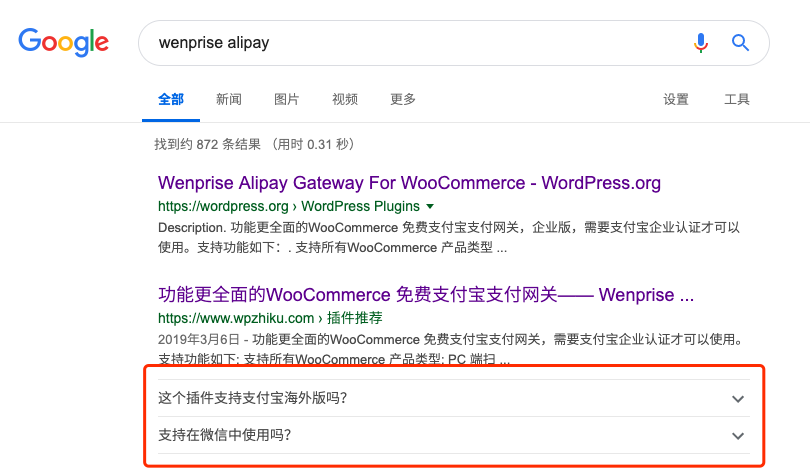
That means users can see some of the answers before even opening the page, which creates a very good search experience.
Some people worry that if Google shows the answers directly, fewer users will click through to the site. In practice, however, rich results make the listing more visually prominent and often make it easier to attract attention and clicks, so this concern is usually unnecessary.
How is this effect implemented? The simplest way is to use the Yoast SEO FAQ block in Gutenberg. That block adds visible FAQ content to the post and also outputs hidden JSON-LD structured data. Once Google crawls that structured data, it may display FAQ-rich search results for relevant queries.
How do you add an FAQ block with structured data?
There are two basic requirements before this works:
- Gutenberg must be enabled in WordPress. The classic editor does not provide this feature.
- The Yoast SEO plugin must be installed.
Once those two conditions are met, you can add an FAQ section with structured data by following these steps.
Steps for adding a structured FAQ block in WordPress:
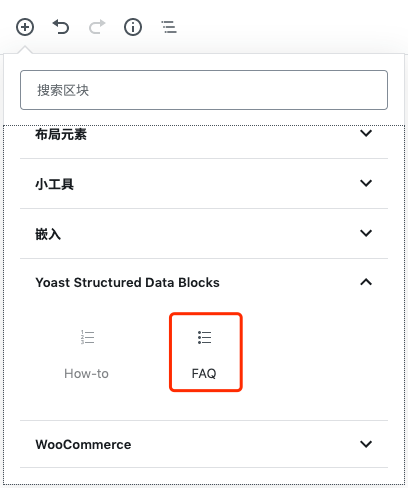
- Add the Yoast Structured Data Block → FAQ block to the post. In the Gutenberg editor, click the
+button, find the Yoast Structured Data Block group, and choose the FAQ block.
In Gutenberg, click the + button, find the Yoast Structured Data Block group, and insert the FAQ block into the post.
- Add FAQ items. Follow the prompts inside the block and enter each question and answer.
Use the prompts in the FAQ block to add each question and answer pair.

After the FAQ content is added, it will not appear in Google search results immediately. Google needs to crawl and refresh its index first. Once that happens, the enhanced FAQ display may begin appearing for relevant searches.