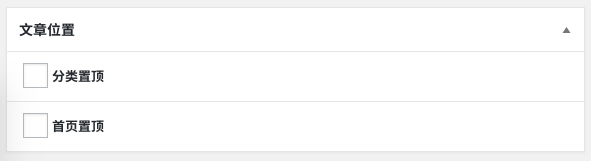
When developing news themes or CMS themes with WordPress, we often have the need to set the position of articles. Generally, we achieve this through custom fields, as shown in the image below. Our implemented requirement is to separately set featured posts for the homepage and category lists. The operation is very simple: if an article needs to be featured, just check the corresponding featured position.
After setting featured articles, if we need to cancel the featuring, a relatively quick way is to find this article on the frontend, then click the edit link, uncheck the featured option, and then save the article. This “then” process is truly troublesome to operate. What if we want to count how many featured articles there are in total? Imagine what kind of operation that would be.
In our previous article “Adding Custom Field Filter Options to the WordPress Admin Post List“, we introduced how to filter articles by adding a dropdown filter option. As shown in the image below, wouldn’t it be much more convenient if we added a filtering option for featured articles in the backend, similar to the default post statuses and featured filtering, which could directly show the number of featured articles and allow us to filter them out by clicking the link?
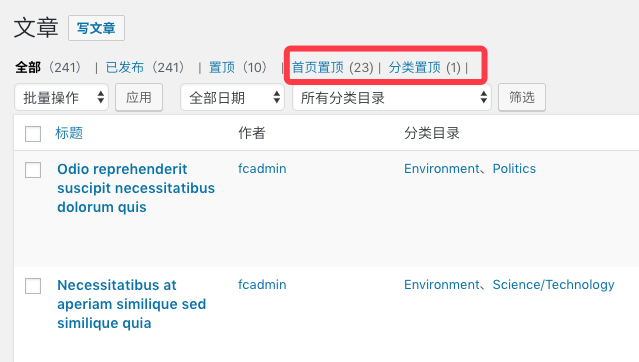
We studied the code for the WordPress post list and found that there’s a filter that can help us achieve this requirement. Below is the code to implement this requirement.
Step 1: Add Category Featured and Homepage Featured Filtering Links
Add category featured and homepage featured filtering options after the post type filtering options. This step only adds the featured post filtering options; clicking the filtering option links doesn’t have any effect yet. We need to modify the backend post query to filter out featured articles.
add_filter('views_edit-post', function ($views)
{

    $views[] = '<a href="' . add_query_arg('position', '_featured_in_category') . '">Category Featured</a>';
    $views[] = '<a href="' . add_query_arg('position', '_featured_in_home') . '">Homepage Featured</a>';

    return $views;
});
Step 2: Add Featured Article Query Parameters to the Query Object to Filter Articles
Based on the query string in the filtering link clicked by the user, add query parameters to the backend post list query object to achieve the purpose of filtering articles.
add_filter('parse_query', function ($query)
{
    global $pagenow;

    if (is_admin() && 'edit.php' == $pagenow && isset($_GET[ 'position' ]) && $_GET[ 'position' ] != '') {
        $position                            = $_GET[ 'position' ];
        $query->query_vars[ 'meta_key' ]     = $position;
        $query->query_vars[ 'meta_value' ]   = 'yes';
        $query->query_vars[ 'meta_compare' ] = '=';
    }

    return $query;
});
Finally, Count the Number of Articles
Having completed the two steps above, you can actually already filter articles in the backend post list. The function below is used to count the total number of articles where a certain “meta_key” is “yes.” We can use this function to add the featured post total count statistic feature to the featured post filtering links in Step 1. Just add this function to a suitable position in Step 1.
/**
 * Count the number of posts at a certain position
 *
 * @param $position
 *
 * @return int
 */
function wprs_count_position_post($position)
{

    global $wpdb;
    $query = $wpdb->get_results("SELECT SQL_CALC_FOUND_ROWS  wp_posts.ID
    FROM wp_posts
    INNER JOIN wp_postmeta
    ON (
        wp_posts.ID = wp_postmeta.post_id
    )
    WHERE 1=1
    AND (
        ( wp_postmeta.meta_key = '$position' AND wp_postmeta.meta_value = 'yes' )
    )
    AND wp_posts.post_type = 'post'
    AND (
        wp_posts.post_status = 'publish'
        OR wp_posts.post_status = 'pending'
        OR wp_posts.post_status = 'draft'
        OR wp_posts.post_status = 'future'
        OR wp_posts.post_status = 'private'
    )
    GROUP BY wp_posts.ID
    ORDER BY wp_posts.post_date DESC");

    return count($query);
}
Besides the operations above, we can also add the feature of setting featured articles into the post list or Quick Edit to make the operation of setting featured articles more convenient and faster. However, this doesn’t belong to the scope of this article’s discussion, so I won’t list it for now. Friends in need can research it themselves.