When using Google to search for some questions, we sometimes see enhanced search results. Taking an article from this site (wpzhiku.com) as an example, when searching for “wenprise alipay” on Google, the search result in the figure below will appear. The red box shows the content corresponding to the frequently asked questions module in the article.
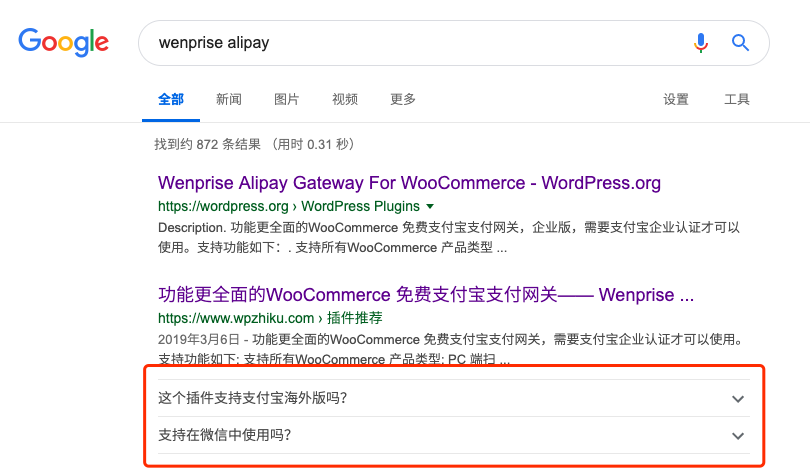
Users can see the answers to some common questions without clicking on the page, which is very convenient, and the user experience is undoubtedly very good.
Some friends may express disagreement: “If users see the answer directly, won’t they stop opening the website? Won’t the website’s visit count decrease because of this?” On the contrary, enhanced search results can make the search result stand out, and it’s easier to attract users’ attention and clicks. All these concerns are unnecessary.
So, how is this effect achieved? In fact, it is very simple. What is used is the FAQ module of the Yoast SEO Gutenberg editor. The FAQ module of Yoast SEO can add FAQ content modules to articles while simultaneously adding hidden JSON-LD microformat data. After Google scans this microformat data, it will display the FAQ enhanced search result in the search result to enhance the user’s search experience.
How to Add an FAQ Module with Microformat?
There are two prerequisites for adding an FAQ module with microformat:
- The Gutenberg editor is enabled in WordPress; the traditional editor does not have this function.
- The Yoast SEO plugin is installed.
After meeting the above two prerequisites, we can follow the steps below to add an FAQ module with microformat to the article.
Steps for adding an FAQ module with microformat for WordPress:
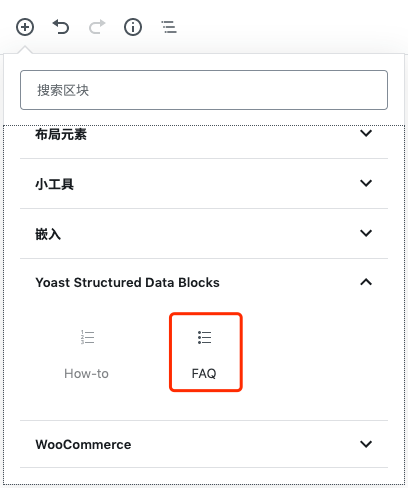
- Add the ‘FAQ’ module under ‘Yoast Structured Data Block’ to the article
Click ‘+’ in the Gutenberg editor, find the ‘FAQ’ module under the ‘Yoast Structured Data Block’ group, and click the module to add it to the article.
- Add Frequently Asked Questions (FAQ) items
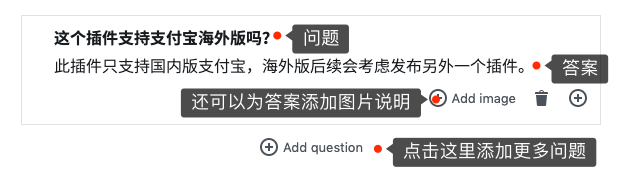
Refer to the image below, and add questions and answers according to the prompts of the FAQ module.
After adding common questions, they won’t immediately appear in Google search results. You need to wait for Google to update the index. Just wait patiently.