Thinking about creating your first WordPress block theme but not sure where to begin? In this article, we’ll take a deep dive into the file structure of a block theme. We’ll explore which directories and files can be included, which ones are mandatory, and what purpose each serves in the modern Theme API.
To get started, I recommend downloading the Twenty Twenty-Four theme. It’s the current gold standard for block themes, and you can study its files to understand how to build and customize your own.
Important Note: This article assumes you are already an experienced WordPress developer who is transitionining to block-based development. While I won’t go into detail on how to code every specific block, this guide will provide the high-level architectural map you need to navigate block theme projects.
Block Theme Structure
A basic block theme consists of just a folder containing a style.css file and a templates/index.html file. However, a full-featured theme usually looks more like the structure shown in the screenshot below.
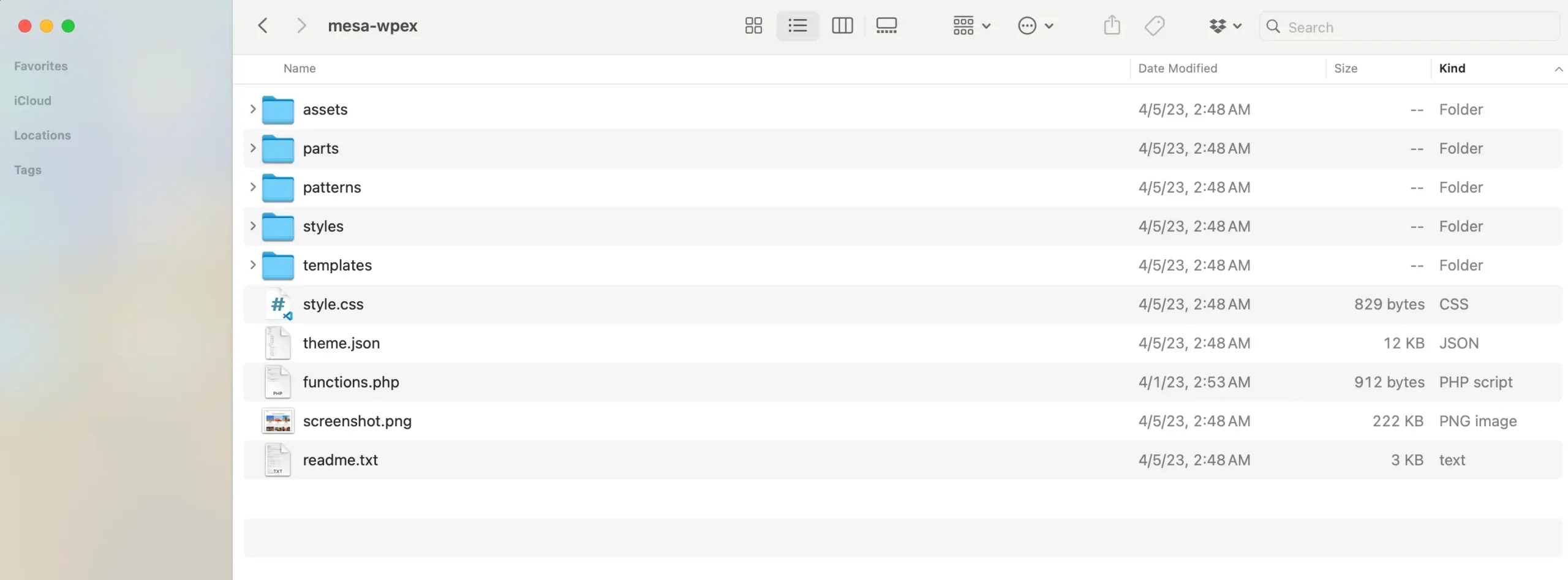
The tables below list all the required and optional folders and files that make up a WordPress block theme.
Required Folders
Every block theme must include the following directory:
| Folder Name | Description |
|---|---|
| templates | Contains the main HTML template files. This folder must contain at least an index.html file. |
Optional Folders
Technically, you can add any folder to a block theme for organization. However, WordPress recognizes these specific folders for core functionality:
| Folder Name | Description |
|---|---|
| parts | Contains global template parts (headers, footers, sidebars). |
| patterns | Stores custom block patterns (reusable sections). |
| styles | Holds custom style variations (global style skins). |
Required Files
These two files form the absolute minimum requirements for a WordPress block theme:
| File Name | Description |
|---|---|
style.css | Contains theme “header” metadata (name, author, version). It also defines the main styles for the theme. |
templates/index.html | The fallback template file used to display any page or post if no more specific template exists. |
Files Required for WordPress.org
If you plan to distribute your theme via the official WordPress repository, you must include these additional files:
| File Name | Description |
|---|---|
readme.txt | Provides theme information, installation instructions, license details, and changelogs. |
screenshot.png | The thumbnail image displayed in the WordPress Appearance > Themes dashboard. (Recommended even for private themes). |
Optional Files
While optional, these files are central to modern block theme development:
| File Name | Description |
|---|---|
theme.json | The most important file in block themes. It defines global settings, styles, and block configurations for both the editor and the frontend. |
functions.php | Used to add custom PHP functionality, register hooks, and enqueue additional assets. |
rtl.css | Automated loading for Right-to-Left languages. (Often unnecessary with modern ‘logical’ CSS properties). |
templates/*.html | Additional templates for specific layouts (home, page, single, archive, etc.). |
parts/*.html | Reusable template components like headers and footers. |
patterns/*.php | PHP files defining curated, reusable collections of blocks. |
styles/*.json | Alternate global style variations that users can select in the Site Editor. |
Core Template File List
WordPress automatically selects templates based on the page being visited. The template hierarchy for block themes is identical to classic themes, following the standard logic familiar to WordPress developers.
| File Name | Description |
|---|---|
home.html | Displays the posts page (fallback for front-page). |
single.html | Displays a single post. |
page.html | Displays a single static page. |
archive.html | Displays lists of posts (categories, tags, dates). |
search.html | Displays search results. |
404.html | Displays the error page when content isn’t found. |
Conclusion
As you can see, the foundation of a block theme is remarkably simple, requires very few files to function, and offers a lot of room for customization through optional folders and JSON configurations. If you are ever stuck, just refer to core themes like Twenty Twenty-Four to see how they handle specific layouts.
If you have any questions about block theme architecture, feel free to leave a comment below!