After receiving a requirement introduced by a friend, I developed aSimple CRM application, the demand was put forward by a confinement nanny (nanny) intermediary company. It is mainly used to manage customers and confinement nanny, record communication records between company customer service personnel and customers, manage confinement nanny, and record confinement nanny’s service customer records. After receiving the demand, the first judgment was that the Laravel framework should be used for development. After careful communication with the customer, I found that the entire CRM system did not have too complicated logic. It mainly recorded information, searched for information, and performed some automated processing based on conditions, so I decided to use WordPress, which I was familiar with, for development.
Data structure of CRM system
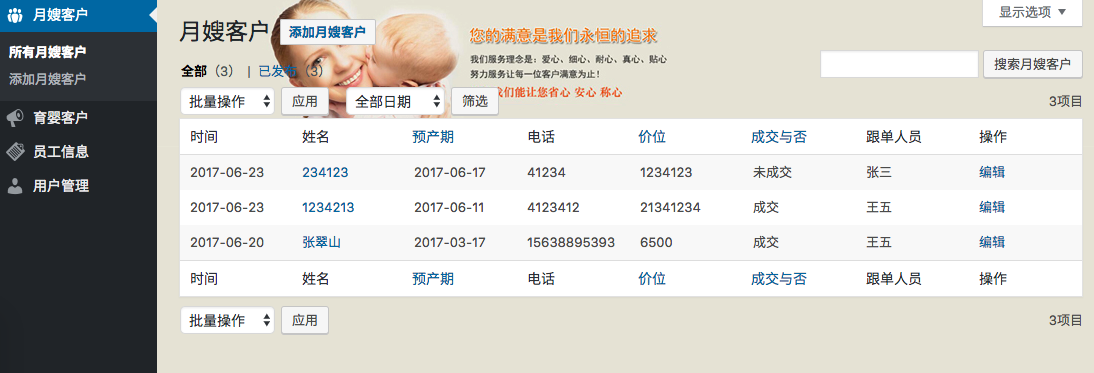
As shown in the figure below, the entire system is mainly divided into the following types of data. The first three types of data can be used with WordPressCustom post typeImplementation, the last user data is WordPress default user management, add management company internal administrators here.
- Confinement nanny customer: Create a new article type of “Confinement nanny customer” and add some custom fields to manage confinement nanny type customers.
- Baby-nursing customers: Create a new article type of “Baby-nursing customers” and add some custom fields to manage confinement nanny type customers.
- Employee Information: Create a new article type of “Employee Information” and add some custom fields to manage confinement nannies (nannies).
- Household record: used to record the customers of confinement nanny service (this data is associated with confinement nanny customer and babysitting customer management, and is not displayed in the main menu on the left).
- Return visit record: used to record information about return visits from company customers (this data is associated with confinement nanny customer and babysitting customer management, and is not displayed in the main menu on the left).
- User management: WordPress default user, there is nothing much to say about this.
Relationships between CRM system data
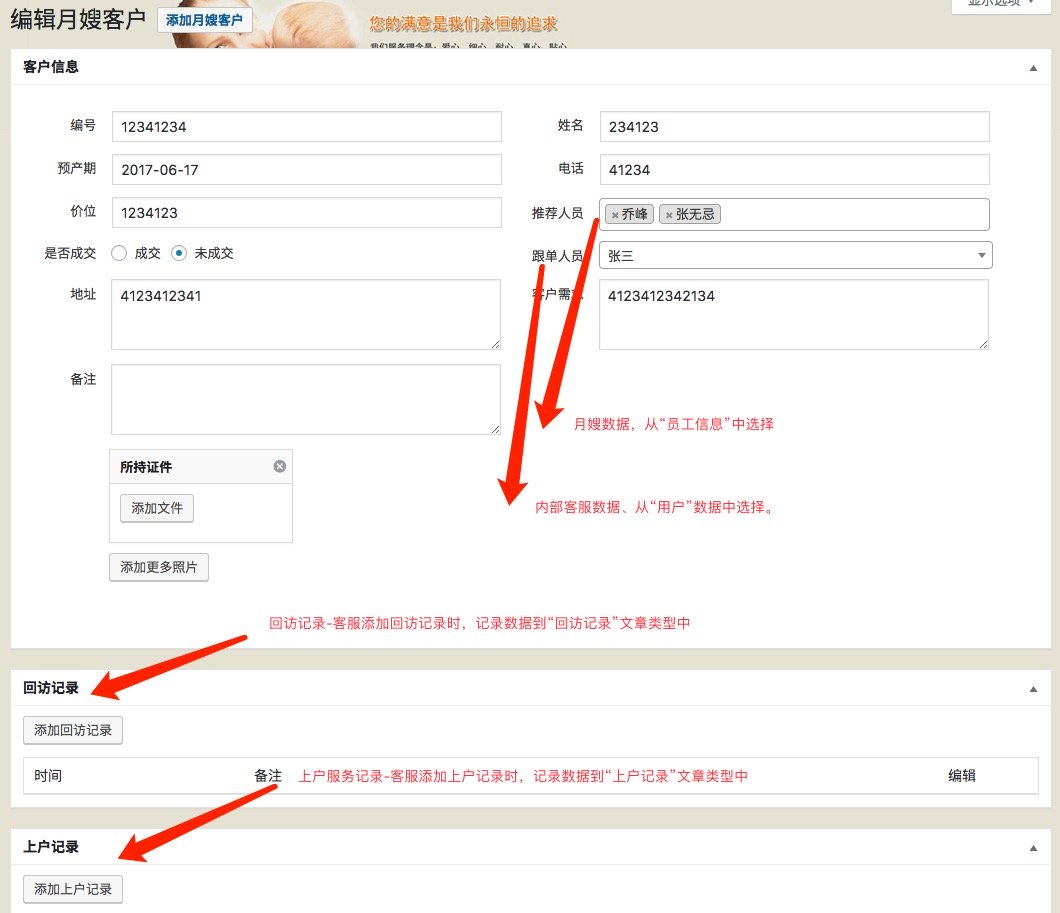
In a CRM system, the association between data is very important. Correct data association can organically organize various information together for easy management and viewing. As far as the CRM system introduced in this article is concerned, the two data of “confinement customers” and “nursing customers” are parallel, and the data are basically the same. Let’s take “Confinement Customers” as an example to explain how Confinement Customers are associated with several other types of data, as shown below:
- Customer information: The recommender is the confinement nanny recommended by the customer service for the confinement nanny customer. Select it from “Employee Information”. “Follower” is the person responsible for communicating with customer service within the company, select it from “User”. The other data are the data of the confinement nanny customers themselves.
- Return visit records: Return visit records added by customer service. There will be multiple return visit records for Yuesao customers. The return visit records are saved in the “Return Visit Record” article type.
- Household registration records: Return visit records added by customer service. Yuesao customers will have multiple household registration records. The household registration records are saved in the “Household Registration Record” article type.
Add and edit associated data
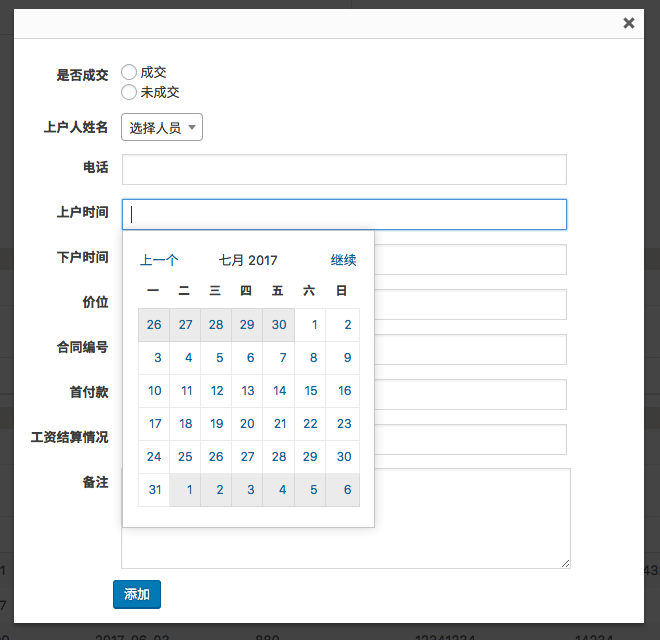
Because a customer will have multiple return visit records and account registration records, it is definitely unrealistic to add and manage these data through WordPress’s ordinary Metabox. Even if it can be added, it will be very painful for ordinary customer service staff to use. In this system, we use WordPress’s thickbox to add the associated “Return Visit Record” and “Account Registration Record”. When you click “Add Account Registration Record”, the interface shown below will pop up. After the information input is completed, click the “Add” button to save the data to the “Account Registration Record” and associate this account registration record with the current customer. Then the added records are displayed on the current page in table form, making it clear at a glance.
Reverse display of associated customer data in employee information
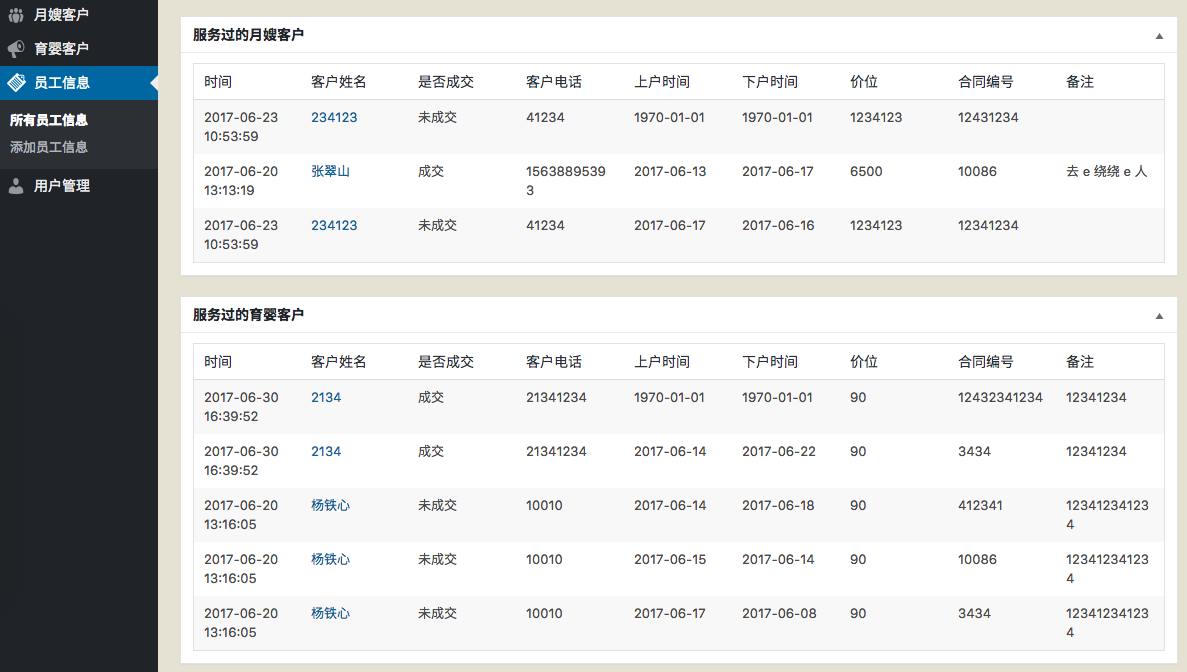
In addition to displaying the confinement nanny who has served the customer in the customer information, we also need to display the customers the employee has served in the “Employee (confinement nanny)” information to facilitate the review of the employee’s work experience, as shown in the following figure:
After the system was developed and launched, the customer spent two weeks inputting customer information and employee information into the system. When looking for information, he could quickly find the information he needed by directly searching for the names of employees or customers. He no longer had to spend time looking through paper documents to find information, which saved a lot of time and improved efficiency.
In addition to CRM systems,Using WordPress as an application development framework, we can also quickly develop some other internal enterprise management systems to meet various needs and help the company achieve information management and improve work efficiency. Compared with a bloated CRM system that contains many unnecessary functions, a customized CRM system will save a lot of costs and will be easier to use.