A friend introduced a project requirement for a simple CRM application. The client was a maternity nanny agency that needed a system to manage customers and nannies, record communication between customer service staff and clients, track employees, and store service history. The first instinct was to build it with Laravel.
But after talking with the client in more detail, it became clear that the system did not involve especially complicated business logic. It was mostly about recording information, searching information, and performing a few automated actions based on conditions.
Because of that, WordPress turned out to be a practical choice. It already had user management, content editing, custom post types, and an admin interface, which meant we could spend more time shaping the workflow and less time rebuilding common management features from scratch.
The data structure of the CRM system
As shown below, the whole system can be divided into several types of data. The first three types can be modeled as WordPress custom post types, while the final one uses WordPress’s built-in user system to manage internal staff accounts.
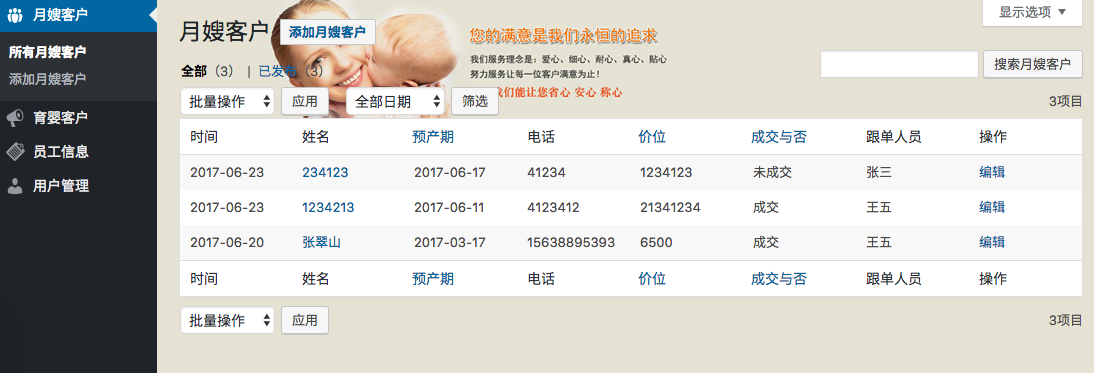
- Maternity-nanny clients: a custom post type with custom fields used to manage one group of clients.
- Infant-care clients: another custom post type with similar fields for another client group.
- Employee records: a custom post type used to manage employees such as nannies.
- Service records: used to store which clients an employee has served. This data is related to the client records and does not need to appear in the main admin menu.
- Follow-up records: used to store customer-service follow-up activity. These are also related records and do not need to appear in the main left-side menu.
- User management: the built-in WordPress user system, used here for internal company staff.
The first three record types are the visible core of the application. The service records and follow-up records exist mainly as related data attached to those core records, while the built-in user system handles staff accounts and permissions.
Relationships between CRM records
Relationships are one of the most important parts of a CRM. If related data is organized correctly, information becomes much easier to manage and review. In this CRM, the two client data types are parallel structures with almost the same shape. Using the maternity-nanny client type as an example, the related data looks like this:
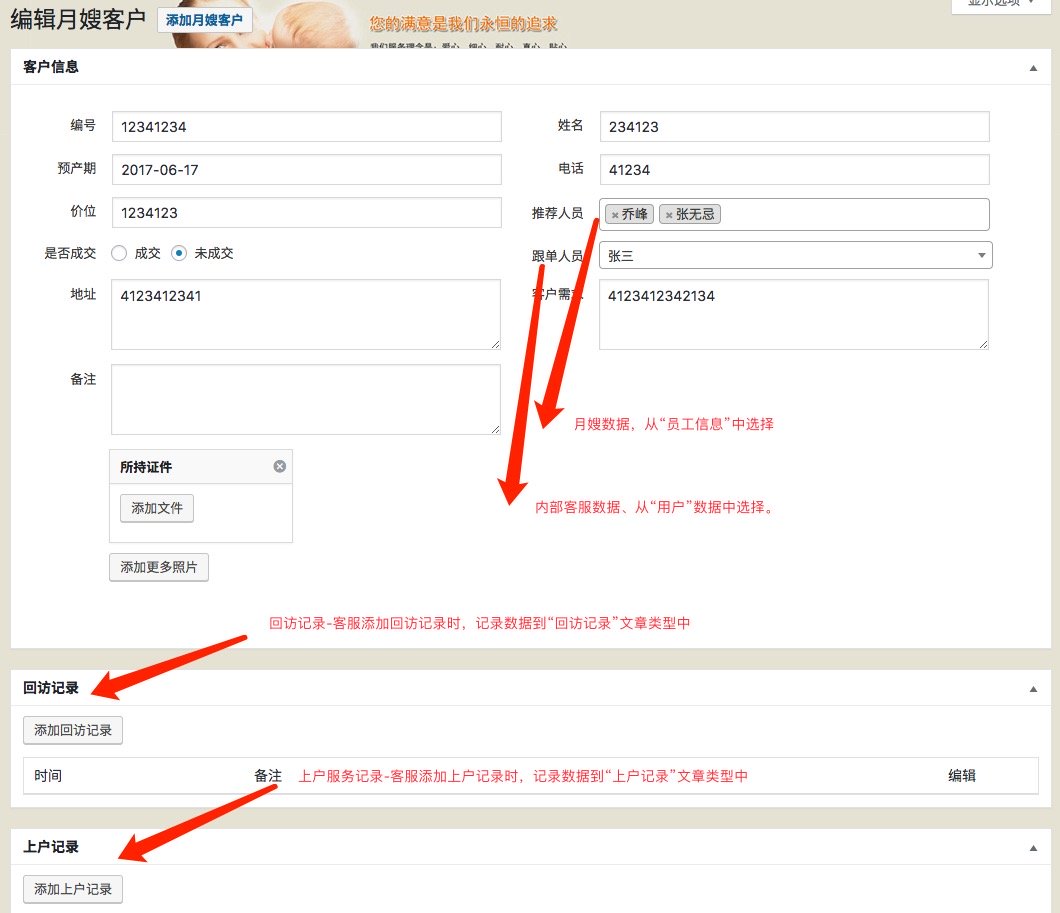
- Client information: the recommended employee is chosen from the employee records, while the account manager is chosen from WordPress users. The rest of the data belongs directly to the client record.
- Follow-up records: customer service staff can add multiple follow-up records for a single client, and those records are stored in their own post type.
- Service records: each client can also have multiple service records, and those records are stored in another related post type.
This relational structure is what turns the project from a collection of isolated data-entry screens into an actual CRM. Once those connections are in place, staff can review clients, employees, service history, and communication records from the same workflow instead of jumping around unrelated screens.
Add and edit related records
Because one client can have many follow-up records and many service records, managing them through ordinary WordPress metaboxes would be painful for normal customer-service staff. In this project, the related follow-up and service records were added through WordPress ThickBox dialogs. When the user clicks “Add service record,” a popup window opens like the one below. After entering the information and clicking the add button, the new record is saved and linked back to the current client. The saved items are then displayed on the page in a table, which makes the data much easier to understand at a glance.
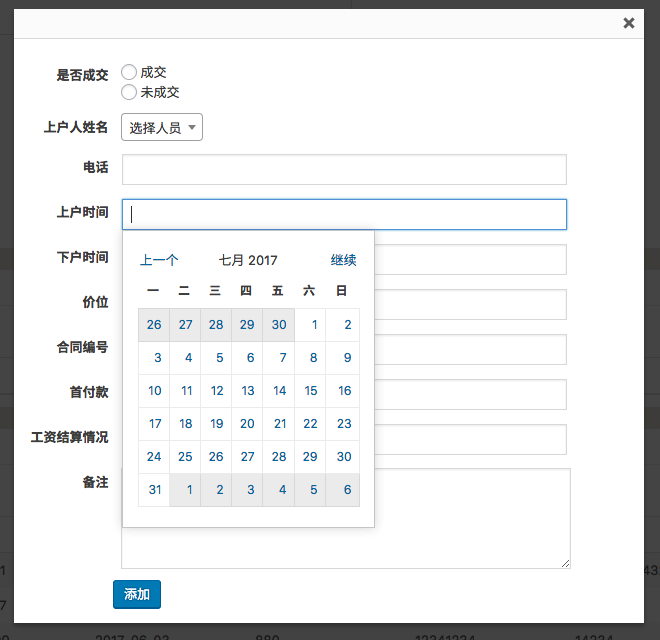
That interaction pattern made the system much easier for customer-service staff to use. They did not need to open a separate edit screen for each related record, and they could see the newly added items immediately after saving them.
Show related client data in reverse on the employee screen
It is not enough to show which employee served a client. We also need to show, on the employee profile screen, which clients that employee has served. That makes it easier to review the employee’s work history and practical experience.
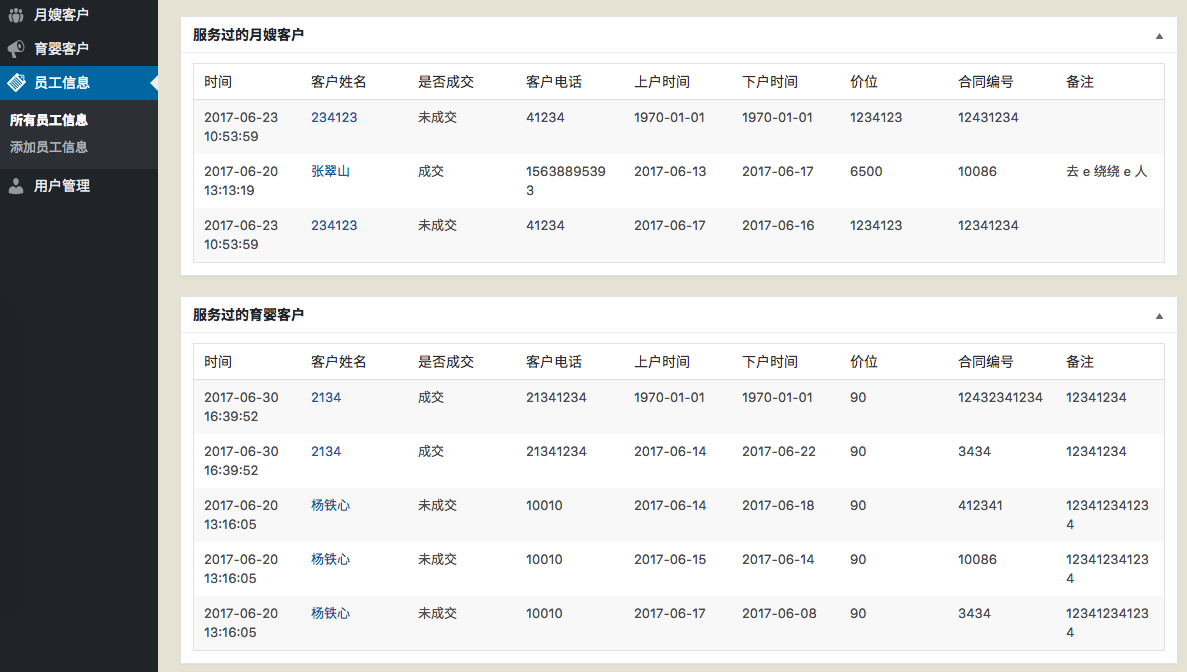
Once the system was launched, the client spent about two weeks entering existing client and employee records into it. After that, finding information became much faster. Staff could search by employee name or client name instead of digging through paper records, which saved time and improved efficiency.
And a CRM is only one example. If we treat WordPress as an application framework, it becomes possible to build many other internal management systems quickly as well. Compared with a bloated off-the-shelf CRM full of unused features, a custom-built CRM can often cost less and be much easier for staff to learn.