CloudFlare is a popular international CDN service provider. Many friends encounter a “Too many redirects” error when using CloudFlare for their WordPress sites, resulting in the site not opening. In Chrome, the error message is “ERR_TOO_MANY_REDIRECTS”. Another way to describe this error is a webpage redirect loop, caused by improper Cloudflare SSL settings.
Reasons for CloudFlare Causing Too Many Redirects
When a site enables CloudFlare services, when users visit our site, they are actually accessing a Cloudflare server closer to them. Cloudflare then proxies the user’s request to our origin server, achieving the purpose of accelerating and protecting the origin server. The process of Cloudflare proxying the user request to our origin server to fetch webpage resources is called back-to-origin.
The redirect loop error caused by Cloudflare occurs during the back-to-origin process, and the cause of this error is the redirect between HTTP and HTTPS.
Cloudflare’s Crypto SSL has 4 options (as shown below). “Off” means not enabling SSL and accessing the site via HTTP protocol. The other 3 are for accessing the site via HTTPS protocol.
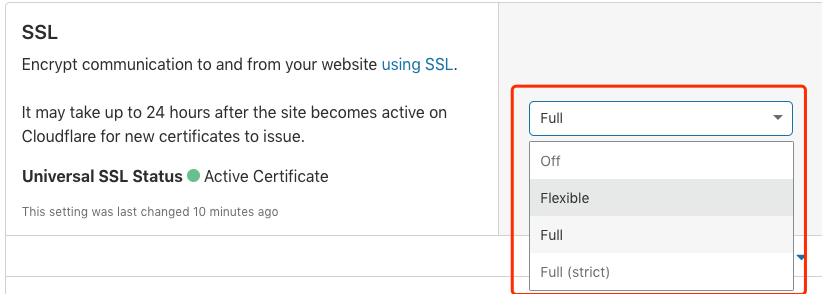
- Flexible: When our origin site is not configured for HTTPS support, enabling this option tells Cloudflare to access our site via HTTP protocol during back-to-origin.
- Full: When our origin site supports HTTPS but the HTTPS certificate and domain name don’t match or it’s a self-signed certificate, Cloudflare will access the origin site via HTTPS protocol but won’t verify the certificate. This means even if our origin site provides an untrusted HTTPS certificate, Cloudflare will still back-to-origin via HTTPS.
- Full (strict): When our origin site supports HTTPS and the certificate is valid (not expired and trusted), Cloudflare will access the origin site via HTTPS protocol and verify the certificate during each request.
Knowing the functions of the settings above, let’s look at how the Cloudflare redirect loop problem occurs. After enabling SSL in Cloudflare, a redirect loop occurs when visiting the site if the following two conditions are met:
- SSL is set to “Flexible”, and the CDN backs-to-origin via HTTP protocol.
- The origin site supports HTTPS and is set to automatically jump to the HTTPS protocol when accessed via HTTP protocol.
By now, some friends might have discovered the problem. When we access Cloudflare’s CDN server, it’s via HTTPS. When the CDN accesses the origin site, it’s via HTTP. The origin site then automatically redirects HTTP to HTTPS—a perfect redirect loop. After too many redirects, the browser gives up and reports the ERR_TOO_MANY_REDIRECTS error.
Solutions for CloudFlare Too Many Redirects
Now that we know the cause of the redirect loop, we know how to solve it. Through testing, the following two setting methods can solve the Cloudflare redirect loop problem.
- Select “Full” or “Full (strict)” in SSL settings, let the CDN use HTTPS when backing-to-origin. Since HTTP is not involved, there won’t be any jumping back and forth.
- Don’t set HTTPS support or HTTP-to-HTTPS redirect on the origin site, let Cloudflare fetch resources via HTTP during back-to-origin.
After modifying CloudFlare settings, it might take a few minutes or require clearing the browser cache to take effect.
In addition to Cloudflare, this problem might also occur when using other CDN providers. If you encounter the “Too many redirects” error in Chrome after setting up a CDN, you can use the reasoning above to troubleshoot. If you encounter similar problems with other CDNs, you’re welcome to bring them up in the comments so more friends can see them.