WP-Pagenavi is arguably the most popular pagination plugin in WordPress. It comes with its own basic CSS styles, and we can customize its appearance through custom CSS. But if your theme is built on Bootstrap, can you directly use Bootstrap’s pagination styles instead? If we compare the HTML structure generated by WP-Pagenavi with the HTML structure used by the Bootstrap pagination component, we will find that they are different. To use Bootstrap’s pagination style, we only need to change the WP-Pagenavi markup so that it matches the HTML structure expected by Bootstrap.
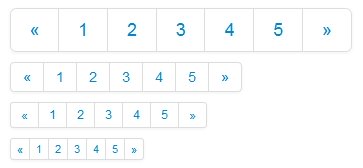
WP-Pagenavi provides a wp_pagenavi filter that allows us to modify the generated pagination HTML. With that filter available, the task becomes very simple.
// Hook a custom function to the wp_pagenavi filter.
add_filter( 'wp_pagenavi', 'ik_pagination', 10, 2 );

// Replace parts of the output string to produce custom HTML markup.
function ik_pagination($html) {
$out = '';

// Wrap a tags and span tags in li tags.
$out = str_replace("<div","",$html);
$out = str_replace("class='wp-pagenavi'>","",$out);
$out = str_replace("<a","<li><a",$out);
$out = str_replace("</a>","</a></li>",$out);
$out = str_replace("<span","<li><span",$out);
$out = str_replace("</span>","</span></li>",$out);
$out = str_replace("</div>","",$out);

return '<div class="pagination pagination-centered">
<ul>'.$out.'</ul>
</div>';
}
If your Bootstrap version is Bootstrap 3, you only need to adjust the output slightly.
return '<ul class="pagination pagination-centered">'.$out.'</ul>';Place the code above in functions.php, and the pagination HTML generated by WP-Pagenavi will become identical to Bootstrap’s pagination markup. Since we are using Bootstrap’s pagination styles, the default WP-Pagenavi CSS is no longer needed, so we can disable it in the WP-Pagenavi settings.
Editorial note: Bootstrap is such a widely used front-end framework that if WP-Pagenavi provided built-in support for Bootstrap styles, users could simply enable Bootstrap support in the backend and achieve the effect described in this article directly. That would clearly make the plugin more convenient to use.