In most cases, the ‘Published’, ‘Private’, and ‘Password Protected’ post statuses provided by WordPress are sufficient for our use, and we do not need to create custom post statuses. When encountering special needs, creating a custom article status can help us process the content more clearly and rationally. For example, we need a custom article status. Articles in this status are still visible to users, but they need to be displayed as notifications. The default article status cannot meet this requirement. We must create a custom article status. WordPress provides a function to create a custom post status. Let’s take a look at how to use this function to create a custom post status.
Register WordPress custom post status ‘archive’
We need to create a custom article status in the currently activated theme. After the custom article is created, we cannot see the effect immediately. When we add an article to the article status, in the article list, we can see the filter link for the article status. Add the following code to the themefunctions.phpRegister custom article status in the file.
<?php
function wizhi_custom_post_status(){
     register_post_status( 'archive', array(
          'label'                     => _x( 'Archive', 'post' ),
          'public'                    => true,
          'show_in_admin_all_list'    => false,
          'show_in_admin_status_list' => true,
          'label_count'               => _n_noop( 'Archive <span class="count">(%s)</span>', 'Archive <span class="count">(%s)</span>' )
     ) );
}
add_action( 'init', 'wizhi_custom_post_status' );
?>
When WordPress is initialized, we need to mount the function for registering custom post status. In the above code, we pass in an array of parameters to the function register_post_status to register custom post status (see the full parameter listOfficial documentation )
Add custom post status to WordPress post status dropdown option
WordPress custom post status does not need to be displayed in the post status drop-down menu when editing an article, but can be added through the program. For a better demonstration, we will introduce how to add it to the drop-down menu. Add the following code to the functions.php file of the theme.
add_action('admin_footer-post.php', 'wizhi_append_post_status_list');
function wizhi_append_post_status_list(){
     global $post;
     $complete = '';
     $label = '';
     if($post->post_type == 'post'){
          if($post->post_status == 'archive'){
               $complete = ' selected="selected"';
               $label = '<span id="post-status-display">Archive</span>';
          }
          echo '
          <script>
          jQuery(document).ready(function($){
               $("select#post_status").append("<option value="archive" '.$complete.'>Archive</option>");
               $(".misc-pub-section label").append("'.$label.'");
          });
          </script>
          ';
     }
}
The above code snippet adds a piece of jQuery code to the footer of the post.php page. We can add a custom post status to the custom post type dropdown menu by replacing the ‘post’ post type name above.
After adding the above code, edit a published article, and then try to modify the article status. If everything is OK, we can see the ‘Archive’ option in the screenshot below.
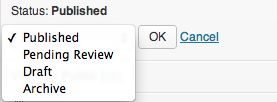
Set the article status to ‘Archive’, update the article, and then return to the article list. We can see the ‘Archive’ article status filter item behind all articles. The effect is as follows.

Add custom post status to post type list
In order to better distinguish custom article status from ordinary articles, we can add an article status suffix to the end of the article title. Similar to the default ‘private’ post status.

Add the following code to the theme’s functions.php article to achieve the effect in the picture above.
function wizhi_display_archive_state( $states ) {
     global $post;
     $arg = get_query_var( 'post_status' );
     if( $arg != 'archive' ){
          if( $post->post_status == 'archive' ){
               return array( 'Archive' );
          }
     }
    return $states;
}
add_filter( 'display_post_states', 'wizhi_display_archive_state' );
By customizing the article status, we can add various statuses to the article. For example, for an article type named Order, we can add article statuses such as ‘paid’, ‘shipped’, and ‘completed’ to the data in this article type. For an article type named product, we can add article statuses such as ‘expired’, ‘listed’, ‘crowdfunding’, etc. By customizing the article status, we can implement various functions. It is a pity that the function of adding custom article status in WordPress is not as simple and direct as other function registration functions. If there are more needs, we can add it through a plug-in to reduce the coding workload.