WooCommerce provides us with a logistics API that allows us to add express/logistics methods, relative toWooCommerce Payment Gateway API, we don’t use this API much, but in some special cases, we still need to use this API to add custom logistics/express delivery methods to realize the docking of some special express delivery/logistics methods, such as the Ezship pickup payment service we will introduce below. After adding and enabling the Ezship payment method, the effect is as shown in the figure below.
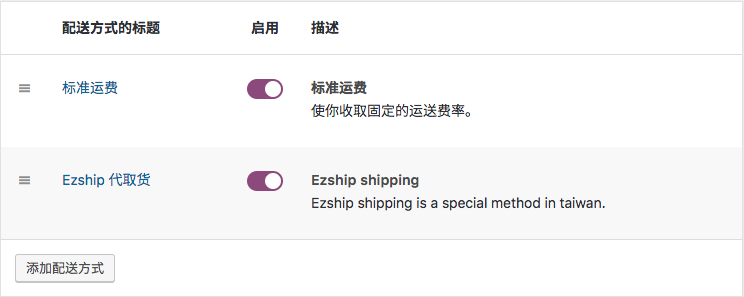
Add the basic code for WooCommerce custom logistics method
Some time ago, I developed a website for Ezship, a Taiwanese company that provides door-to-door pick-up and door-to-door payment and collection services.WooCommece plugin, this plug-in integrates Ezship’s payment gateway, express delivery method to WooCommece, and integrates Ezship’s real-time logistics status in the background order list. The following sample code is the main code for adding express/logistics methods.
<?php
/**
 * 判断WooCommerce是否已经激活
 */
if ( in_array( 'woocommerce/woocommerce.php', apply_filters( 'active_plugins', get_option( 'active_plugins' ) ) ) ) {

   add_action( 'woocommerce_shipping_init', 'your_shipping_method_init' );

   /**
    * 添加自定义物流方法
    */
   function your_shipping_method_init() {

      if ( ! class_exists( 'WC_Ezship_Shipping_Method' ) ) {

         /**
          * Ezship 快递方法
          *
          * A simple shipping method for Ezship.
          *
          * @class   WC_Shipping_Method
          * @version 2.6.0
          */
         class WC_Ezship_Shipping_Method extends WC_Shipping_Method {

            /**
             * WC_Ezship_Shipping_Method constructor.
             *
             * @param int $instance_id int 实例 ID
             */
            public function __construct( $instance_id = 0 ) {

               $this->id                 = 'ezship_shipping_method';
               $this->instance_id        = absint( $instance_id );
               $this->method_title       = 'Ezship 代取货';
               $this->method_description = 'Ezship 是台湾的一家提供商店代取货付款的快递服务公司。';

               $this->supports = [
                  'shipping-zones',
                  'instance-settings',
                  'instance-settings-modal',
               ];

               $this->init();

               $this->enabled = $this->get_option( 'enabled', 'yes' );
               $this->title   = $this->get_option( 'title', __( 'Ezship Shipping', 'woocommerce' ) );

            }

            /**
             * 初始化物流方法
             */
            public function init() {
               // 加载设置
               $this->init_form_fields();
               $this->init_settings();

               // 设置变量
               $this->min_amount = $this->get_option( 'min_amount', 0 );
               $this->requires   = $this->get_option( 'requires' );

               // Actions.
               add_action( 'woocommerce_update_options_shipping_' . $this->id, [ $this, 'process_admin_options' ] );
            }

            //... 此处省略了一些方法
            // 快递方法是否可用
            // 快递费计算

         }

      }

   }
}
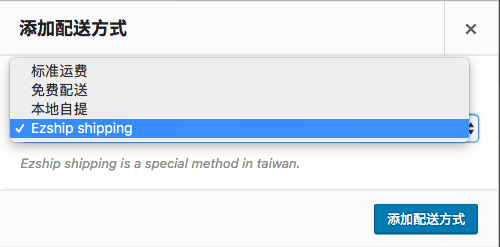
The above code only adds the express delivery method, but does not add the express delivery method to the available delivery methods. We need to use the woocommerce_shipping_methods Filter hook to add the custom express delivery method added above to the available delivery methods. Only then will our customized express delivery method appear in the drop-down option of adding a delivery method.
/**
 * 添加自己物流方法到WooCommerce物流方法中
 */
add_filter( 'woocommerce_shipping_methods', function ( $methods ) {
   $methods[ 'ezship_shipping_method' ] = 'WC_Ezship_Shipping_Method';

   return $methods;
} );
Add custom logistics method settings
If we need to add some settings for a custom express delivery method, we can use the WooCommerce Settings API to add some custom settings. For example, in the code below, we have added a switch to enable the logistics method and the title of the logistics method. In the real plug-in, there are also switches for whether to enable logistics tracking and settings for the maximum amount of fees to be charged.
/**
 * 初始化表单字段
 */
public function init_form_fields() {

   $this->instance_form_fields = [

      'enabled' => [
         'title'       => '启用',
         'type'        => 'checkbox',
         'default'     => 'yes',
      ],

      'title' => [
         'title'       => '快递方法名称',
         'type'        => 'text',
         'default'     => $this->method_title,
         'desc_tip'    => true,
      ],

   ];

}
Due to space limitations, the above code is not the complete code for adding WooCommerce express/logistics methods, because this plug-in is custom-developed for customers and does not have the rights to open source plug-in code. If there is anything you don’t understand when using the above reference code, you can leave it in the message and I will try my best to explain it to you.