In WordPress, when we delete articles or comments, they will first enter the recycle bin. After 30 days, the contents in the recycle bin will be permanently deleted. We can restore articles from the recycle bin at any time within 30 days if we need to. This is a good insurance mechanism to avoid data loss caused by human operating errors. In this article, let’s take a look at how to limit or disable this mechanism.
Disable WordPress from automatically deleting articles in the recycle bin
WordPress’s function of regularly deleting articles is throughScheduled tasksTo achieve this, the scheduled task is executed daily and checks the articles in the recycle bin. If the addition time exceeds 30 days, the operation attached to the scheduled task will delete these expired articles.
If we need to permanently retain the contents of the WordPress recycle bin and clean it manually at the appropriate time, we can disable WordPress’s ability to regularly clean the recycle bin and add the following code to the theme’s functions.php.
add_action( 'init', function () {
    remove_action( 'wp_scheduled_delete', 'wp_scheduled_delete' );
} );
The function of this code is very simple. It directly deletes the regular article deletion function mounted on the Hook in the scheduled task. The scheduled task of deleting articles will still be executed regularly, but the actual operation mounted on this scheduled task has been disabled by us.
Modify the time for automatic deletion of articles
The default time for WordPress to permanently delete an article is 30 days after the article is added to the recycle bin. We can shorten or extend this time as needed. For example, we need to set a custom deletion period of articles to 7 days, directly inwp-config.phpJust add the following code. 7 can be modified to any number of days we need.
define('EMPTY_TRASH_DAYS', 7);Disable recycle bin functionality
Although the recycle bin is a great feature, not everyone needs it in all sites. If we don’t need the recycle bin function, we can directly disable the recycle bin and add the following code towp-config.php, the recycle bin function is disabled.
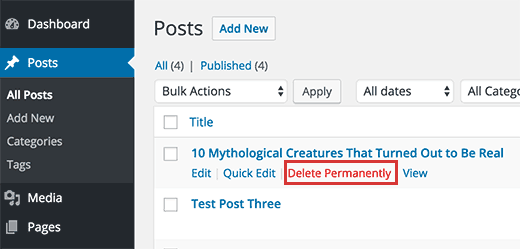
define('EMPTY_TRASH_DAYS', 0);After being disabled, the original “Move to Recycle Bin” function in articles and comments will automatically change to “Permanently Delete”.
By default, WordPress’s processing of deleting articles and cleaning the recycle bin can already meet the needs of most users. Even so, WordPress still leaves enough interfaces to facilitate users with special needs to customize functions. This is one of the reasons why WordPress is so popular.