While there are many choices for programming languages, each language is suited to its own application scenarios. As technology evolves, Web development is gradually forming several reliable technologies. This is especially true for WordPress.
Despite high user expectations for dynamic and interactive websites, JavaScript remains in a maturing phase on this platform. Frameworks can bridge this gap, but the complexity of some popular frameworks may hinder your development. HTMX, a lightweight library, offers usability and simplification when creating modern web experiences.
In this article, we’ll explore how to integrate HTMX into our WordPress development workflow. Throughout the process, we’ll learn how to build dynamic content and interactivity using this powerful yet easy-to-use method.
We’ll discuss what HTMX is, why it’s gaining popularity, and how it combines with WordPress. You’ll also receive a practical guide for integrating and using HTMX with WordPress.
What is HTMX?

In short, HTMX is a JavaScript library that allows you to extend standard Hypertext Markup Language (HTML) without writing native or framework-based JavaScript. Through these extensions, we can also use other technologies:
- Asynchronous JavaScript and XML (AJAX): HTMX uses AJAX to send “asynchronous” requests to the server. This way, you can update parts of a page directly without needing to reload the entire page.
- WebSockets: You can establish WebSocket connections to achieve real-time, two-way communication between the browser and the server.
- Server-Sent Events (SSE): This technology allows the server to push data to the browser. With it, you can use HTMX for real-time page updates.
- CSS Transitions: You can integrate CSS Transitions technology to achieve smooth animation updates on your website.
The core of HTMX is to simplify our process of creating dynamic, interactive Web applications. Its key feature is how to issue GET, POST, PUT, PATCH, and DELETE HTTP requests from HTML elements. This means we can handle partial page updates as smoothly as processing a mobile application. Overall, HTMX is a powerful toolkit that can help us create dynamic web experiences without writing large amounts of JavaScript code.
Why Are We All Talking About HTMX?
HTMX has recently sparked heated discussions. In the past five years, the search volume for this library has grown explosively.

This surge in popularity is partly due to HTMX’s visibility in social media and developer forums. Several factors make HTMX an attractive development option:
- Simplicity: Because HTMX uses familiar HTML syntax to help us create dynamic, interactive Web applications, implementation is very simple, without the typical complexity of JavaScript frameworks.
- Performance: HTMX minimizes JavaScript usage, resulting in faster load times and better performance than other frameworks, especially on mobile devices.
- Server-Side Rendering: If you want to improve initial page load times and search engine optimization (SEO), server-side rendering is an excellent choice. HTMX incorporates this into its feature set.
- Progressive Enhancement: This means adding interactivity to a website without breaking functionality for users who have JavaScript disabled. HTMX follows these principles and thus has accessibility advantages.
Furthermore, unlike some large frameworks, HTMX does not require a complex build process or toolchain. Coupled with a shallower learning curve, integrating the library into our projects becomes much easier.
These advantages, in turn, promote discussion and adoption of HTMX among developers. If you’re looking for a more direct solution to creating interactive web experiences, this library might be your best choice.
The Relationship Between WordPress and JavaScript
The modern relationship between WordPress and JavaScript began with the 2015 “State of the Word,” where Matt Mullenweg concluded with the phrase “Learn JavaScript deeply.”
The typical path for WordPress developers is researching site needs for interactive, dynamic components. In most cases, jQuery has always been the preferred JavaScript framework for WordPress. Even the highly popular Harvard Gazette website is built on jQuery:

Thus, WordPress integrates jQuery by default. In addition, many core functions, plugins, and themes extensively use jQuery. This method is consistent and has received widespread support.
However, with the development of Web technology, the way WordPress handles JavaScript is also constantly changing. With the introduction of the Block Editor, the method for building user interfaces began to shift toward using the React framework, especially within the WordPress dashboard.
Advantages and Disadvantages of Current JavaScript Implementation in WordPress
This means multiple frameworks are supported in the WordPress core code. There are both advantages and disadvantages to this. First, the advantages:
- React and jQuery have broad compatibility. The former is a powerful and popular framework, while the latter has a long-term connection with WordPress.
- Due to the popularity of React and jQuery, many developers are familiar with these two frameworks. More importantly, we can find more resources to learn and solve problems related to these two frameworks.
- WordPress provides built-in support for AJAX via
wp_ajax.
However, these advantages also have some disadvantages:
- Relying on jQuery can affect website performance, and some applications might not need this framework at all.
- Due to compatibility and security reasons, WordPress does not implement all “modern” features and functions of JavaScript. If you want to build some specific features, this might become a problem.
- As React is added to various areas of WordPress (such as blocks and the Site Editor), our learning difficulty will be greater than before.
If you have development knowledge of recommended frameworks or have time to learn them, current WordPress JavaScript architecture is suitable. If not, you might need a solution that doesn’t have the typical framework complexity but provides a modernized front-end interactive experience. This is where HTMX comes into consideration.
Why HTMX is More Suitable for Certain WordPress Development Tasks
In WordPress development, HTMX has some notable advantages. It can provide a middle ground between jQuery’s simplicity and React’s modernity and high performance.
We’ve already discussed some aspects of this; let’s briefly recap below:
- Compared to jQuery and React, HTMX’s “weight” has a significant impact on performance.
- Most WordPress developers consider HTML and PHP to be their most familiar languages, rather than JavaScript. HTMX is like a markup language, making it easier to pick up.
- Since server-side rendering is adopted, PHP and HTMX can work well together, which also positively impacts performance.
- Although HTMX is a “newer” library, you can integrate HTMX more easily and master how it works. This will benefit your workflow.
For WordPress development, we also like how it lets you easily prototype new features for a website. You can quickly create complex new functionality within existing HTML code. On this basis, you can flexibly add React components or small amounts of jQuery as needed.
HTMX’s progressive enhancement principle is also attractive. Accessibility should be at the core of your design strategy, and HTMX allows you to build interactivity without breaking experience for users who choose to disable JavaScript in the browser.
Finally, a significant advantage of HTMX is not requiring any custom or special server-side setup. You can use HTMX on any host.
Typical HTMX Use Cases
As we prefaced, HTMX won’t be a library you use to directly replace any more familiar JavaScript framework. Instead, it works best alongside existing frameworks, helping to share the load when necessary.
This means you’ll use HTMX to complete certain tasks that jQuery and React might struggle with. Before diving deep into how to implement HTMX in WordPress, let’s introduce three common application scenarios where this library can enhance WordPress.
Partial Page Reload
The primary use case for HTMX is how to achieve partial page reloads at minimum cost. This can be a major issue for many developers, especially for rapid simulation and prototyping. However, HTMX can provide production-quality results.
For example, it can help you implement real-time search functionality on a website:

The HTMX examples library also introduces ways to perform real-time updates to other content areas within a page. For example, their example uses a contact form with an available contact table; as soon as a user submits a new contact, the table refreshes. HTMX has many elegant ways to achieve this:
<div id="table-and-form">
    <h2>Contacts</h2>
    <table class="table">
      <thead>
        <tr>
          <th>Name</th>
          <th>Email</th>
          <th></th>
        </tr>
      </thead>
      <tbody id="contacts-table">
        ...
      </tbody>
    </table>

    <h2>Add A Contact</h2>

    <form hx-post="/contacts" hx-target="#table-and-form">
      <label>
        Name
            <input name="name" type="text">
      </label>

      <label>
        Email
            <input name="email" type="email">
      </label>
    </form>
</div>
This form uses hx-post and hx-target attributes to extend its target. You can also use HTMX attributes to retain form input fields after an error or other validation attempt using refresh:
<input form="binaryForm" type="file" name="binaryFile">

<form method="POST" id="binaryForm" enctype="multipart/form-data" hx-swap="outerHTML" hx-target="#binaryForm">
    <button type="submit">Submit</button>
</form>
Here, we place the binaryForm input outside the main form element and use hx-swap and hx-target.
Dynamic Loading
This dynamic refresh and loading method also applies to more common tasks. Take infinite scrolling as an example:
<tr hx-get="/contacts/?page=2"
    hx-trigger="revealed"
    hx-swap="afterend">
  <td>Agent Smith</td>
  <td>amos@example.com</td>
  <td>55F49448C0</td>
</tr>
The hx-swap attribute acts as a “listener” for the hx-trigger attribute. As soon as a user reaches the end of an list, HTMX infinitely loads the second page of contact info.
You can also apply the same method to lazy loading functionality:

This will again use hx-get and hx-trigger attributes to start the htmx-settling transition, loading the chart using a fade-in method.
Data Display
It’s no surprise that HTMX is an excellent tool for using interactive or other dynamic elements to display information on a screen.
For example, you can implement filtering by content type, such as value selection. In this scenario, options in one list populate based on selections in another:

You can even easily set up modals or UI tabs. This also demonstrates how HTMX works with other libraries and frameworks (like Bootstrap):

This flexibility also extends to tab implementations. There are two ways to achieve this: one is combining plain JavaScript with HTMX, and the other is using Hypermedia as the Engine of Application State (HATEOAS) principles:

There are many more ways to use HTMX for front-end website elements, while its core remains on the server side. In the next section, we’ll provide tools for you to create your own visions in WordPress.
How to Integrate HTMX into WordPress
If you want to add HTMX to your WordPress site, the good news is it’s quite simple and fast. Next, we’ll introduce three steps for this work. We won’t introduce the entire process and code for developing features for WordPress, but we’ll introduce all key points you need to follow.
Furthermore, if you’ve already developed for WordPress, then most of the process, especially the first step, should be very typical.
1. Enable HTMX in PHP Code
As with other WordPress scripts, you must include the HTMX library in your theme or plugin code.
wp_enqueue_script('htmx-script', 'https://unpkg.com/htmx.org@2.0.0', array(), '2.0.0', true);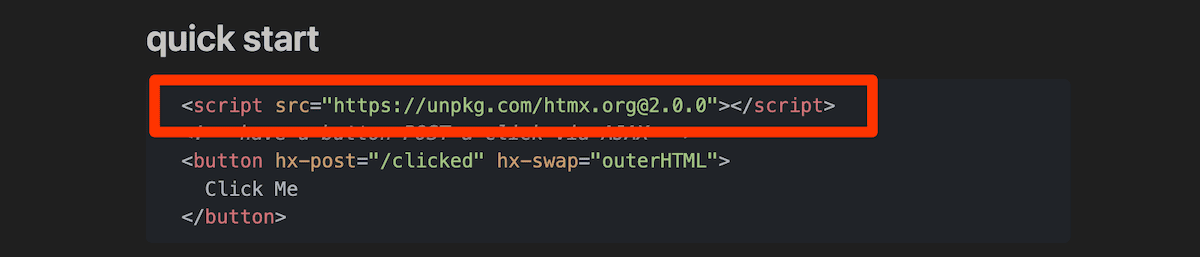
Ensure you use the latest version of HTMX, and note that the quick start guide calls the library from a CDN, which might not be suitable for your project. However, a good idea is to encapsulate this enqueue in a function while also enqueuing and registering a block in WordPress. Of course, this depends on whether your project needs to use the Block Editor.
The final part of introducing HTMX is using add_action to call the whole function. Later, when handling AJAX requests, you’ll need to use hooks and filters again.
2. Add HTMX Elements to WordPress Template Files
From our usage examples, you’ll find HTMX needs to use appropriate markup in HTML to handle and trigger AJAX requests. The library uses typical HTTP request attributes (GET, POST, PUSH, PATCH, and DELETE) prefixed with hx-:
hx-postWordPress AJAX requests use the admin-ajax.php endpoint—remember this point! Typical elements created with HTMX will issue AJAX requests, send them to target elements, and potentially handle triggerers.
Through the hx-target attribute, you can specify the destination of request results. This could be another page, a specific div, or other content. You can imagine it as an HTML anchor tag:
<input type="search"
        name="search" placeholder="Search..."
        hx-post="<?php echo admin_url('admin-ajax.php'); ?>?action=live_search"
        hx-target="#search-results"
        ...
HTMX uses “natural” and “non-natural” to define operations. For example, submit will trigger a form, which is a natural element event. For non-natural element events, use the hx-trigger attribute. These triggers might be one of the more complex parts of HTMX, but remain simple and easy to understand.
For example, you can use triggers to monitor input fields:
...
hx-post="<?php echo admin_url('admin-ajax.php'); ?>?action=live_search"
hx-target="#search-results"
hx-trigger="input changed delay:500ms, search"
hx-indicator=".htmx-indicator">
...
Changing any content in the input field will trigger an update elsewhere on the page. Take another example: you might hope to trigger an event once based on a non-typical operation (like the cursor entering a certain part of the screen):
<div hx-post="/mouse_entered" hx-trigger="mouseenter once">
    [Here Mouse, Mouse!]
</div>
This might trigger you to create a pop-up window or other modal applications. However, before seeing these operations, you must first handle the AJAX request.
3. Handling AJAX Requests
Finally, you need to handle the AJAX request on the server side. For WordPress, storing all of these in a single separate file is a beneficial practice you can call upon at will.
Using this part of HTMX requires utilizing your PHP skills. Handling AJAX requests will be unique to your specific project. This connects the attributes named in template files to server-side processing.
Of course, whether using HTMX, JavaScript, or other code, you’ll do it this way. Below is some pseudo-code showing the effect of doing so:
function my_search_action() {
    $search_term = sanitize_text_field( $_POST['search'] );

    $args = array(
        's' => $search_term,
        'post_type' => 'post',
        'posts_per_page' => 5
    );

    $query = new WP_Query( $args );

    if ( $query->have_posts() ) :
        while ( $query->have_posts() ) : $query->the_post();
            echo '<h2>' . get_the_title() . '</h2>';
            echo '<p>' . get_the_excerpt() . '</p>';
        endwhile;
    else:
        echo 'No results found.';
    endif;

    wp_reset_postdata();

    wp_die();
}
Even so, this might be unrelated to your own project’s AJAX processing, and might not even look similar. Skills you use in building block templates, using PHP to extend plugins, etc., can similarly help you craft your own AJAX request processing programs and functions.
Tips for Using HTMX in WordPress
While using HTMX is one of the simplest methods to achieve dynamic content in WordPress, it still requires careful management and consideration. There are several ways to improve your development experience.
The first tip relates to HTMX’s “maturity.” Currently, it remains a newer library on the platform, so its integration level is not yet on par with jQuery, etc.
HTMX has excellent documentation, but resources combining this library with WordPress are not many. This means without a ready-made community safety net, you’ll need to do significant work to ensure it runs correctly.
An important suggestion we can provide is to temporarily build your functionality into a plugin. This can provide you with structure and more convenient management when checking for errors and other integration mistakes.
Speaking of WordPress, we need to understand how the admin-ajax.php file connects with other parts of the ecosystem, as many interactions will involve it.
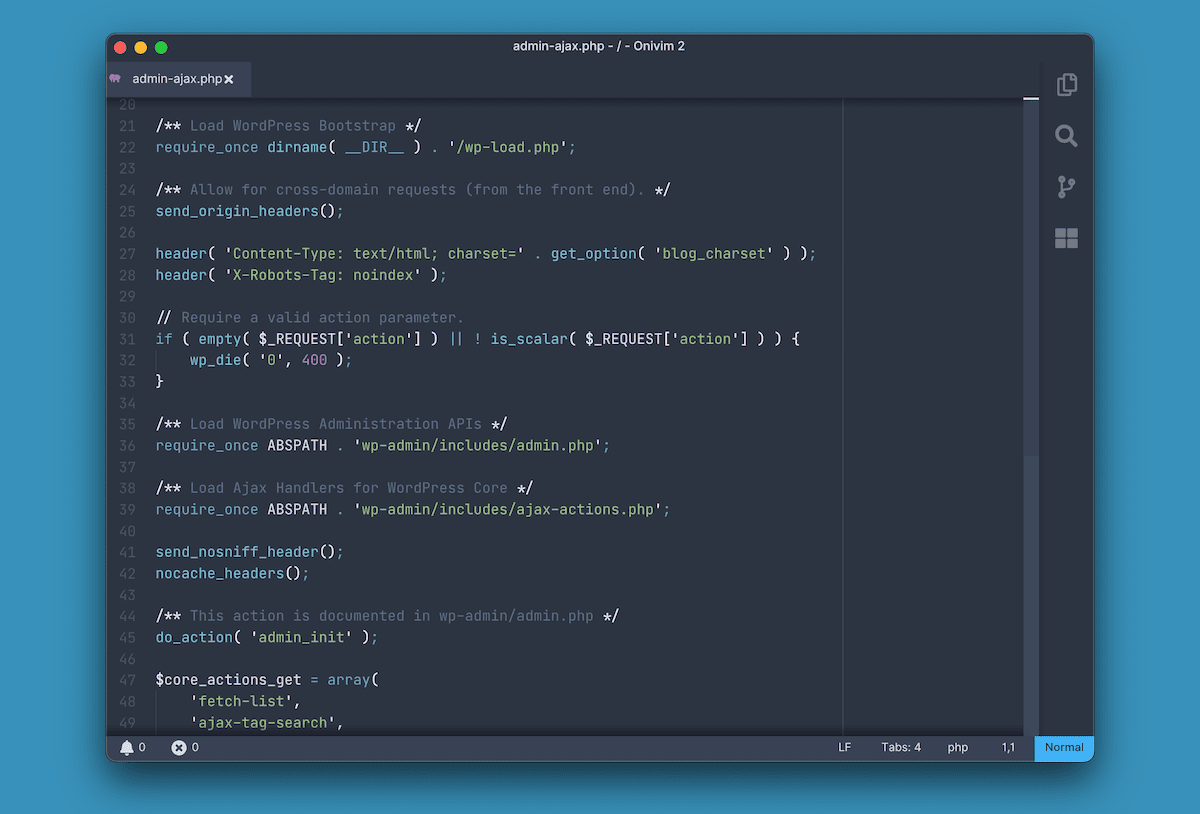
While HTMX performance is good, usage of AJAX should be kept low enough to avoid affecting site load speed or search engine optimization. Debugging requests should also become a primary part of your workflow, especially the XMLHttpRequest (XHR) metrics in browser developer tools.
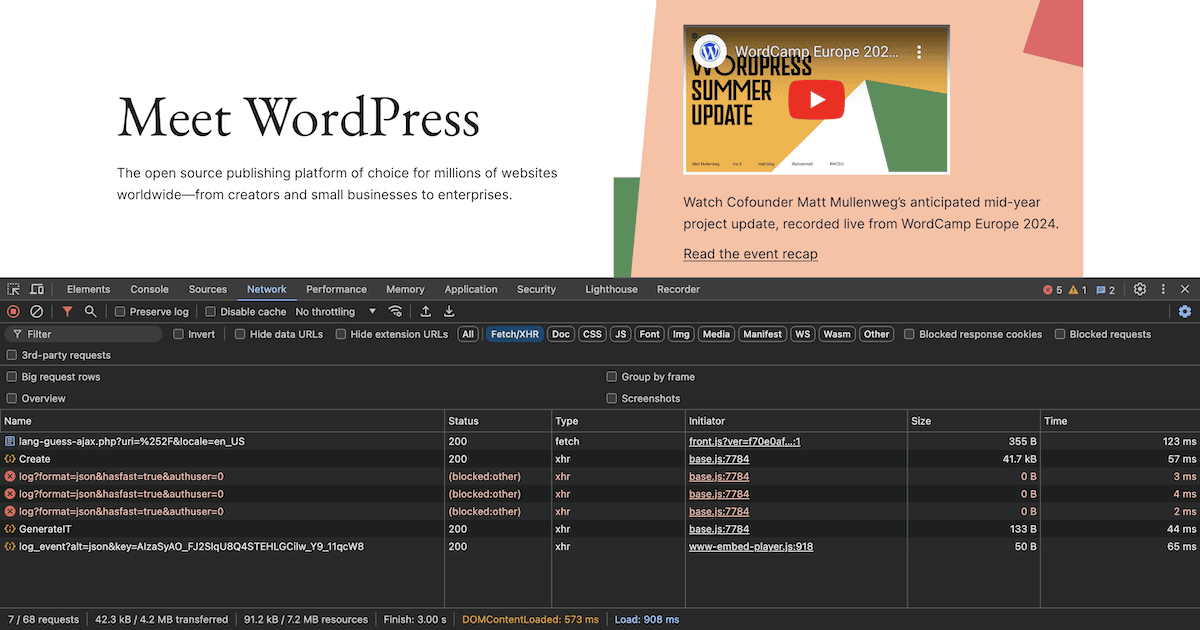
This is a record of request and response data; you can use it to debug AJAX requests and Application Programming Interface (API) calls. Given that HTMX is not yet tightly integrated with WordPress, debugging work might be more important than debugging other JavaScript frameworks.
Summary
For WordPress developers who want to create dynamic, interactive site elements without spending time on complex JavaScript frameworks, HTMX offers an exciting option. It allows you to build directly in HTML and provides modern interactivity for you.
In practice, we can use HTMX alongside other frameworks. It might not be suitable for all tasks, but its implementation is very simple, providing us a method for rapid prototyping of site interactive elements. Interested friends can try the following.