WooCommerce provides a shipping API that lets us register custom shipping methods. Compared with the WooCommerce payment gateway API, this one is used less often, but it is still very useful when a store needs special delivery logic.
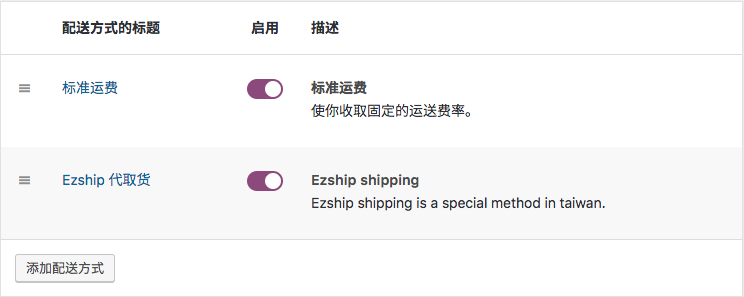
For example, I previously built a custom WooCommerce plugin for a Taiwanese service called Ezship. The plugin integrated Ezship payments, an Ezship shipping method, and real-time shipping status inside the WooCommerce order list. The snippets below come from the shipping-method part of that plugin.
Basic code for adding a custom WooCommerce shipping method
The following example registers a custom shipping method class after confirming that WooCommerce is active.
<?php
/**
 * Check whether WooCommerce is active.
 */
if ( in_array( 'woocommerce/woocommerce.php', apply_filters( 'active_plugins', get_option( 'active_plugins' ) ) ) ) {

    add_action( 'woocommerce_shipping_init', 'your_shipping_method_init' );

    /**
     * Register the custom shipping method class.
     */
    function your_shipping_method_init() {

        if ( ! class_exists( 'WC_Ezship_Shipping_Method' ) ) {

            /**
             * Ezship shipping method.
             *
             * A simple shipping method for Ezship.
             *
             * @class   WC_Shipping_Method
             * @version 2.6.0
             */
            class WC_Ezship_Shipping_Method extends WC_Shipping_Method {

                /**
                 * Constructor.
                 *
                 * @param int $instance_id Shipping instance ID.
                 */
                public function __construct( $instance_id = 0 ) {

                    $this->id                 = 'ezship_shipping_method';
                    $this->instance_id        = absint( $instance_id );
                    $this->method_title       = 'Ezship Pickup Service';
                    $this->method_description = 'Ezship is a Taiwanese shipping service that supports pickup and payment collection.';

                    $this->supports = [
                        'shipping-zones',
                        'instance-settings',
                        'instance-settings-modal',
                    ];

                    $this->init();

                    $this->enabled = $this->get_option( 'enabled', 'yes' );
                    $this->title   = $this->get_option( 'title', __( 'Ezship Shipping', 'woocommerce' ) );
                }

                /**
                 * Initialize the shipping method.
                 */
                public function init() {
                    $this->init_form_fields();
                    $this->init_settings();

                    $this->min_amount = $this->get_option( 'min_amount', 0 );
                    $this->requires   = $this->get_option( 'requires' );

                    add_action( 'woocommerce_update_options_shipping_' . $this->id, [ $this, 'process_admin_options' ] );
                }

                // ... Additional methods omitted here.
                // Availability checks.
                // Shipping rate calculation.
            }
        }
    }
}
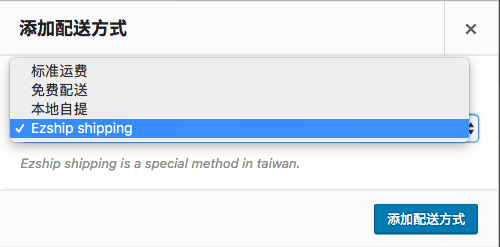
That code only defines the shipping method. To make it appear in WooCommerce’s list of available methods, you still need to add it through the woocommerce_shipping_methods filter.
/**
 * Add the custom method to WooCommerce shipping methods.
 */
add_filter( 'woocommerce_shipping_methods', function ( $methods ) {
    $methods['ezship_shipping_method'] = 'WC_Ezship_Shipping_Method';

    return $methods;
} );
Add settings for the custom shipping method
If the shipping method needs settings, you can define them with the WooCommerce settings API. The simplified example below adds an enable switch and a custom title. In the real plugin there were also options for shipment tracking and maximum COD amounts.
/**
 * Initialize form fields.
 */
public function init_form_fields() {

    $this->instance_form_fields = [

        'enabled' => [
            'title'   => 'Enable',
            'type'    => 'checkbox',
            'default' => 'yes',
        ],

        'title' => [
            'title'    => 'Shipping method title',
            'type'     => 'text',
            'default'  => $this->method_title,
            'desc_tip' => true,
        ],

    ];
}
Because the original plugin was built for a client, the article does not publish the full production code. Even so, the snippets above show the core idea: define the method class, register it with WooCommerce, and then add the instance settings your shipping method needs.