By default, WordPress allows you to sort the post list by the publication date. However, as your site grows and you update old content, being able to sort by the modified date becomes incredibly useful for content auditing. In this tutorial, we’ll implement a custom ‘Modified Date’ column and make it fully sortable. We previously covered how to show a word count column in the WordPress admin post list; if you want to make that type of custom column sortable as well, you can apply the same pattern from this guide.

Step 1: Register the Modified Date Column
First, we use the manage_posts_columns filter to add our new column to the table header.
add_filter( 'manage_posts_columns', function ( $cols ) {
    $cols[ 'modified' ] = 'Modified Date';
    return $cols;
} );
Step 2: Display the Modified Date Data
Next, we use the manage_posts_custom_column action to fetch and display the last modified time for each post.
add_action( 'manage_posts_custom_column', function ( $column_name ) {
    if ( $column_name === 'modified' ) {
        echo get_post_modified_time( get_option( 'date_format' ), '', get_the_ID() );
    }
} );
Step 3: Enable UI Sorting
To make the column header clickable for sorting, we need to register it as a sortable column.
add_filter( "manage_edit-post_sortable_columns", function ( $sortable_columns ) {
    $sortable_columns[ 'modified' ] = array( 'modified', true, 'Modified Date', 'Sort by Modified Date', 'desc' );
    return $sortable_columns;
} );
Step 4: Handle the Sorting Logic
Finally, we intercept the query via pre_get_posts to apply the sorting logic when the user clicks the column header.
add_filter( 'pre_get_posts', function ( $wp_query ) {
    global $pagenow;
    if ( is_admin() && 'edit.php' == $pagenow && isset($_GET['orderby']) && $_GET['orderby'] === 'modified' ) {
        $wp_query->set( 'orderby', 'modified' );
        $wp_query->set( 'order', isset($_GET['order']) ? $_GET['order'] : 'DESC' );
    }
} );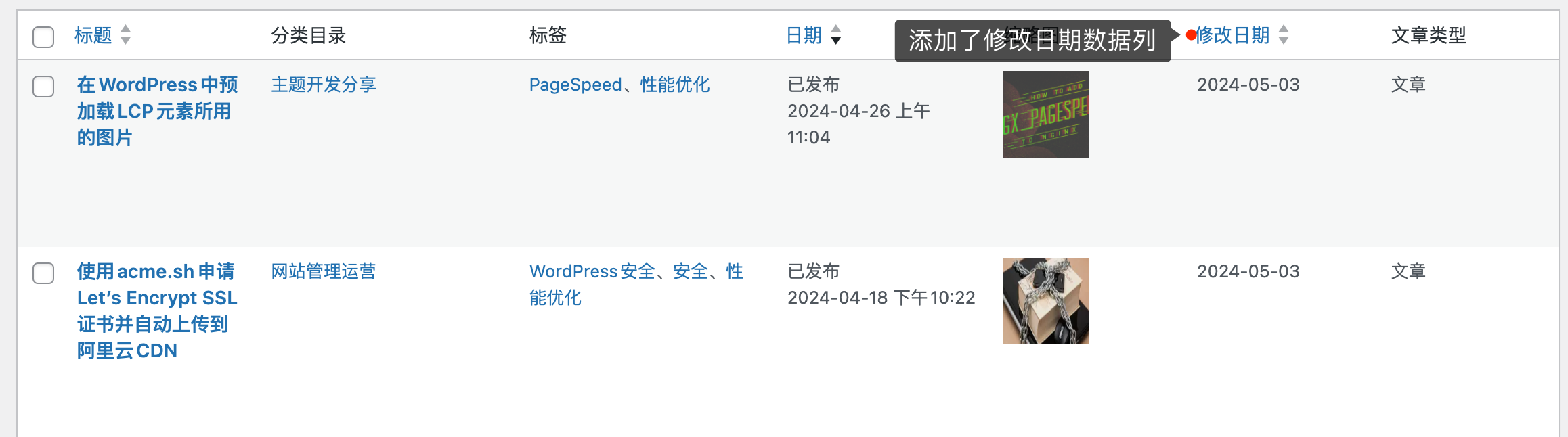
With these steps, you now have a professional-grade content management interface that allows you to easily track and organize your most recently updated articles.