WP User Manager is a simple yet powerful plugin for creating a frontend user center in WordPress. Beyond its rich default features, it provides several hooks that allow developers to easily add custom pages to both the “My Account” area and public user profiles. In this guide, we’ll demonstrate how to add a custom “Application” tab to these pages.
1. Adding a Custom Account Tab
First, we use the wpum_get_account_page_tabs filter to modify the $tabs array. In the code below, we append a new “Application” entry to the existing account tabs.
add_filter('wpum_get_account_page_tabs', function ($tabs)
{
    $tabs[ 'application' ] = [
        'name'     => esc_html__('Submit Application', 'wp-user-manager'),
        'priority' => 0,
    ];

    return $tabs;
});
Once this filter is active, you will see a new “Submit Application” option appear in the WP User Manager account navigation on the frontend.
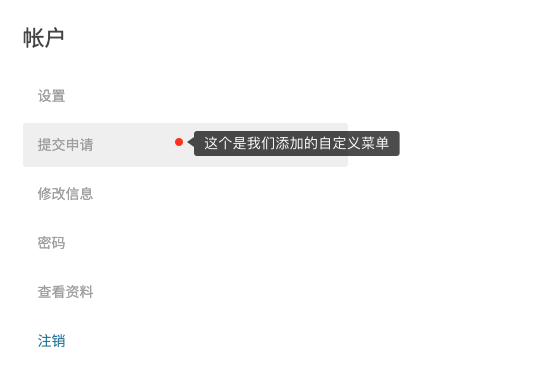
Currently, clicking this tab will display an empty area because we haven’t defined any content for it yet. Let’s fix that in the next step.
2. Adding Content to the Custom Account Page
To inject content into our new tab, we use the wpum_account_page_content_$active_tab action. We replace $active_tab with the key we defined earlier (application).
In this example, we’re displaying content generated by a custom shortcode [wpzhiku_my_posts]:
add_action('wpum_account_page_content_application', function ()
{
    echo do_shortcode('[wpzhiku_my_posts]');
});
3. Adding Custom Tabs to the Public Profile Page
Adding tabs to the public profile page follows a similar pattern, but uses different hooks: wpum_get_registered_profile_tabs and wpum_profile_page_content_$active_tab. Here is an implementation example:
add_filter('wpum_get_registered_profile_tabs', function ($tabs)
{
    $tabs[ 'application' ] = [
        'name'     => esc_html__('Applications', 'wp-user-manager'),
        'priority' => 5,
    ];

    return $tabs;
});

add_action('wpum_profile_page_content_application', function ($data, $active_tab)
{
    echo 'This is the public application profile content.';
}, 10, 2);
By leveraging these four hooks, you can seamlessly integrate any custom functionality or data into the WP User Manager user interface. The plugin offers many more granular hooks for deeper customization, which you can explore based on your specific project requirements.