For store owners who need to manage complex workflows, splitting WooCommerce orders programmatically is incredibly useful. Whether you’re handling pre-orders, partial shipments, or simply organizing products into multiple deliveries, dividing an order based on specific product criteria ensures smoother operations and a better customer experience.
However, splitting an order isn’t just about moving products; duplicating key details like payment methods, shipping addresses, and maintaining accurate totals across all resulting orders is equally important for consistency.
In this tutorial, we’ll explore how to programmatically split orders in WooCommerce while ensuring that all cloned orders contain all relevant details from the original, such as payment method, order status, billing, and shipping addresses.
By the end of this guide, you’ll have a robust solution to automatically split orders directly within your WooCommerce store. Let’s dive into the code!
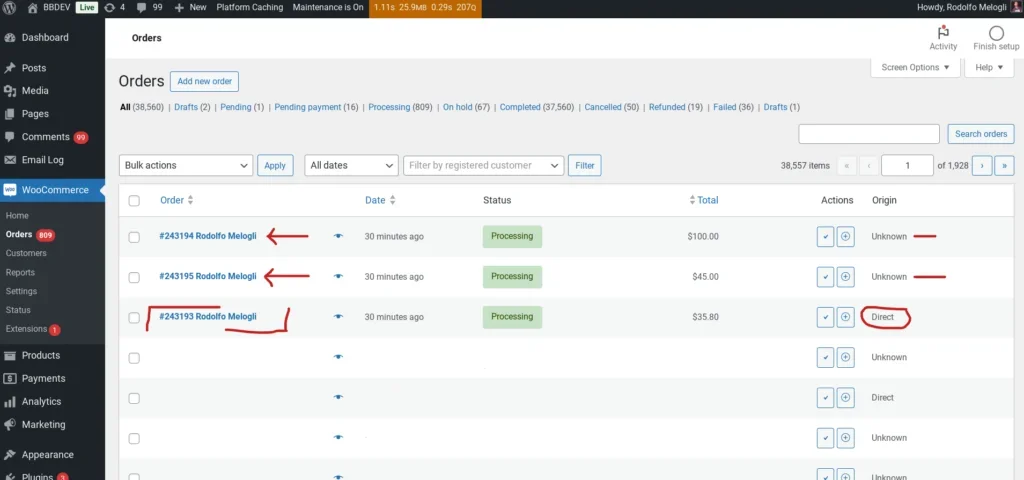
How to Split Orders Based on Shipping Class During Purchase
Of course, you can change the criteria for splitting orders, such as by product ID, product category, or custom meta data. I chose shipping class because each product can typically only have one shipping class (or none, in which case the class ID is 0), and this is a very common requirement for splitting shipments.
add_action( 'woocommerce_thankyou', 'wprs_split_order_after_checkout', 9999 );

function wprs_split_order_after_checkout( $order_id ) {

	 $order = wc_get_order( $order_id );
	 if ( ! $order || $order->get_meta( '_order_split' ) ) return;
    $items_by_shipping_class = array();

    foreach ( $order->get_items() as $item_id => $item ) {
        $product = $item->get_product();
		  $class_id = $product->get_shipping_class_id();
		  $items_by_shipping_class[$class_id][$item_id] = $item;
    }

    if ( count( $items_by_shipping_class ) > 1 ) {
		foreach ( array_slice( $items_by_shipping_class, 1 ) as $class_id => $items ) {

	      $new_order = wc_create_order();
			$new_order->set_address( $order->get_address( 'billing' ), 'billing' );
    		if ( $order->needs_shipping_address() ) $new_order->set_address( $order->get_address( 'shipping' ) ?? $order->get_address( 'billing' ), 'shipping' );

			foreach ( $items as $item_id => $item ) {
				$new_item = new WC_Order_Item_Product();
				$new_item->set_product( $item->get_product() );
				$new_item->set_quantity( $item->get_quantity() );
				$new_item->set_total( $item->get_total() );
				$new_item->set_subtotal( $item->get_subtotal() );
				$new_item->set_tax_class( $item->get_tax_class() );
				$new_item->set_taxes( $item->get_taxes() );
				foreach ( $item->get_meta_data() as $meta ) {
					$new_item->add_meta_data( $meta->key, $meta->value, true );
				}
				$new_order->add_item( $new_item );
				$order->remove_item( $item_id );
			}
			$new_order->add_order_note( 'Splitted from order ' . $order_id );
			$new_order->calculate_totals();
			$new_order->set_payment_method( $order->get_payment_method() );
			$new_order->set_payment_method_title( $order->get_payment_method_title() );
			$new_order->update_status( $order->get_status() );

			$order->calculate_totals();
			$order->update_meta_data( '_order_split', true );
			$order->save();
		}

    }

}
Function Overview
Our order splitting function wprs_split_order_after_checkout is hooked into the WooCommerce woocommerce_thankyou action. This means the code runs once an order is paid and the user is redirected to the “Thank You” page.
- Check if Order is Already Split
- The function first checks if the order has already been processed (using a custom meta field
_order_split) to avoid duplicate operations if the page is refreshed.
- The function first checks if the order has already been processed (using a custom meta field
- Group Products by Shipping Class
- Items in the order are iterated through and grouped based on their shipping class ID. This is useful when you want to split orders by different delivery methods or logistics types.
- Check if Splitting is Needed
- If the order contains more than one shipping class, it triggers the creation of multiple smaller sub-orders.
- Create New Orders for Each Class
- For each unique shipping class (except the first one, which remains in the original order), a new order is created via
wc_create_order(). - Billing and shipping addresses are copied from the original order to the new orders.
- Products are cloned and moved to the new orders, maintaining all relevant details like quantity, total pricing, taxes, and metadata.
- The moved items are then removed from the original order.
- For each unique shipping class (except the first one, which remains in the original order), a new order is created via
- Order Notes and Totals
- A note is added to the new orders indicating they were split from the original ID.
- Totals for both the new and original orders are recalculated, and the payment method is copied over.
- Save Changes
Summary
The code provided in this article is ideal for scenarios where you need to split an order into multiple smaller orders based on specific criteria like shipping classes. It ensures that every new order retains the essential details of the original—such as addresses, payment methods, and product info—maintaining business consistency. This is especially useful for dropshipping or when different products require separate fulfillment strategies.