In WordPress, default core, theme, and plugin update routines periodically request wordpress.org to check for new versions. Some premium themes and plugins also request their own API servers to verify license keys. While these requests are important for ensuring a complete WordPress experience, sometimes target servers respond slowly, which can significantly drag down the loading speed of your WordPress pages—especially in the admin dashboard—ruining the user experience.
To solve this problem, we can block these external requests. This avoids slow calls from affecting the overall speed of your WordPress site.
How to Block External Requests in WordPress
WordPress provides a constant called WP_HTTP_BLOCK_EXTERNAL to implement this. You simply need to add the following setting to your wp-config.php file to block all external requests from WordPress.
define( 'WP_HTTP_BLOCK_EXTERNAL', true );Once you add this code, all outgoing connections from WordPress will be blocked, including connections to wordpress.org. This means the update features for WordPress core, themes, and plugins will no longer work. Therefore, unless absolutely necessary, you should avoid blocking all external requests this way. Instead, you can use other methods to block specific external requests.
Allowing Specific External Requests
Using the WP_ACCESSIBLE_HOSTS constant, you can allow WordPress to send requests to specific domains. In this constant, you can set multiple domains separated by commas, and even use wildcards to allow a group of domains. Here is an example code snippet:
define( 'WP_ACCESSIBLE_HOSTS', '*.wordpress.org,www.some-api.com' );This method essentially creates a whitelist of domains for WordPress. Only the domains in this whitelist will be accessible by the WordPress application.
Using the Snitch Plugin to Block External Requests
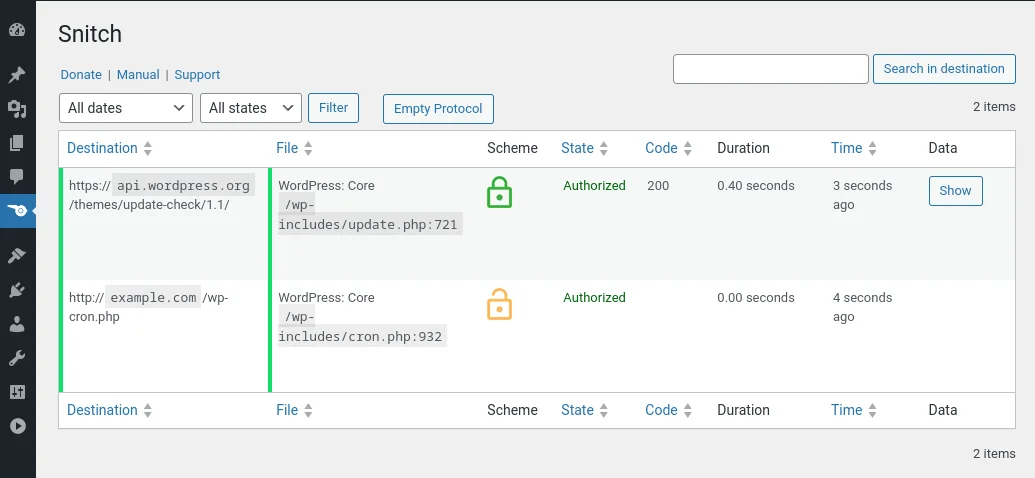
If you prefer not to edit code and would rather use a plugin to customize WordPress, a plugin named Snitch can help you block external requests.
As shown in the image below, this plugin lists all external requests happening within WordPress and displays the time taken for each access. You can then selectively block external requests that are particularly slow.
Limitations and Solutions
The methods described above (using constants or plugins) are convenient but only apply to requests made using the WordPress HTTP class (including the wp_remote_get and wp_remote_post functions). If a theme or plugin uses custom request methods like cURL or other HTTP libraries, these blocks will not work. To achieve maximum restriction of external resources, it is recommended to implement a firewall at the server level.