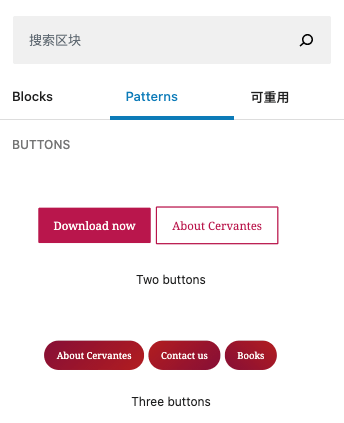
Introduced in WordPress 5.5, the “Block Patterns” feature allows developers to create predefined collections of Gutenberg blocks that users can easily insert into their posts and pages. While they may seem similar to “Reusable Blocks,” Patterns serve as content templates: once inserted, each instance can be edited independently without affecting other instances or the original template. Reusable blocks, on the other hand, maintain a global sync across all instances.
How to Register Custom Block Patterns
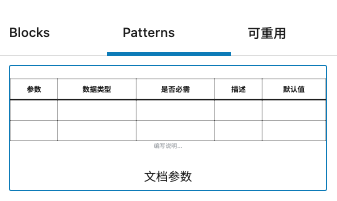
To register a custom pattern, WordPress provides the register_block_pattern function. This is typically hooked into the init action. In the example below, we’re creating a pattern called “Documentation Parameters” which inserts a pre-formatted table for documenting function arguments.
add_action('init', function ()
{
    register_block_pattern(
        'my-theme/doc-params-pattern',
        [
            'title'       => __('Documentation Parameters', 'my-theme'),
            'description' => _x('A table for listing function parameters', 'my-theme'),
            'content'     => '<!-- wp:table {"className":"is-style-regular"} --><figure class="wp-block-table is-style-regular"><table><thead><tr><th>Parameter</th><th>Type</th><th>Required</th><th>Description</th><th>Default</th></tr></thead><tbody><tr><td></td><td></td><td></td><td></td><td></td></tr><tr><td></td><td></td><td></td><td></td><td></td></tr></tbody></table></figure><!-- /wp:table -->',
            'categories'  => ['text'],
        ]
    );
});
After implementing the code above, the “Documentation Parameters” pattern will appear in the Patterns tab of the Gutenberg inserter. Clicking it will add the table structure to your editor, where you can then fill in the specific details for your article. This method is extensively used in our own developer documentation for its efficiency.
When to Use Patterns vs. Reusable Blocks
The choice between these two features depends on your intent:
- Block Patterns: Use these as starting points or layout templates. They are ideal for structures that share a common design but contain unique data in every instance (e.g., pricing tables, team member profiles, or documentation headers).
- Reusable Blocks: Use these for global content. They are perfect for snippets that must remain identical across your entire site (e.g., a newsletter signup form or a specialized call-to-action). Updating the reusable block in one place updates it everywhere.