In WooCommerce, we can choose different functional pages in the backend settings, which is very convenient. So when developing a WooCommerce theme, how do we retrieve the URLs of those pages? In this article, I have summarized several common methods for retrieving WooCommerce page URLs so they are easy to reference during WooCommerce secondary development.
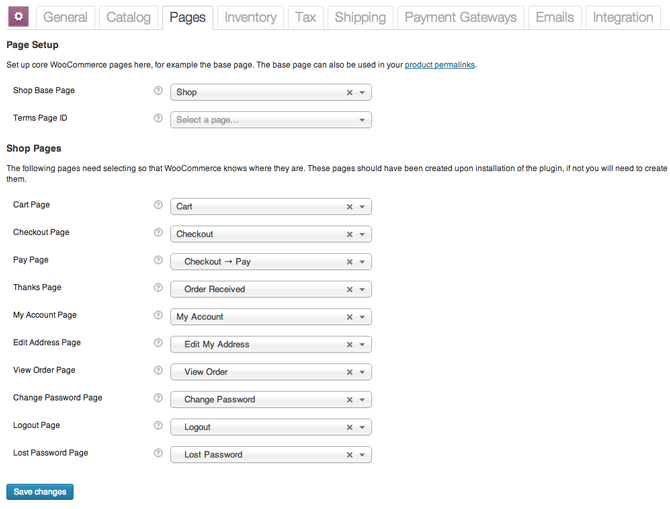
Shop URL
Use the following code to get the WooCommerce shop URL, in other words the main shop page:
$shop_page_url = get_permalink( woocommerce_get_page_id( 'shop' ) );
My Account URL
Use the following code to get the page URL for “My Account” as configured in WooCommerce settings:
$myaccount_page_id = get_option( 'woocommerce_myaccount_page_id' );
if ( $myaccount_page_id ) {
  $myaccount_page_url = get_permalink( $myaccount_page_id );
}
Cart URL
Get the cart URL through the get_cart_url() method on the WooCommerce cart object:
global $woocommerce;
$cart_url = $woocommerce->cart->get_cart_url();
Checkout URL
Get the checkout URL through the get_checkout_url() method on the WooCommerce cart object:
global $woocommerce;
$checkout_url = $woocommerce->cart->get_checkout_url();
Payment page URL
The payment page is used to collect user information and redirect to the payment gateway. It usually takes a form like /checkout/pay/. Use the following code to get the payment page URL:
$payment_page = get_permalink( woocommerce_get_page_id( 'pay' ) );
// Determine whether the URL needs to be forced to SSL.
if ( get_option( 'woocommerce_force_ssl_checkout' ) == 'yes' ) $payment_page = str_replace( 'http:', 'https:', $payment_page );
Logout URL
This is really just the standard WordPress logout page, and it can be retrieved with the following code.
$myaccount_page_id = get_option( 'woocommerce_myaccount_page_id' );

if ( $myaccount_page_id ) {
  $logout_url = wp_logout_url( get_permalink( $myaccount_page_id ) );

  if ( get_option( 'woocommerce_force_ssl_checkout' ) == 'yes' )
    $logout_url = str_replace( 'http:', 'https:', $logout_url );
}
Once you have these page URLs, you can use them directly anywhere you need to output links to those pages. Even if the URLs for those pages are changed later in the backend, the links on the front end will update automatically as well. That avoids the many problems caused by hard-coding links directly into templates. When developing a WooCommerce multilingual site, it also avoids the problem of hard-coded links that cannot be translated into the corresponding language.