Whether you’re developing a custom WordPress theme or a complex plugin, you’ll frequently need to display media metadata like Alt text or image titles. If you find yourself constantly checking the codex to remember which function retrieves which piece of data, this guide is for you. I’ve summarized the most effective methods to programmatically access all key attachment fields.
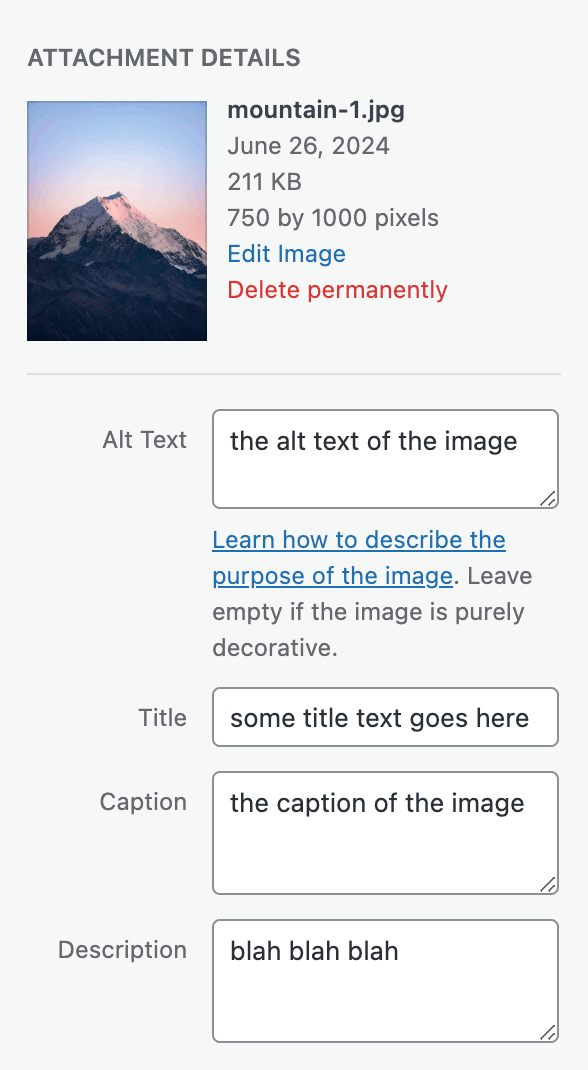
How to Get Attachment Alt Text
The Alt text for an image is not stored in the main post object but rather as attachment metadata. Therefore, we use the get_post_meta() function to retrieve it:
$alt_text = get_post_meta( $image_id, '_wp_attachment_image_alt', true );How to Get the Title
The Title, Caption, and Description are native parts of the WP_Post object for attachments. You can use get_post_field() for specialized queries or get_post() to retrieve the full object.
$title = get_post_field( 'post_title', $image_id );How to Get the Caption
In WordPress, the media “Caption” field is stored in the post_excerpt column:
$caption = get_post_field( 'post_excerpt', $image_id );How to Get the Description
The full “Description” field of an attachment is stored as the post’s content (post_content):
$description = get_post_field( 'post_content', $image_id );How It Works Behind the Scenes
In WordPress, every media file is essentially just a post with the custom post type attachment. This underlying architecture means:
- Attachments do not have a separate database table; they reside in
wp_postsandwp_postmetajust like standard posts and pages. - You can use standard post-retrieval functions like
get_posts(),get_post(), andget_post_meta()to handle them.
Instead of calling get_post_field() multiple times for different fields, it is often more efficient to retrieve the entire post object once. Since WP_Post objects are cached, performance is excellent either way.
$attachment = get_post( $image_id );

// Easily access properties from the WP_Post object
$title       = $attachment->post_title;
$caption     = $attachment->post_excerpt;
$description = $attachment->post_content;

// Alt text still requires get_post_meta because it's not a native column
$alt_text = get_post_meta( $image_id, '_wp_attachment_image_alt', true );
WordPress provides a vast array of helper functions for data retrieval. Once you understand that attachments are simply a specific post type stored in the standard tables, fetching their metadata becomes straightforward and logical.