In WooCommerce, using product variations is generally set up in the product editor and then displayed on the product page. This is an easy operation for those familiar with WooCommerce. However, for we developers, how to obtain product variations programmatically is a less common operation. In this article, I will introduce how to programmatically get product variations for further processing.
Let’s assume that in the example below, $product is a WC_Product object, or more specifically, a WC_Product_Variable object. We can obtain it as a parameter when using WooCommerce hooks or with the help of the wc_get_product() function.
But if you are not sure whether the $product object belongs to a product variation, you can also use the if( $product->is_type( 'variable' ) ) condition to judge.
Method 1. get_available_variations()
$variations = $product->get_available_variations();

if( $variations ) {
	foreach( $variations as $variation ) {
		// a WC_Product_Variation object

		echo $variation->get_id(); // ID of a specific variation
		echo $variation->get_name();
	}
}
This method seems to be exactly what we need, but there is a small problem — it only works for visible in-stock variations. That is to say, only variations with the “Enabled” checkbox checked can be obtained through this function.
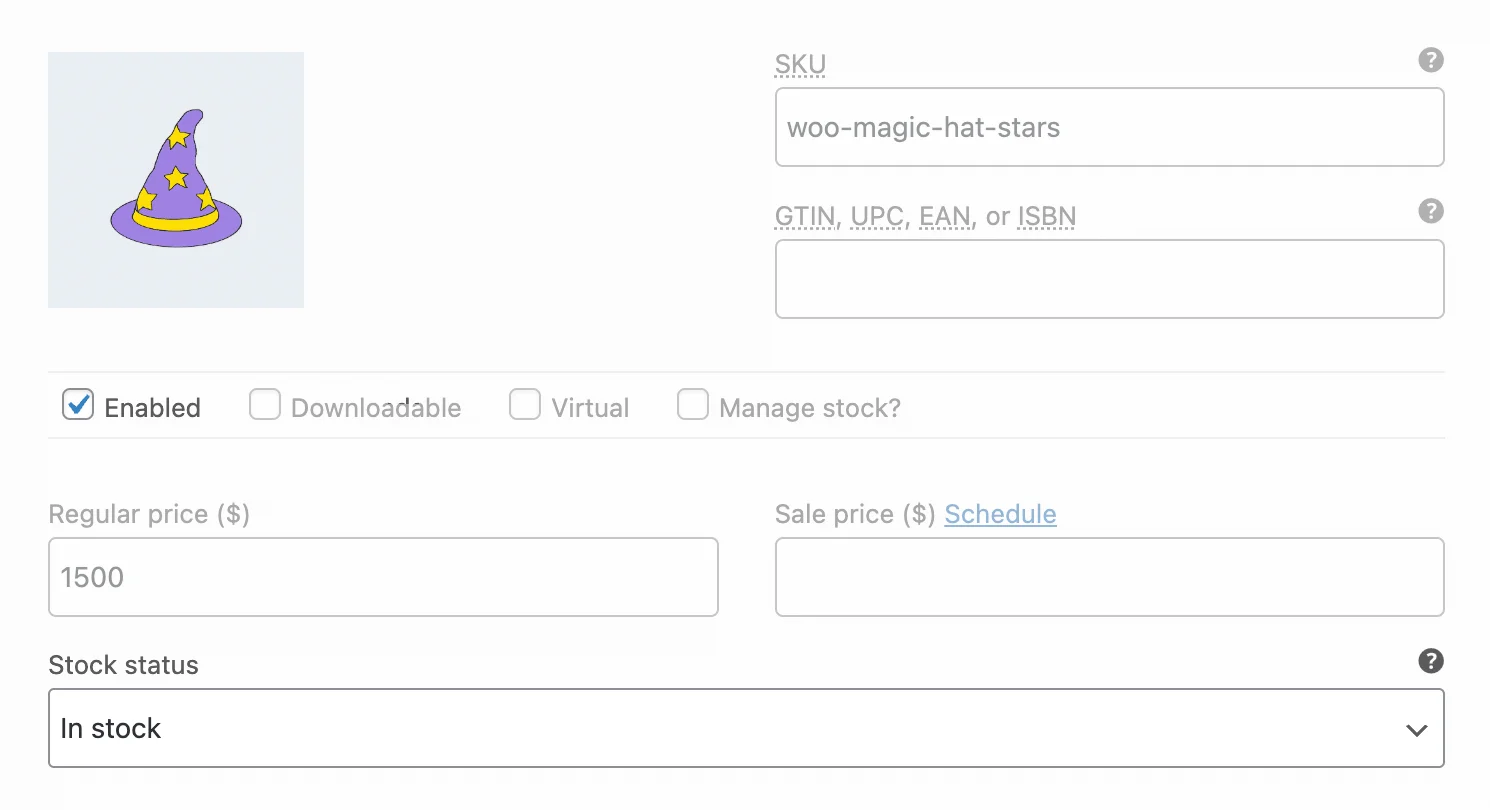
We can use the get_available_variations() method to get only enabled in-stock variations.
How to Get All Variations Using get_available_variations()
As I mentioned before, get_available_variations() only returns variations that are in stock and not hidden. Is there a way around this? The answer is yes.
If we uncheck this checkbox in the WooCommerce settings, we can allow this method to return out-of-stock variations:

This checkbox can be found in WooCommerce > Settings > Products > Inventory.
Secondly, we can also use the filter hook woocommerce_hide_invisible_variations to make the get_available_variations() method also return hidden (disabled) variations:
add_filter( 'woocommerce_hide_invisible_variations', 'wprs_all_variations', 25, 3 );

function wprs_all_variations( $hide_invisible, $variation_id, $variation ) {
	// We can also add some variation-specific conditions here
	$hide_invisible = false;
	return $hide_invisible;
}
Or a simplified version:
add_filter( 'woocommerce_hide_invisible_variations', '__return_false' );Method 2. get_children()
The get_available_variations() method we discussed above works on the basis of the get_children() method.
However, if you need to get hidden and visible, in-stock and out-of-stock variations of a WooCommerce product at the same time, the get_children() method might be more suitable for you. You just need to remember one thing — it returns an array of variation IDs, not objects.
$variation_ids = $product->get_children();

if( $variation_ids ) {
	foreach( $variation_ids as $variation_id ) {

		$variation = wc_get_product( $variation_id );
		if ( ! $variation || ! $variation->exists() ) {
			continue;
		}

		echo $variation->get_id();
		echo $variation->get_name();
	}
}
Method 3. Get Product Variations in WooCommerce REST API
In addition to the two ways above, we can also get product variations by using the WooCommerce REST API. However, this method is a bit roundabout. Since they can be obtained directly from the database through PHP, this method actually adds an HTTP request, which will also have a slight impact on performance. Unless there is a special need, it is not recommended to use this method.
$url = '';
$username = '';
$pwd = ''; // Application Password, not WordPress login password

// Send request to get product variations in WooCommerce
$response = wp_remote_get(
	add_query_arg(
		array(
			'per_page' => 100, // Default is 10
			// 'status' => 'publish', // Get only enabled variations
			// 'stock_status' => 'instock', // Get only in-stock variations
		),
		"{$url}/wp-json/wc/v3/products/{$product_id}/variations"
	),
	array(
		'headers' => array(
			'Authorization' => 'Basic ' . base64_encode( "{$username}:{$pwd}" )
		)
	)
);

// You can check the server return code and content here before proceeding
$variations = json_decode( wp_remote_retrieve_body( $response ), true );
if( $variations ) {
	foreach( $variations as $variation ) {
		echo $variation[ 'id' ];
		echo $variation[ 'sku' ];
	}
}
Let me explain this code:
- As you can see, I am using the WordPress HTTP API function —
wp_remote_get(). - For authentication, you need to provide a username and application password.
- Please note the
per_pageparameter, because its default value is10, which means that if your product has many variations, you will not be able to get all variations in one REST API request.
If you have any questions or thoughts about this article, feel free to mention them in the comments section and we will discuss them together.