WooCommerce has long lacked a built-in feature to view a customer’s order history directly on a single order management page. This functionality is incredibly useful for quickly checking a customer’s past purchasing records, including what products they’ve bought, their total spending, and their purchase frequency.
In fact, you only need a simple PHP code snippet to add this feature. Below, I’ll walk you through the steps and provide the PHP code necessary to display order history details on the order management page.
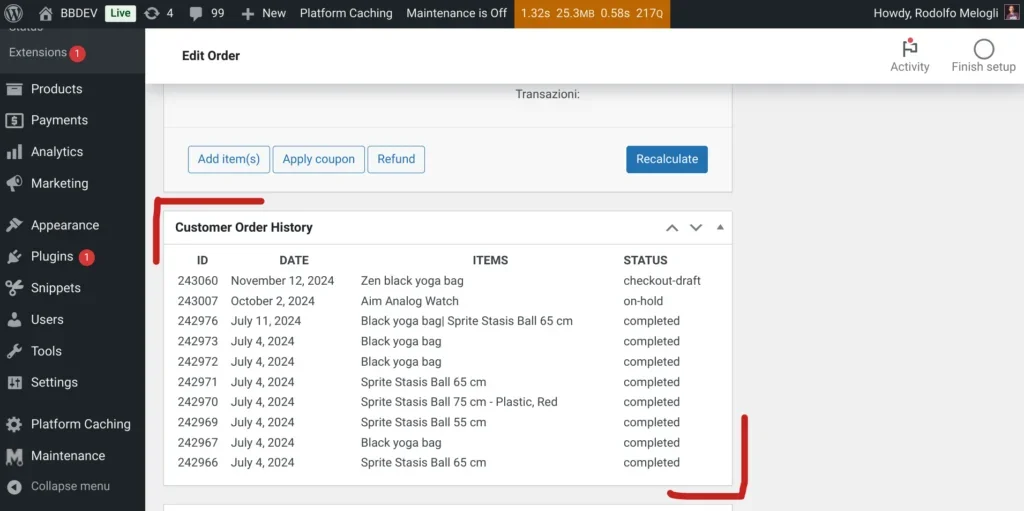
On the single order management interface, we’ve added a new “Meta Box” containing information for the last 10 orders associated with the current WooCommerce customer ID.
PHP Code to Display the Last 10 Customer Orders
First, we use the add_meta_boxes hook to add a meta box to the WooCommerce single order management page. The add_meta_box function sets the title to “Customer Order History” and associates it with the shop_order post type.
The wprs_display_order_history function triggers when the meta box loads. It uses wc_get_order and wc_get_orders to fetch the relevant customer order history and outputs it in a table format.
Order Retrieval: The code retrieves the customer ID for the current order to load up to 10 of their previous orders. By using 'return' => 'ids', it only fetches order IDs, which speeds up the query.
Output Formatting: For each past order, the code displays the order ID, date, product names (separated by |), and status, providing an organized view of the customer’s order history on a single management page.
add_action( 'add_meta_boxes', function() {
    add_meta_box( 'order_history', 'Customer Order History', 'wprs_display_order_history', 'shop_order', 'normal', 'default' );
}, 1 );

function wprs_display_order_history() {
	global $post;
	$order = wc_get_order( $post->ID );
	if ( ! $order ) return;
   $orders = array();
	if ( $id = $order->get_customer_id() ) {
		$orders = wc_get_orders( [ 'customer_id' => $id, 'return' => 'ids', 'limit' => 10 ] );
	}
	if ( ! $orders ) return;
	echo '<table style="width:100%"><thead><tr><th>ID</th><th>DATE</th><th>ITEMS</th><th>STATUS</th></tr></thead><tbody>';
	foreach ( $orders as $order_id ) {
		$order = wc_get_order( $order_id );
		if ( ! $order ) continue;
		$items = array();
		foreach ( $order->get_items() as $item_id => $item ) {
			$items[] = $item->get_name();
		}
		echo '<tr><td>' . $order_id . '</td><td>' . wc_format_datetime( $order->get_date_created() ) . '</td><td>' . implode( ' | ', $items ) . '</td><td>' . $order->get_status() . '</td></tr>';
	}
	echo '</tbody></table>';
}
By adding the above code to your theme or a custom plugin, you can implement the feature to display customer order history directly on the order details page. This makes it much easier to understand a customer’s purchasing history while managing their orders. Beyond displaying past orders, you could also display other customer-related information in this meta box if needed. If you have any specific requirements, feel free to ask in the comments, and I can look into how to implement them for you.