In WordPress, when we delete posts or comments, they are moved to the Trash first. Content in the Trash is only deleted permanently after 30 days. During those 30 days, we can restore items whenever necessary. It is a useful safety mechanism because it protects us from accidental data loss. In this article, we will look at how to limit or disable that behavior.
Stop WordPress from automatically deleting trashed posts
WordPress performs this cleanup through a scheduled task. That task runs daily, checks the items in the Trash, and permanently deletes anything that has been there longer than 30 days.
If you want to keep trashed content until you choose to clean it manually, you can disable that automatic cleanup behavior by adding the following code to your theme’s functions.php file.
add_action( 'init', function () {
    remove_action( 'wp_scheduled_delete', 'wp_scheduled_delete' );
} );
The logic is straightforward. The scheduled task itself still runs, but the actual callback that performs the deletion is removed from the hook, so no automatic deletion happens.
Change how long WordPress waits before deleting trashed content
By default, WordPress permanently deletes trashed content after 30 days. Depending on the project, you may want that window to be shorter or longer. For example, if you want content to be deleted automatically after 7 days, add the following line to wp-config.php. The value 7 can be changed to any number of days you need.
define('EMPTY_TRASH_DAYS', 7);Disable the Trash feature entirely
The Trash feature is useful, but it is not needed on every site or for every workflow. If you do not need it at all, you can disable the Trash completely by adding the following line to wp-config.php.
define('EMPTY_TRASH_DAYS', 0);After that, the usual “Move to Trash” action for posts and comments changes into “Delete Permanently.”
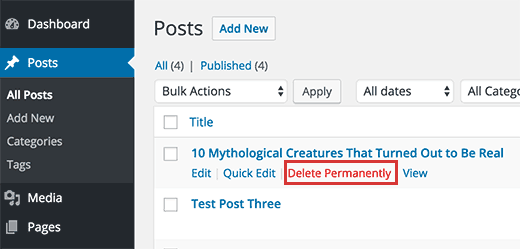
For most users, the default WordPress behavior is already good enough. Even so, WordPress still exposes the necessary hooks and constants so people with special requirements can customize the behavior. That flexibility is one of the reasons WordPress remains so popular.