The WordPress dashboard still has a few rough edges from a usability perspective. One example is the View Site link in the admin bar. In the Chinese dashboard it is labeled “查看站点.” When you click it, the site homepage opens in the current browser tab. If you were editing something in the dashboard and just wanted to preview the result, you then have to hit the browser back button to return and continue working.
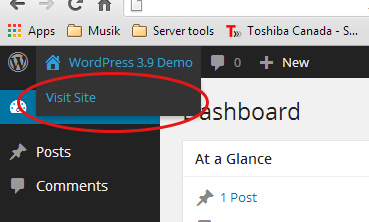
How to make the View Site link open in a new tab
WordPress provides a hook called admin_bar_menu. We can use it to modify how the View Site link opens. Copy the code below into your theme’s functions.php file and save it.
add_action( 'admin_bar_menu', 'customize_my_wp_admin_bar', 80 );
function customize_my_wp_admin_bar( $wp_admin_bar ) {

    //获取view-site 节点以便修改
    $node = $wp_admin_bar->get_node('view-site');

    //修改打开方式
    $node->meta['target'] = '_blank';

    //更新节点
    $wp_admin_bar->add_node($node);

}
The same approach also works for links such as Updates and Comments. Their corresponding node names are updates and comments. To change those links, replace the argument passed to get_node() with the appropriate node name.