
In one project, the client needed to embed the swf document converted by print2swf software into the WordPress article page. It may be that there is less demand for inserting swf files into articles. The default editor of WordPress does not have a button to insert swf files, and adding media does not provide shortcodes to support swf files. Inserting through custom fields is more troublesome, so I found the official plug-in [Top Flash Embed](https://wordpress.org/plugins/top-flash-embed/).
Main functions and features of Top Flash Embed plug-in
– Automatically detect SWF file size – Insert SWF files directly through the [Add Media] button, very convenient – Allow embedding external SWF files (such as Youku swf player) – Support additional parameters, such as: wmode, flashVars, allowFullScreen, etc. – Pass XHTMl object tag verification (not applicable to SWFObject)
How to use the Top Flash Embed plug-in
If you have uploaded and inserted a video through the “Add Media” button of WordPress, you must have realized how simple it is to add multimedia in WordPress. The method of using Top Flash Embed is similar to the method of adding video.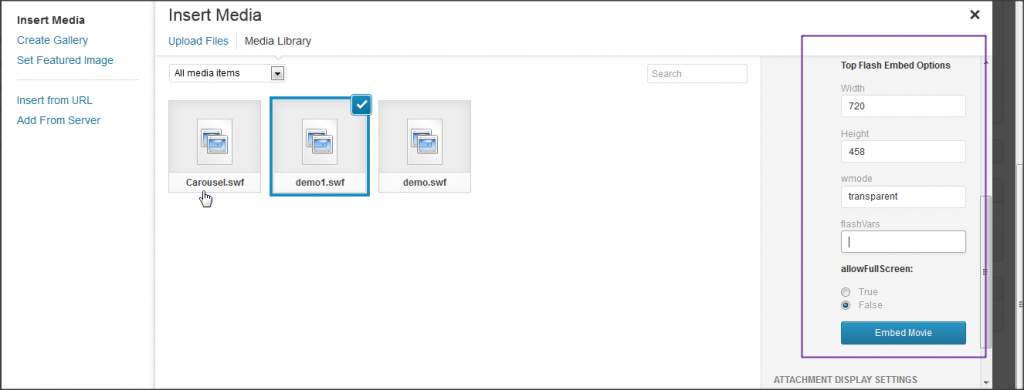 As shown in the picture above, after selecting a swf file, the “Embed Movie” button will appear in the file information editing area on the right. Click this button directly, and the swf file will be added to the WordPress content editing area in the form of a shortcode. Before inserting, we can also make some settings on the embedded swf file to make the display better. The inserted code is as follows.
[topswf swf='https://sc.wpzhiku.com/uploads/2014/07/nnba80ctzyod.swf' width='282' height='400' quality='best' wmode='transparent' scale='default' flashvars='' allowfullscreen='false']You can embed swf files without this plug-in
As can be seen from the front-end code, the function of this plug-in is to make the work of embedding SWF a little easier. In fact, without the Top Flash Embed plug-in, we can directly paste the code page in the editor to achieve the same effect.
<object width="282" height="400" data="https://sc.wpzhiku.com/uploads/2014/07/nnba80ctzyod.swf" type="application/x-shockwave-flash">
<param name="movie" value="https://sc.wpzhiku.com/uploads/2014/07/nnba80ctzyod.swf" />
<param name="quality" value="best" />
<param name="wmode" value="transparent" />
<param name="scale" value="default" />
<param name="FlashVars" value="" />
<param name="allowFullScreen" value="false" />
</object>
The above several pieces of code are converted by the plug-in from the shortcode generated by the plug-in. With two more conversion processes, the efficiency of the program will definitely be lower, but the operation will be much more convenient. It is more cost-effective to trade the operating efficiency of the program for the simplicity of operation. After all, the program is written to serve human beings.