
WordPress users can create navigation menus in the menu management interface. After the menus are created, they can be assigned display positions for these menus, and then the menus can be displayed in templates that contain these menu positions.
How WordPress Menus and Menu Positions Work
If this template is a category template, the navigation menu will be displayed on all category pages. If it is a tag template, the menu will be displayed on each tag page. If we only want the menu to be displayed on certain category pages, WordPress’s default menu system cannot do anything. WordPress does not provide such a logical function. Friends who have used Joomla or Drupal may feel that the WordPress menu system is weak. Because these two CMS provide relatively complete configuration parameters for the navigation menu, you can control which pages the menu is displayed on.
Implement conditional menu through plug-in
The easiest way to achieve similar functions in WordPress is through plug-ins. What we are going to introduce late today is exactly such a plug-in: Conditional Menus. The name of this plug-in is called Conditional Menu, which is actually not very accurate. According to the function of the plug-in, this plug-in should be called Conditional Menu Position. This plug-in allows us to set conditional functions for each menu position, as shown in the figure: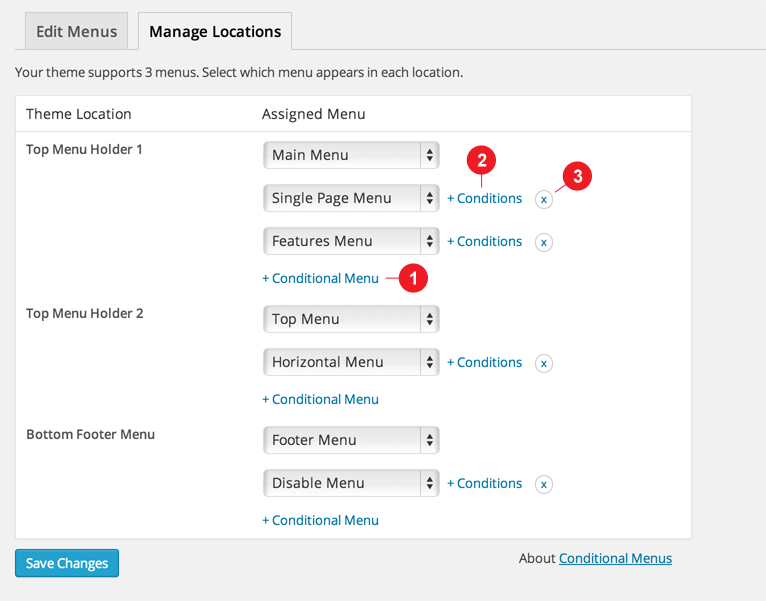 We can set display conditions for each menu position. The plug-in provides a very rich set of conditional functions, including article types, custom taxonomies, user roles, etc. These conditional functions can control the display or hiding of the menu position on almost any page. It is also very simple to use, just select the corresponding display conditions in the pop-up window.
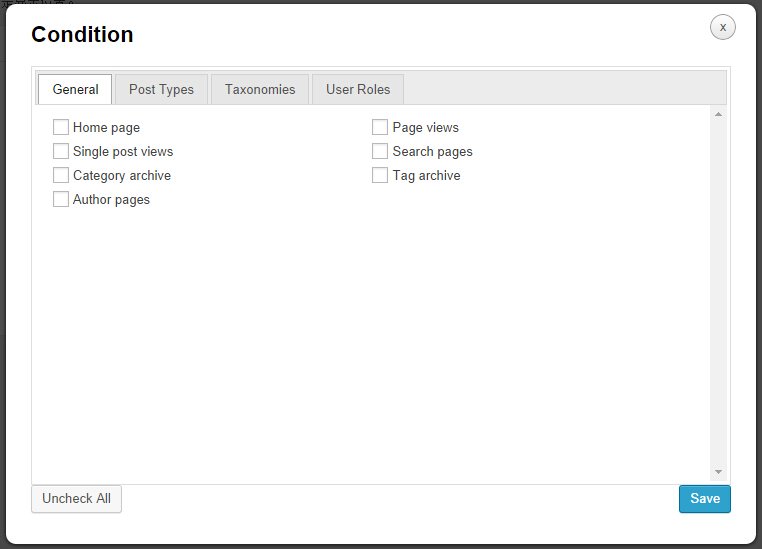 The plug-in is very useful, but there is one thing that needs to be complained about. The pop-up condition selection interface is too anti-WordPress, and is a bit incompatible with the WordPress management interface. I hope that in future updates, the author can directly use the WordPress model function instead of reinventing one by myself.