
ButterBean is a WordPress custom field management plug-in that can help us better organize many custom fields into tabs in a MetaBox. When a certain article type has a lot of custom fields, this function is particularly useful. It can help us make the custom field input interface more logically organized and more convenient to operate. popularWordPress eCommerce pluginWooCommerce is a product field management interface implemented in a similar way. The effects that ButterBean can achieve are as follows.
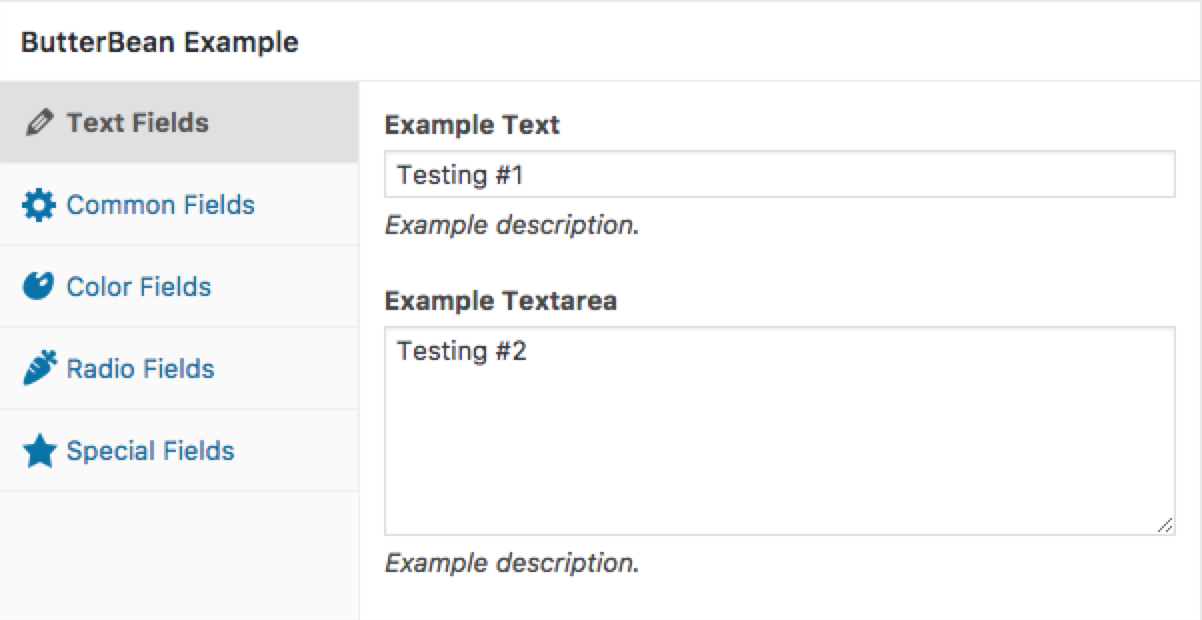
Install ButterBean plug-in
If we are not using ButterBean as a standard plug-in, we need to copybutterbeanfolder into the theme directory and then loadbutterbean.phpDocuments, below.
add_action( 'plugins_loaded', 'th_load' );
function th_load() {
    require_once( 'path/to/butterbean/butterbean.php' );
}
Register ButterBean callback
After installing the ButterBean plug-in, we can usebutterbean_registerThe action hook registers custom managers, sections, controls, and settings, and the callback function is$butterbeanand current$post_typeTwo objects.
add_action( 'butterbean_register', 'th_register', 10, 2 );
function th_register( $butterbean, $post_type ) {
	if ( 'your_post_type' !== $post_type )
		return;
}
Create manager manager
In ButterBean, Manager is a combination of multiple Sections and Controls. A Manager is a Meta Box. We can register multiple Managers at the same time. The code is as follows:
$butterbean->register_manager(
	'example',
	array(
		'label'     => esc_html__( 'Sample data', 'your-textdomain' ),
		'post_type' => 'post',
		'context'   => 'normal',
		'priority'  => 'high'
	)
);

$manager = $butterbean->get_manager( 'example' );
Create custom sections Sections
A Sections is a combination of Controls, which is displayed as a tab. We can add custom labels, descriptions, and icons to each tab.
$manager->register_section(
	'section_1',
	array(
		'label' => esc_html__( 'Dataset 1', 'your-textdomain' ),
		'icon'  => 'dashicons-admin-generic'
	)
);
Create custom controllers Controls
A Controls is a custom field input form item. The controller appears in the tab and is used to input custom field data. Controls has many form types, from simple text boxes to WordPress media input boxes, the types are comprehensive enough.
If what we need is not available in the default Controls type, we can also extend itButterBean_ControlClass creates custom Controls types.
$manager->register_control(
	'abc_xyz', // Same as the name of the Settings below
	array(
		'type'    => 'text',
		'section' => 'section_1',
		'label'   => esc_html__( 'Text 1', 'your-textdomain' ),
		'attr'    => array( 'class' => 'widefat' )
	)
);
Create custom settings
Settings defines how data is saved. By default, the Settings name is the custom field Key. We can use the WordPress standard on the front end.get_post_metaThe function gets the saved value. Before saving the data, don’t forget to usesanitize_callbackFunctions to validate and cleanse data.
$manager->register_setting(
	'abc_xyz', // Same as the Controls name above
	array(
		'sanitize_callback' => 'wp_filter_nohtml_kses'
	)
);
If you are developing a more complexWordPress themeOr plug-in, there are many custom fields that need to be managed. You can try to use the ButterBean plug-in to optimize the custom field input interface. I believe the user experience will be greatly improved.