
By default, WordPress does not provide the functionality to create a multilingual site, however, we can add multilingual functionality to our WordPress website through plugins or online translation services. For some individuals or companies who want to do business internationally, adding multilingual content to their website is essential. The characteristic is that many WordPress websites that do foreign trade business often need to create content in several languages. Let’s discuss howDevelop WordPress multilingual websites。
Method 1: Create a multilingual site with WordPress multilingual plugin
Among the WordPress multi-language plug-ins, WPML is the earliest and has the most powerful functions, followed by Polylang, which is equally powerful and easier to set up than WPML plug-ins, and then qTranslate. Let’s first take a look at how to use the Polylang multilingual plug-in to create a multilingual site.
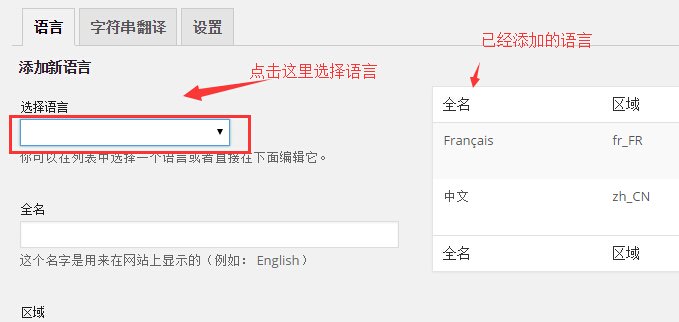
Step 1: Add a language
After the Polylang plug-in is installed, the setting options are in “Settings>Language” and add the language in the settings.
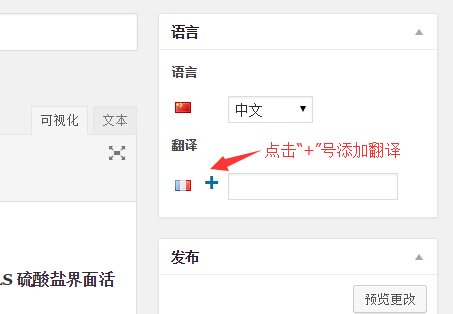
Step 2: Add translations to existing articles
In the article editing interface, click the “+” sign in the multi-language setting, then jump to a page where articles in the corresponding language are published, and start adding the corresponding version of the language.
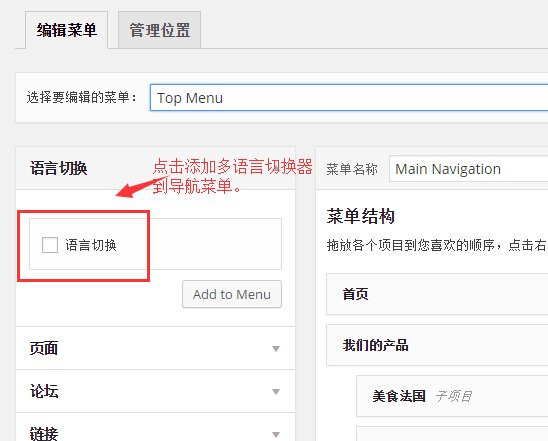
Step 3: Add the language switching tool to the main navigation menu
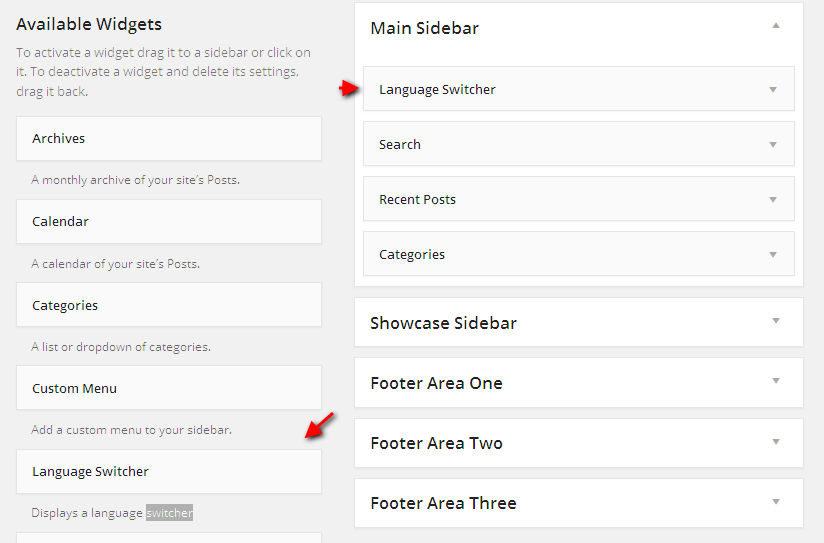
Polylang also provides us with a language switcher, which can be added through the main navigation menu or the sidebar.
If you want to add Polylang’s language switcher to a custom area, you can pass <?php pll_the_languages();?>. For specific usage, please refer to the version article:WordPress multi-language plug-in Polylang theme function reference
Second method, create a multilingual site through WordPress Muiltisite multisite network
Strictly speaking, this method does not actually create a multilingual WordPress website, but the effect is the same as using the Polylang plug-in to create a multilingual website. And multiple languages are independent of each other. Website content in multiple languages can be different, which is different from using the Polylang plug-in. When using a multi-site network to create a multi-language site, it is recommended to install it using a subdomain name.
Use the same theme, different databases
Sites in a multisite network can share the sameWordPress theme, which provides great convenience when we use multi-site networks to create multi-language sites. You only need to develop an international theme and use this theme in sub-sites in various languages. When displaying, the corresponding languages are displayed according to the languages of different sub-sites. The fixed strings in the theme only need to be translated into the corresponding language using poetry.
Display the language switching tool in multilingual sites created using a multisite network
In multilingual sites created using multisite networks, the language switcher needs to be implemented by ourselves. The idea is very simple, just determine the language of the current site, and then replace the second-level domain names in various languages through the PHP string replacement function. The example is as follows.
$lang = get_locale();

//返回 zh_CN 或 en_US 的语言代码
$link = "http://$_SERVER[HTTP_HOST]$_SERVER[REQUEST_URI]";

// 获取完整的当前 URL
$en_link = str_replace('http://cn', 'http://www', $link);
$cn_link = str_replace('http://www', 'http://cn', $link);
If we want to make management more convenient, we can useMultilingualPress multilingual site pluginTo manage the association between sub-sites in different languages, this plug-in associates the content between sub-sites in different languages through a lightweight interface, which is very convenient.
Summarize
Both methods have their own characteristics. As for which method is better, there is no absolute conclusion. Which method to use to develop a WordPress multilingual website depends on the content of the multilingual website. If each article has a corresponding multilingual version, it is undoubtedly more convenient to use the Polylang plug-in. If the content of each language is different, then using WordPress Muiltisite will be more appropriate.