
If your WordPress site has enabled user registration, congratulations! You open the door for malicious users to register. WordPress comments have an audit function. After a user posts a comment, it must pass the audit before it can be displayed on the website. If user registration can also have a function like comment review, it will be a powerful tool to fight spam and malicious user registration. The plug-in introduced below can help WordPress implement the function of reviewing user registration. First we need to install and activate the New User Approve plug-in. After installation, it can be run. The plug-in does not provide setting options for everyone to configure because there is nothing to configure.
How to use the user audit plug-in
After the installation is successful, log out as the current user, and then visit the WordPress registration page. There will be a prompt message on the registration box to remind the user that the registration request will be sent to the administrator for review, as shown below.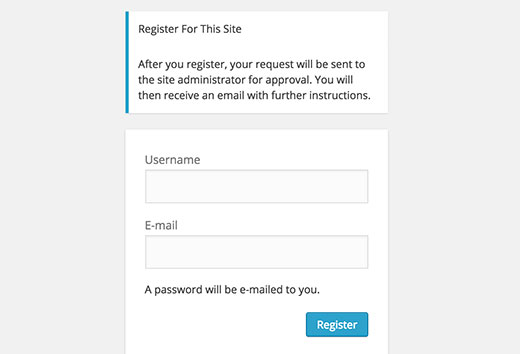 Once a new user is registered, the administrator’s email address of the WordPress site will receive a notification informing the administrator that a new user has been registered on the site. The administrator can then log in to the WordPress backend and approve or reject new user registrations on the user list page.
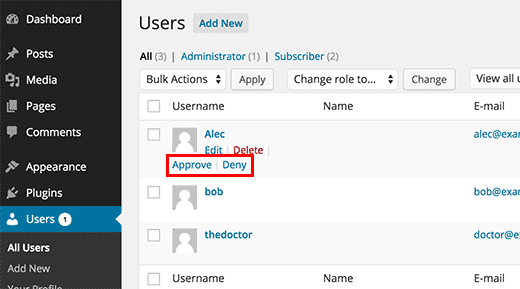 If you approve the user registration, the new user’s password will be sent to them via the registered email. If you reject the user registration, they will receive a registration rejection notification email. It should be noted that the rejected new user registration information will not be deleted from the database. These users are only restricted from logging in. At the same time, they cannot register again with the same user name or email address. If you delete the rejected users, they can apply again, and they still need to pass the review before they can log in to the website.