In order to protect the copyright of images, many websites will add watermarks to the images on their websites. WordPress can implement this function with a watermark plug-in. Today we are introducing a very simple and easy-to-use watermark plug-in.Image Watermark, this plug-in can automatically add watermarks to images when uploading them. For images previously uploaded using this plug-in, Image Watermark also thoughtfully provides the function of adding watermarks in batches.
Install and use the Image Watermark watermark plug-in
The installation of the plug-in is very simple. Just search for Image Watermark directly in the WordPress backend, then install and enable it. What is very convenient is that this plug-in has integrated Chinese, which is undoubtedly good news for friends who are not good at English.

As can be seen from the screenshot, Image Watermark provides setting options such as watermark switch, which sizes of thumbnails to add watermarks to, and which article types to add watermarks to.
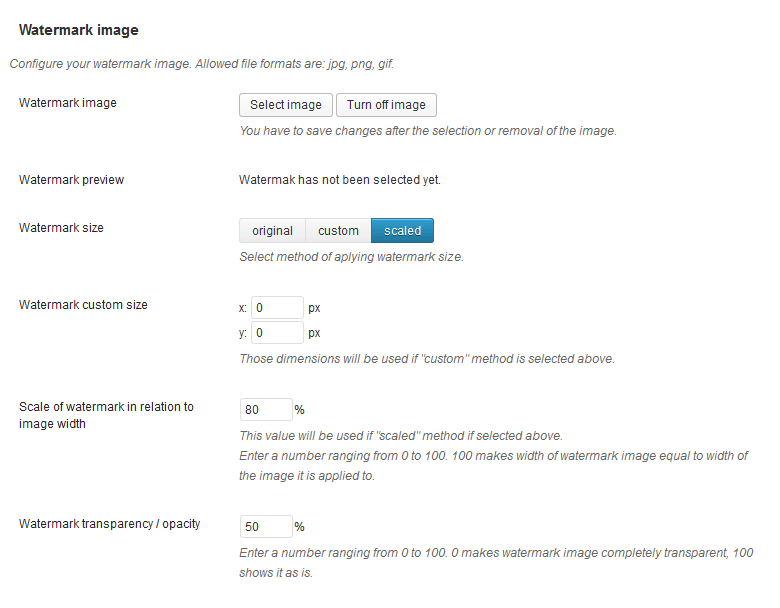
Then select a watermark image (usually a website logo in png format), set the image size and image position to generate image quality, and the transparency of the watermark. It can be said that all the options are available.
How to add watermarks in batches
We may also need to add watermarks to the images we uploaded before installing this plug-in. Image Watermark provides us with a method to add watermarks in batches. However, because there is no complete documentation, many friends may not be able to discover this feature. In fact, it is very simple. After enabling the plug-in, there will be an additional function of adding watermarks in the batch operation menu of media library media management. After selecting the pictures, directly click this menu to add watermarks to previously uploaded pictures in batches.