
Plug-in function
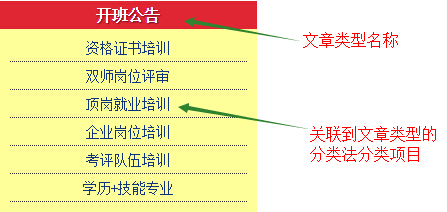
Display a list of subpages of a page or a list of custom category items belonging to a certain article type in the sidebar. It perfectly solves the problem of WordPress not having automatic submenus. The text may be difficult to understand, so I’ll use screenshots to illustrate.
Subpage menu

Taxonomy menu under article type
Installation method
- Download the plug-in, upload it to the wp-content/plugins directory via FTP, and then enable it on the background plug-in management page
- Search for Wizhi Submenus directly in the WordPress backend, install and enable it
How to use
Find the **Wizhi Submenus** widget on the widget page and drag it to the sidebar. This plug-in integrates the following functions:
- WordPress displays a list of links to subpages of the current page
- WordPress gets a list of all custom taxonomies contained in a post type
The plugin has been published to the official plugin directory
At present, the plug-in has been submitted to the official plug-in directory, and all subsequent updates to the plug-in will be submitted to the official plug-in directory.Wizhi Submenus sidebar submenu plug-in official plug-in page