WordPress has a very useful feature – shortcodes, which are often translated into shortcodes and snippets of code. The function of shortcode is to insert a content block into the article through a simple piece of code, which is very suitable for inserting complex format data into the article. It plays a very good supporting role in the management of WordPress article content. In WordPress, the default photo albums and videos are implemented through shortcodes.
If your theme is based on Bootstrap, and you often need to insert some Bootstrap component styles into the website, the plugin Bootstrap Shortcodes shortcode plugin introduced to you today can help us easily insert these elements, such as the warning below.
Bootstrap components supported by WordPress Bootstrap shortcode plugin
Bootstrap Shortcodes provides us with a very rich set of shortcodes for Bootstrap components. They are:
- grid grid system
- tabs tabs
- collapse collapse
- c-alerts warning box
- wells embed effect
- buttons button
- labels labels
- icons icons
- lead introduction
- tooltip tooltip
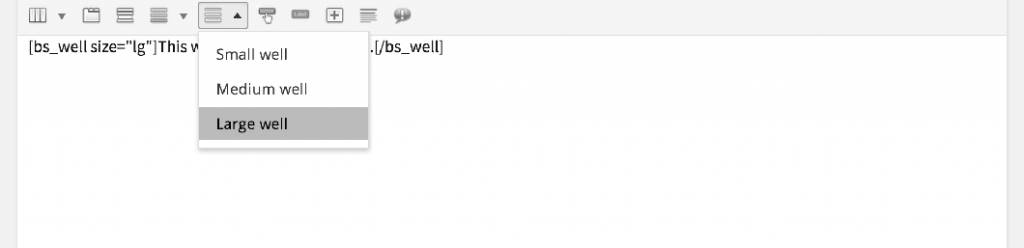
After the plug-in is enabled, the visual editor will have an additional row of icons. Click on any icon in this row and the input options for the shortcode element will pop up. Enter the content we need to display and click insert.
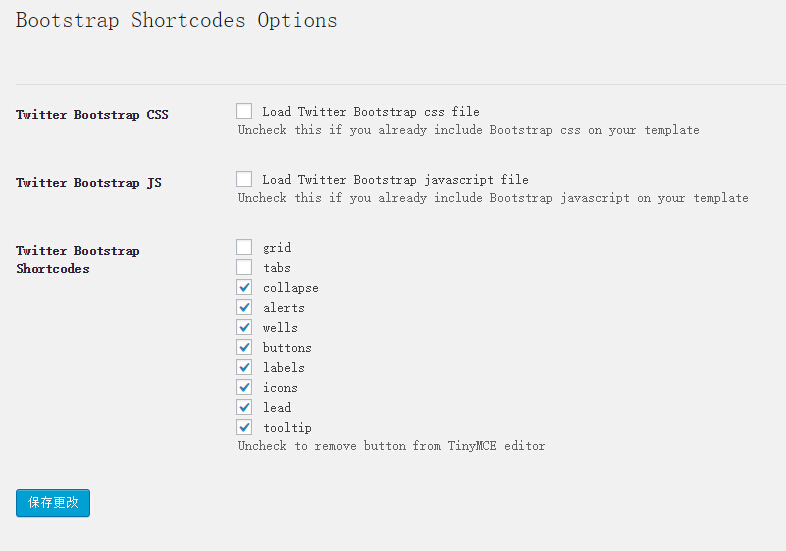
WordPress Bootstrap shortcode plugin options settings
The Bootstrap Shortcodes plugin provides us with several necessary settings.
- Load the Bootstrap css file. If the theme used is based on Bootstrap, there is no need to load the Bootstrap CSS file.
- Load the Bootstrap js file. If the theme used is based on Bootstrap, there is no need to load Bootstrap Js.
- Enabled Bootstrap shortcode elements, we can choose to enable or disable certain Bootstrap elements