
Friends who play WordPress like to keep playing with themes and plug-ins. Over time, the WordPress database will be filled with useless, isolated (not related to articles) and duplicate data. After some plug-ins are deleted, the data generated by the plug-in will be deleted from the database together, but not all plug-ins will do this.

There is a plug-in called WP-Sweep that can help us clean up junk data in the database. WP-Sweep uses the delete function of WordPress to clean up the data. The advantage of this method is that when cleaning a piece of data, the data associated with this data will also be deleted. Compared with WP-Optimize, which directly uses MySQL statements to delete junk data, this method can undoubtedly clean up the WordPress database more comprehensively.Improve WordPress website opening speed。
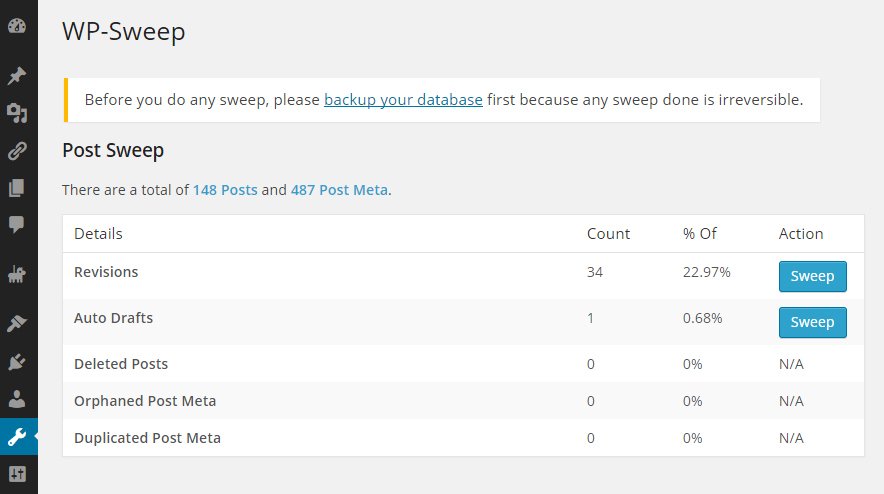
What data can WP-Sweep clean?
WP-Sweep uses WordPress delete functionality, e.g.wp_delete_post_revision(), delete_post_meta(), wp_delete_comment()Wait, you can clean the following data:
- Article version
- automatic draft
- Deleted comments
- Unapproved comments
- Flagged spam comments
- Deleted comments
- independent article field
- Separate comment field
- separate user fields
- Independent classification project relationship
- Unused category items
- Duplicate article fields
- Duplicate comment field
- Duplicate user fields
- Temporary option data
After installation, the WP-Sweep link is under the “Tools” menu. Click the WP-Sweep link to see all the options that can be cleaned. After testing, after using the WP-Optimize plug-in to clean the database, the database size of this site was reduced by 23.5%.
The WP-Sweep plug-in will also add the function of regularly cleaning the database in the future, and support more and more comprehensive garbage data.
Think tank reminds: At any time, batch operations on the database are a relatively dangerous action. Before cleaning, the database must be backed up first.