
Introduced in previous articles on this siteWordPress filters query content based on multiple criteriamethod, many friends found this article and asked me about the specific usage method. In fact, the article has already introduced it relatively clearly. Friends with a little basic knowledge should be able to integrate it into the theme.However, laziness is the basic quality of a qualified programmer. Implementing functions that have already been implemented again is a waste of human intelligence and everyone’s time.. In order to make it easier for everyone to use, I spent a day making the above function into a plug-in. The plug-in is named: Wizhi Multi Filters. Without further ado, let’s introduce how to use the plug-in.
Screenshot of the effect achieved by the Wizhi Multi Filters plug-in
As shown in the picture below, the subjects, majors, and qualifications in the picture are all custom taxonomies defined in the background. The subsequent filtering items are all classification items in the custom taxonomy and can be freely edited in the background. When you click a link for a filter, the content is immediately filtered.

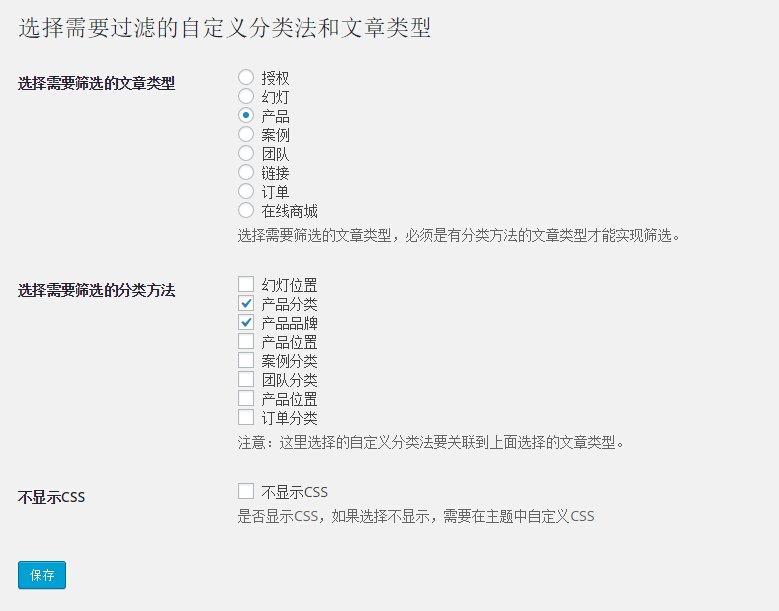
Wizhi Multi Filters plug-in settings
For everyone’s convenience, the plug-in provides some basic settings, as shown below:
- Select the type of articles you want to filter:Select one of the custom article types as the article type to be filtered.
- Select the classification method to be filtered:Select one or several custom classification methods as filter conditions. It should be noted that the classification method used as filter conditions must be a custom taxonomy registered in the article type selected above.
- Do not display CSS:In order to enable the filter to be displayed normally, the plug-in defines some basic CSS styles. If you select this option, the plug-in will not output the default CSS styles, and you need to add them yourself in the theme.
Show Wizhi Multi Filters filters in topics
By default, the plugin does not output anything other than basic CSS.You need to add the following pieces of code to the theme to display multi-condition filtering. The place to add the code can be a custom page template or a custom taxonomy archive page.
<?php //输出多条件筛选过滤列表 ?>
<?php
   $filters = new Wizhi_Filter('prod', array('procat','area'), true); //输出多条件筛选
   $wp_query = $filters->wizhi_get_filter_object(); //筛选后的WP_Query实例
?>

<?php //插件升级到1.5版本之后,终于支持了筛选多个文章类型,使用方法也简单了,直接在主循环之前,添加这一个函数就可以了。 ?>
<?php if ( function_exists ("wizhi_multi_filters")) { wizhi_multi_filters(); } ?>

<?php //输入多条件筛选过滤列表,就是一个标准的WordPress查询,输出的模板可以自由定制 ?>
<?php if (have_posts()) { ?>
    <?php while (have_posts()) : the_post(); ?>
        <?php get_template_part( 'content', 'lists' ); ?>
    <?php endwhile; ?>
<?php } ?>
Plug-in follow-up update plan
This is the first version of the Wizhi Multi Filters plug-in, and there are still some imperfections. I will keep the plug-in updated based on the usage of the plug-in and everyone’s suggestions. Some functions that may be added currently:
Add shortcodes and default templates to make them more convenient to use: 2015/08/20 The latest version of the plug-in can directly use the theme’s template. This function is no longer necessary, and the addition will be abandoned.Added option to display filtered items in the background: 2015/06/08 Completed- Static filter URLs to increase SEO friendliness.
In the plug-in settings, the taxonomy associated with the article type is displayed according to the selected article type, making the plug-in settings have a better user experience.: 2015/06/20 CompletedAdded article sorting function, sorting conditions can be customized: 2015/08/027 It is planned to be independent and put into a special article sorting plug-in.Added search function to search for articles in filtered custom categories: 2015/07/02 CompletedAdd default article type and taxonomy, and the name of the custom taxonomy can be modified in the background: 2015/07/06 CompletedAdd support for multiple article types and automatically display taxonomies as judgment criteria based on article types:2015/07/19, completed
If you have any comments or suggestions about the Wizhi Multi Filters plugin, please leave them in the comments or contact me directly for feedback.
Get the Wizhi Multi Filters plugin
Things to note before using plug-ins
This plug-in can only filter archive pages of custom article types, and may not work properly on the homepage or custom pages.
Customized development of multi-condition filtering themes
Due to the limitations of this plug-in principle, many functions cannot be implemented (such as URL staticization, filtering default articles, etc.), so based on the principle of this plug-in, a theme based on multi-condition filtering was made.Implemented URL staticization, added multiple article types in the background, automatically generated keywords based on filtering conditions and other advanced functions, currently, this function will only be added in customized themes. If necessary, you can contact me for consultation.