Many friends find that when they build a website with WordPress on a standalone server or VPS, their mailbox does not receive emails sent by the website, whether it is a registration notification email, a comment notification email, or a password retrieval email. They receive nothing at all.
The main reason for not receiving emails is that the mail sending server is not correctly set up on the server where WordPress is located. Without a mail server, emails cannot be sent. The solution is simple: set up an SMTP service for the server or WordPress.
What is SMTP and Its Role?
SMTP stands for Simple Mail Transfer Protocol. It is the de facto standard for transmitting emails on the Internet. Put simply, SMTP is used for sending emails. A server that supports sending emails using the SMTP protocol is called an SMTP server.
Most email services support the SMTP protocol, such as QQ Mail, 163 Mail, Gmail, etc. When using these SMTP servers, most require us to provide a username and password for authentication. Some email services allow using the password for logging into the Web terminal as the SMTP password (like 163 Mail), while others require setting a dedicated SMTP password (like QQ Mail).
Configuring SMTP Server Using Plugins
The method for configuring SMTP is simple: install an SMTP plugin and set the sender email address, SMTP server, and SMTP password. A commonly used SMTP plugin is WP Mail SMTP by WPForms. It is easy to use and has been stable for a long time. We recommend it to friends in need.
How to Set Up WP Mail SMTP
Actually, we can think of WP Mail SMTP as an email client, like Foxmail, but it runs on the server. Based on this, you can refer to the method of setting up an email client to set up the WordPress SMTP server. Since we don’t need to receive emails in WordPress, just set up the SMTP server; the POP3 server for receiving emails doesn’t need to be set up.
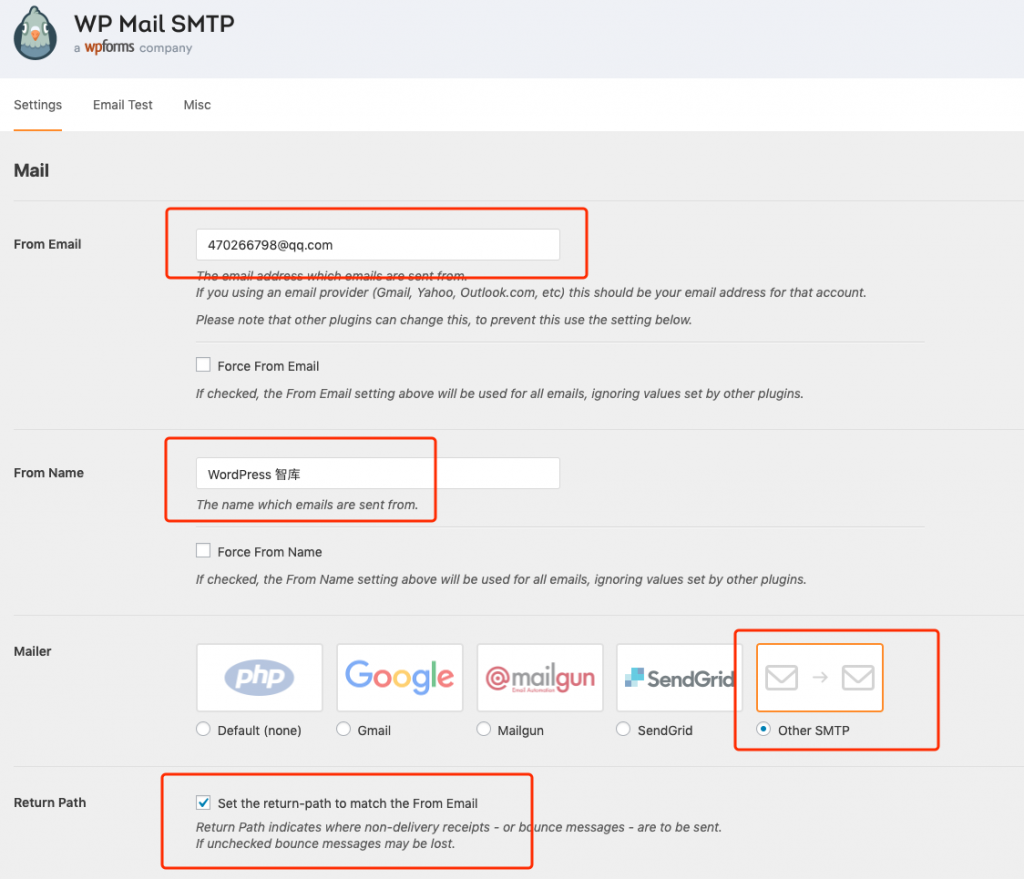
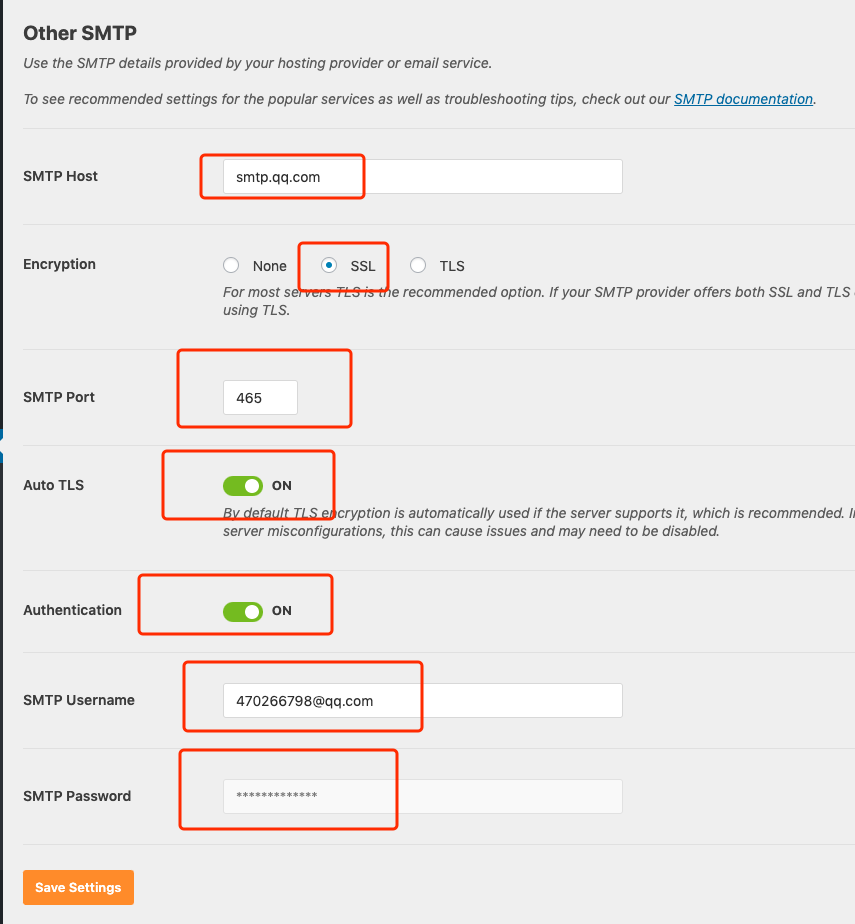
For your reference, here is a screenshot of the WP Mail SMTP settings for this site. Friends who need to set up an SMTP server can refer to the following screenshots.
Configuring SMTP Service on a Linux Server
If your server hosts 100 customer WordPress sites, setting them up one by one is too troublesome. Is there a simpler way to handle SMTP services so that all 100 WordPress sites can send emails via SMTP?
Of course, there is. Please refer to a previous article on this site: Using Mailx to send emails via SMTP on CentOS. The principle is to set up a unified SMTP server for the Linux server. When WordPress needs to send emails, it can directly call the SMTP server set by the system.
With this method, we no longer need to install the WP Mail SMTP plugin for 100 WordPress sites one by one. The time saved can be spent drinking tea and chatting. What? No girls? We are good at WordPress development, but dealing with girls is not our specialty. Maybe you should call Mr. Meng?
In short, if you want your WordPress website to send emails to you, you must have the SMTP server set up correctly. Whether it’s through an SMTP plugin or through server settings, as long as the WordPress site can send emails via SMTP, it will definitely send them when it’s time.