When publishing posts through the WordPress REST API, the first step is usually authenticating the user. After that, publishing a normal post is straightforward. But things become more complicated if the form includes fields that do not belong to the default WordPress post schema. The REST API post endpoint only accepts the standard fields stored in wp_posts. If we want to submit additional custom fields and save them on the current post, we need to do a little extra work.
The form below is a good example. In it, “Title of your story” and “Submission” are the post title and post content, while the rest of the fields are custom fields.
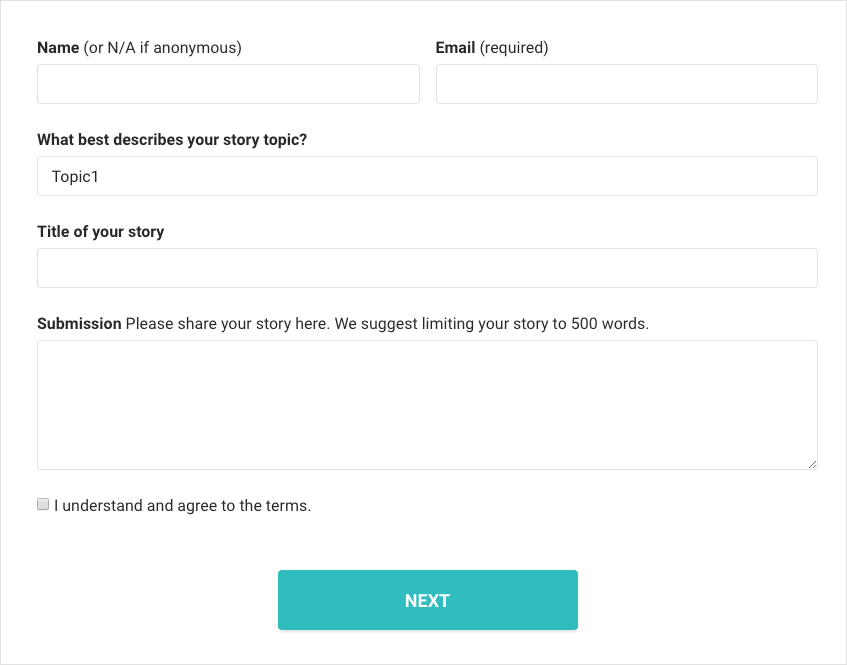
The data format submitted from the front end
In this project the form was built with React, but the same general idea applies if you are using jQuery, PHP, Python, or any other language. First we gather the data we want to send to the API. In the following example, values contains the final payload. The title and content fields are normal post data, while metadata is an array of extra key-value pairs we want to save as custom fields. submitPost is a helper method that sends the payload to the REST API.
// Data needed for publishing the post
values.title = rawValues.title;
values.content = rawValues.content;
values.metadata = [
  {'key' : 'name', 'value': rawValues.name},
  {'key' : 'email', 'value': rawValues.email},
  {'key' : 'topic', 'value': rawValues.topic},
  {'key' : 'photo', 'value': rawValues.photo},
  {'key' : 'agree', 'value': rawValues.agree}
];

const submission = this.props.submitPost(values, 'contribute');
When the request is sent, the metadata array travels along with the normal post fields and reaches the WordPress REST API as part of the same payload.
How to handle the extra data on the back end
After the front end sends the request, the default REST API post endpoint still does not know what to do with the extra metadata field. WordPress gives us hooks that let us register and handle those extra fields ourselves. The following example shows one way to save custom field data that arrives through the REST API.
add_action( 'rest_api_init', function() {

	// 'post' can also be replaced with another custom post type.
	// 'metadata' is the array submitted by the front end.
	register_rest_field( 'post', 'metadata', array(

        // Called when outputting data. We can attach post meta to the API response here.
		'get_callback' => function( $object ) {
			return get_post_meta($object->ID);
		},

        // Called when saving data. Here we receive the submitted metadata
        // and save it item by item as post meta.
		'update_callback' => function( $meta, $post ) {
			$postId = $post->ID;

			foreach ($meta as $data) {
				update_post_meta($postId, $data['key'], $data['value']);
			}

			return true;
		},

	));

});
With that in place, we can both retrieve and save post meta through the WordPress REST API. That is where WordPress starts to feel much more flexible.
One thing to remember is that the code above does not create any custom-field UI inside the WordPress post editor. If you need editing fields in the dashboard too, you still need to create them separately, for example through the Metabox API or a related plugin.