When using WordPress Rest API to publish articles, first we need to useUser authentication via WordPress Rest API, then we can publish articles through Rest API. If we publish default articles, it is very simple. I believe friends with some experience in Rest API development can handle it. If we need to submit other fields besides WordPress articles, things will become complicated, because in WordPress Rest API, the article interface accepts limited data, only the default fields in the wp_posts data table. If we need to submit custom fields and attach them to the currently submitted article, we will have to do more work.
Let’s look at the form below, where “Title of your story” and “Submission” are the title and body content of the article respectively, and the other fields are all custom fields.
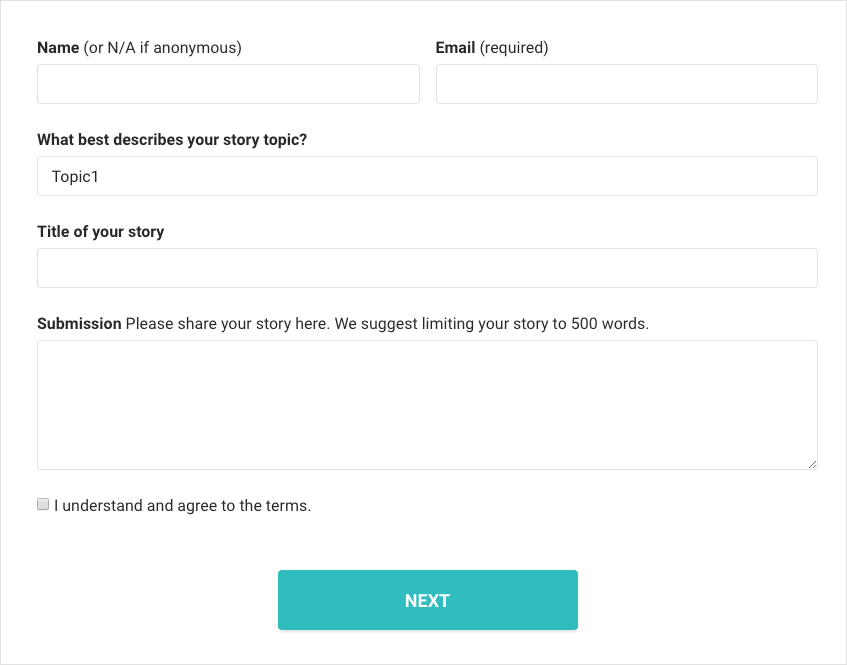
Data format submitted by the front end
We used the above form developed with React. If developed using jQuery, PHP, Python or other languages, the process is similar. First, we need to get the data that needs to be sent to the Rest API interface. The “values” in the code below are the data we are going to want. The ‘title’ and ‘content’ are the default article data, and the ‘metadata’ is an array of custom field objects we added. “submitPost” is an encapsulated method for submitting data to the Rest API.
// 发布文章需要的数据
values.title = rawValues.title;
values.content = rawValues.content;
values.metadata = [
  {'key' : 'name', 'value': rawValues.name},
  {'key' : 'email', 'value': rawValues.email},
  {'key' : 'topic', 'value': rawValues.topic},
  {'key' : 'photo', 'value': rawValues.photo},
  {'key' : 'agree', 'value': rawValues.agree}
];

const submission = this.props.submitPost(values, 'contribute');
When sending data, the “metadata” in the form will be appended to the data we submit and submitted to the WordPress Rest API interface together with the default Post data.
Backend processing methods
After the front-end submitted the data, the back-end of the default Rest API article interface did not process the additional “metadata” data. WordPress provides us with hooks that allow us to process this additional data ourselves. Let’s look at the following code to see how to save additional data submitted through the Rest API to the custom fields of the article.
add_action( 'rest_api_init', function() {

	// 下面一行的 ‘post’ 文章类型,也可以是其他自定义文章类型;‘metadata’ 就是我们前端提交过来的 metadata 数组
	register_rest_field( 'post', 'metadata', array(

        // 显示数据时候的回调,我们可以在这个函数里面,把自定义字段数据附加到 Rest API 文章接口返回的 Json 数据里
		'get_callback' => function( $object ) {
			return get_post_meta($object->ID);
		},

        // 保存数据的回调,我们就是在这里获取前端提交过来的附加数据,然后逐个保存到自定义字段中的
		'update_callback' => function( $meta, $post ) {
			$postId = $post->ID;

			foreach ($meta as $data) {
				update_post_meta($postId, $data['key'], $data['value']);
			}

			return true;
		},

	));

});
With the above code, we can passWordPress Rest APIGet and save custom fields of post types. With this feature, the flexibility of WordPress can be unleashed. It should be reminded that the above code will not create a custom field UI form in the WordPress article editing interface. If necessary, we can create it separately through the Metabox API or some plug-ins.