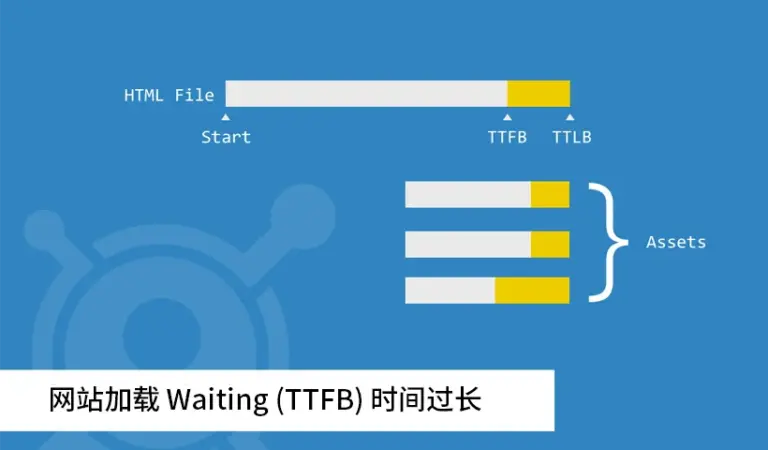
Many WordPress users feel that WordPress performs poorly because pages in both the dashboard and the front end sometimes take a long time to open. If you inspect the request waterfall in Chrome DevTools, you will often see a long Waiting (TTFB) phase, and in some cases it even exceeds one second.
Before a website can fully load, the request usually goes through the following chain:
- The user enters the domain name, and DNS resolves that domain to the server IP address.
- The browser requests the page, and Nginx receives the request and forwards it to PHP.
- PHP executes the page logic, reads data from MySQL, assembles the HTML page, and returns it to Nginx.
- Nginx returns the generated HTML to the browser.
- The browser parses the HTML, fetches the CSS, JavaScript, images, and other assets, and then renders the final page.
If any one of those stages becomes slow, the whole site feels slow. If several stages have problems at the same time, the delay becomes even more obvious.
That is why page-speed optimization needs diagnosis before action. If you do not identify the real bottleneck, an optimization attempt may do nothing or may even make performance worse.
1. Network latency or server bandwidth limitations
When people say a site is slow because of network problems, they often think about the visitor’s own connection. For WordPress sites, however, the more common issue is the network path and bandwidth available to the server.
For example, if the server is in the United States while most visitors are in China, the data has to cross a long international route in both directions before the page can complete.
Another example is a server with extremely limited bandwidth. If the server only has a 1 Mbps connection, even downloading a single 1 MB image can take several seconds, and a media-heavy page quickly starts to feel painfully slow.

Network-related problems mainly affect steps 1, 2, and 4 in the request chain above. Typical ways to improve this include the following:
- Move the site to a server that is geographically closer to the main audience.
- Use a CDN so that static assets can be served from locations nearer to visitors without changing the main hosting environment.
- If neither of those options is practical, reduce the number of front-end requests by trimming CSS, JavaScript, image weight, and other assets.
2. Server configuration and available resources
A site can also be slow simply because the server is underpowered. That often happens on low-spec VPS plans or crowded shared hosting accounts where WordPress does not get enough CPU time, memory, or database throughput.
Imagine that the homepage needs a list of recent posts from several categories, along with titles, excerpts, images, view counts, and publish dates, and all of that needs to be assembled in under 100 milliseconds.
If MySQL takes three seconds to return those records, PHP cannot do much except wait. From the user’s perspective, the entire page is slow, even though the real bottleneck sits deeper in the stack.
This is exactly why server resources matter so much. If the server cannot supply the CPU, RAM, and disk performance required to fetch data quickly, generating the page in a short time simply is not realistic.

Server-side bottlenecks mainly affect steps 2, 3, and 4 in the request chain. Common solutions include:
- Upgrade the server if the current plan is too weak.
- Use WordPress caching so repeated requests do not always rebuild the same data from scratch.
3. Theme or plugin problems
Some feature-heavy themes load a lot of code even when the site itself is simple. In extreme cases, poorly designed themes or plugins can even create endless loops or other failures that exhaust server resources.
Another common problem is expensive database work. If a theme or plugin does not cache heavy queries appropriately, WordPress has to repeat the same database operations again and again.
Front-end assets can also become a problem. One plugin may only add one or two CSS or JavaScript files, but after enough plugins are installed, the page may end up loading dozens of separate files before it can render.
These theme and plugin issues mainly affect steps 3 and 5 in the request chain.
- Switch to a cleaner, better-designed theme. If possible, use a focused custom theme instead of a bloated all-purpose one.
- Review the existing theme code and disable features that the site does not actually need.
- Increase server resources if the codebase is acceptable but the current environment is still too weak to run it efficiently.
4. Google Fonts and Gravatar requests
If a page loads Google Fonts in a region where Google’s font CDN is slow or unreachable, the browser may keep waiting even after the rest of the page is technically ready.
For many Chinese-language websites, removing those font requests changes almost nothing visually, yet it can improve perceived speed quite a lot.
If the fonts really are necessary, a better option is to self-host them or replace them with a domestic mirror so the site keeps the same appearance without depending on a slow remote request.
The same general idea applies to Gravatar requests. These assets mainly affect step 5 in the rendering process, and they can be handled in straightforward ways:
- Disable Google Fonts or Gravatar where the site does not really need them.
- Use a local mirror or another faster replacement, such as a Google Font Fix style solution.
Related optimization reading
This site has also published several other WordPress performance articles worth reading after you identify the main bottleneck.
How to speed up a WordPress site correctly, using the Avada theme as an example
Use ngx_pagespeed to optimize front-end pages and improve WordPress loading speed
Use the Cachify plugin to cache WordPress pages in Memcache so pages open almost instantly