Whether you understand post types and custom taxonomies is a simple way to judge whether a developer has truly started with WordPress development. Being able to add custom post types and taxonomies and performing theme or plugin development based on this is a necessary path for advancing to a senior WordPress developer. This explanation is the ultimate tutorial for using the register_post_type() function to register WordPress custom post types. After reading this tutorial, you won’t need to look at others.
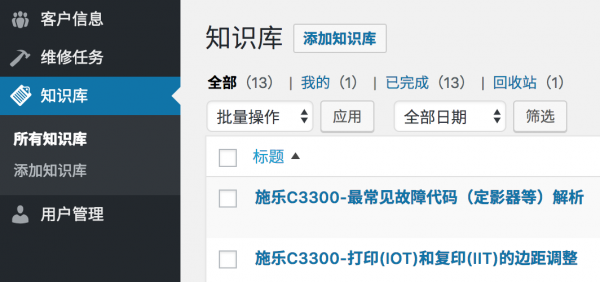
Below is a post type we registered in a WordPress CRM system; everyone feel free to get a sense of it.
What exactly is a custom post type?
Yes, this question is very important. Understanding what a custom post type is allows us to clearly see custom post types. In fact, a custom post type is not a “thing”; it’s a class named “WP_Post_Type.” When we use a custom post type, we need to “new” an object of this class. Once we have the object, subsequent operations revolve around this object. Generally, we don’t directly use the new WP_Post_Type method to create objects, but instead use the register_post_type() function.
First, let’s take a look at the parameters supported by the register_post_type() function
Below are the parameters for the register_post_type() function. By adjusting these parameters according to needs, we can register a post type that fits our requirements.
<?php

# Register custom post type on the 'init' hook.
add_action('init', 'my_register_post_types');

/**
 * Register post types needed for the plugin
 *
 * @since  1.0.0
 * @access public
 * @return void
 */
function my_register_post_types()
{

    // Set post type parameters
    $args = [

        // Brief description of the post type, doesn't seem to be used in the WordPress core, but we can use it in themes or plugins
        'description'         => __('This is a description for my post type.', 'wprs'),
        // String

        // Whether the post type is public for administrators or frontend users; this parameter's value is the default for many subsequent parameters
        'public'              => true,
        // bool (default is FALSE)

        // Whether this post type can be queried as part of parse_request() on the frontend
        'publicly_queryable'  => true,
        // bool (defaults to the value of the 'public' parameter).

        // Whether to hide this post type in frontend searches
        'exclude_from_search' => false,
        // bool (defaults to the inverse of 'public')

        // Whether it can be selected in navigation menus
        'show_in_nav_menus'   => false,
        // bool (defaults to the value of the 'public' parameter)

        // Whether to generate a default management interface in the admin backend; using subsequent parameters, we can control the generated UI components. If we want to build our own management interface, set this parameter to False.
        'show_ui'             => true,
        // bool (defaults to the value of 'public')

        // Whether to show in the management menu; the 'show_ui' parameter must be set to True for this to take effect. We can also set this parameter to a top-level menu (e.g., 'tools.php'); in this case, this post type's management menu will appear under the Tools menu.
        'show_in_menu'        => true,
        // bool (defaults to the value of 'show_ui')

        // Whether to show this post type in the admin bar; if set to true, WordPress will add a link to create a new post of this type in the admin bar.
        'show_in_admin_bar'   => true,
        // bool (defaults to the value of 'show_in_menu')

        // The position where this post type appears in the management menu; 'show_in_menu' must be set to true for this parameter to be useful.
        'menu_position'       => null,
        // int (defaults to 25 - appears after the "Comments" menu)

        // The URI of the management menu icon, or the class name of a Dashicon. See: https://developer.wordpress.org/resource/dashicons/
        'menu_icon'           => null,
        // string (defaults to using the post icon)

        // Whether posts belonging to this post type can be exported via the WordPress import/export plugin or a type's export plugin.
        'can_export'          => true,
        // bool (defaults to TRUE)

        // Whether to expose in the Rest API
        'show_in_rest' => true,
        // boolean, defaults to false

        // The base URI alias for accessing via the Rest API
        'rest_base' => 'example',
        // string, defaults to page type slug

        // Use a custom Rest API controller instead of the default WP_REST_Posts_Controller; custom controllers must inherit from WP_REST_Controller
        'rest_controller_class' => 'WP_REST_Posts_Controller',
        // string, defaults to WP_REST_Posts_Controller

        // Whether to delete their written posts when a user is deleted
        'delete_with_user'    => false,
        // bool (if the post type supports the ‘author’ feature, this parameter defaults to TRUE)

        // Whether this post type supports hierarchical posts (parent posts/child posts/etc.)
        'hierarchical'        => false,
        // bool (defaults to FALSE)

        // Whether to enable an archive page (index/archive/root page) for this post type. If set to TRUE, the post type name will be used as the archive page slug; of course, we can also set a custom archive slug.
        'has_archive'         => 'example',
        // bool|string (defaults to FALSE)

        // Set the query_var key for this post type. If set to TRUE, the post type name will be used; if needed, a custom string can also be set.
        'query_var'           => 'example',
        // bool|string (defaults to TRUE - post type name)

        // Strings used for building editing, deleting, and reading permissions for this post type; can be set as a string or an array. If the plural form of a word is not just adding "s," we need to set an array, e.g., array( 'box', 'boxes' ).
        'capability_type'     => 'example',
        // string|array (defaults to 'post')

        // Whether to let WordPress map permission meta data (edit_post, read_post, delete_post). If set to FALSE, we need to set post type permissions ourselves through the “map_meta_cap” hook.
        'map_meta_cap'        => true,
        // bool (defaults to FALSE)

        // Set more precise post type permissions. WordPress defaults to using the 'capability_type' parameter to build permissions. In most cases, we don't need full permissions like posts or pages; below are a few permissions I often use: 'manage_examples', 'edit_examples', 'create_examples'. Each post type is unique; we can adjust these permissions according to needs.
        'capabilities'        => [

            // meta caps (don't assign these to roles)
            'edit_post'              => 'edit_example',
            'read_post'              => 'read_example',
            'delete_post'            => 'delete_example',

            // primitive/meta caps
            'create_posts'           => 'create_examples',

            // primitive caps used outside of map_meta_cap()
            'edit_posts'             => 'edit_examples',
            'edit_others_posts'      => 'manage_examples',
            'publish_posts'          => 'manage_examples',
            'read_private_posts'     => 'read',

            // primitive caps used inside of map_meta_cap()
            'read'                   => 'read',
            'delete_posts'           => 'manage_examples',
            'delete_private_posts'   => 'manage_examples',
            'delete_published_posts' => 'manage_examples',
            'delete_others_posts'    => 'manage_examples',
            'edit_private_posts'     => 'edit_examples',
            'edit_published_posts'   => 'edit_examples',
        ],

        // Define the URL structure for this post type. We can set a specific parameter or a boolean value. If set to false, this post type will not support URL Rewrite functionality.
        'rewrite'             => [

            // Slug for the post type
            'slug'       => 'example', // string (defaults to post type name)

            // Whether to show the $wp_rewrite->front post type slug in the permalink
            'with_front' => false, // bool (defaults to TRUE)

            // Whether to allow pagination in the post type through the <!--nextpage--> quick tag
            'pages'      => true, // bool (defaults to TRUE)

            // Whether to create beautiful permalink feeds for the subscription source
            'feeds'      => true, // bool (defaults to the value of 'has_archive')

            // Set the endpoint mask for the permalink setting
            'ep_mask'    => EP_PERMALINK, // const (defaults to EP_PERMALINK)
        ],

        // WordPress features supported by the post type, many of which are very useful on the post editing page. These help other themes and plugins decide to let users use what features or provide what data. We can set an array for this parameter or set it to false to prevent adding any features. After creating the post type, we can use add_post_type_support() to add features or use remove_post_type_support() to remove features. Default features are "title" and "editor."
        'supports'            => [
            'title',// Post title ($post->post_title).
            'editor', // Post content ($post->post_content).
            'excerpt', // Post excerpt ($post->post_excerpt).
            'author',  // Post author ($post->post_author).
            'thumbnail',// Featured image (the current site's used theme must support 'post-thumbnails').
            'comments', // Display the comments metadata box; if set, this post type will support comments.
            'trackbacks', // Display the metadata box for allowing sending link notifications on the editing page
            'custom-fields', // Display the custom fields metadata box
            'revisions', // Display the revisions metadata box; if set, WordPress will save post revisions in the database.
            'page-attributes',  // Display the "Page Attributes" metadata box, including parent page or page order fields.
            'post-formats',// Display the post format metadata box and allow this post type to use post formats
        ],
        // Labels used to display the post type's name in the management interface or frontend. Labels will not automatically rewrite fields in post updates, errors, etc.; we need to filter the 'post_updated_messages' hook to customize these messages.
        'labels'              => [
            'name'                  => __('Posts', 'wprs'),
            'singular_name'         => __('Post', 'wprs'),
            'menu_name'             => __('Posts', 'wprs'),
            'name_admin_bar'        => __('Posts', 'wprs'),
            'add_new'               => __('Add New', 'wprs'),
            'add_new_item'          => __('Add New Post', 'wprs'),
            'edit_item'             => __('Edit Post', 'wprs'),
            'new_item'              => __('New Post', 'wprs'),
            'view_item'             => __('View Post', 'wprs'),
            'search_items'          => __('Search Posts', 'wprs'),
            'not_found'             => __('No posts found', 'wprs'),
            'not_found_in_trash'    => __('No posts found in trash', 'wprs'),
            'all_items'             => __('All Posts', 'wprs'),
            'featured_image'        => __('Featured Image', 'wprs'),
            'set_featured_image'    => __('Set featured image', 'wprs'),
            'remove_featured_image' => __('Remove featured image', 'wprs'),
            'use_featured_image'    => __('Use as featred image', 'wprs'),
            'insert_into_item'      => __('Insert into post', 'wprs'),
            'uploaded_to_this_item' => __('Uploaded to this post', 'wprs'),
            'views'                 => __('Filter posts list', 'wprs'),
            'pagination'            => __('Posts list navigation', 'wprs'),
            'list'                  => __('Posts list', 'wprs'),

            // Labels only used in hierarchical post types
            'parent_item'           => __('Parent Post', 'wprs'),
            'parent_item_colon'     => __('Parent Post:', 'wprs'),
        ],
    ];

    // Register post type
    register_post_type(
        'example', // Post type name, maximum 20 characters, doesn't support uppercase or spaces
        $args // Post type parameters
    );

}
Creating Custom Post Types Using Visual Plugins
For friends accustomed to UI operations, you can use some visual plugins to create custom types, such as the popular Custom Post Type UI, or the Post Type Generator service provided by GenerateWP.
Modifying a Registered Post Type via the register_post_type_args Filter
The text above uses the register_post_type() function to register a brand new post type. What if we need a post type that has already been registered? WordPress provides a filter “register_post_type_args” for us. Using this filter, we can modify the parameters of an existing post type, thereby achieving the purpose of modifying a registered post type. For example, in the example below, we modified the parameters of the “order” post type to false to hide this post type in the interface.
add_filter('register_post_type_args', function ($args, $post_type)
{
    if ($post_type == 'order') {
        $args[ 'public' ] = false;
    }

    return $args;
});
Using Helper Functions to Modify Registered Custom Post Types
Besides using the filter method above to modify existing post types, WordPress also provides several functions for us to achieve common post type modification needs.
add_post_type_support( 'post_type_name', array( 'title', 'editor' ) ); // Add post type support
register_taxonomy_for_object_type( 'taxonomy_name', 'post_type_name' ); // Register custom taxonomy
unregister_taxonomy_for_object_type( 'taxonomy_name', 'post_type_name' ); // Remove custom taxonomy
Unregistering / Deleting a Registered Custom Post Type
Where there’s positive, there’s negative; where there’s registration, there’s deletion. We can use the function below to remove an existing post type.
unregister_post_type('post_type_name')Doing some things with custom post types
Having a custom post type and not using it is also a waste. We can also use custom post types to do some things with the help of the functions below. Due to space limits, these functions won’t provide parameter explanations; if needed, please search the documentation. If you can’t find documentation, flipping through the source code is also possible.
Determining the Nature of a Post Type
is_post_type_hierarchical( $post_type ) // Determine whether it's a hierarchical post type
post_type_exists( $post_type ) // Determine whether the post type exists
post_type_supports( $post_type, $feature ) // Determine whether the post type supports a certain feature
is_post_type_viewable( $post_type ) // Determine whether the post type can be viewed on the frontend
Retrieving the Post Type Object and Its Properties
get_post_type( $post = null ) // Determine the post type of a specified post
get_post_type_object( $post_type ) // Get the post type object
get_post_types( $args = array(), $output = 'names', $operator = 'and' ) // Get all post types
get_post_type_labels( $post_type_object ) // Get all post type labels
get_all_post_type_supports( $post_type ) // Get all features supported by the post type
get_post_types_by_support( $feature, $operator = 'and' ) // Get all post types that support a certain feature
set_post_type( $post_id = 0, $post_type = 'post' ) // Set the post type of a post
How did I know all of this?
Reviewing the tutorial above, I mainly copied some things from the three places below; interested friends can come and join the fun.
- Documentation: https://codex.wordpress.org/Function_Reference/register_post_type
- Source Code: /wp-includes/post.php
- Source Code: /wp-includes/class-wp-post-type.php