The Themosis Framework is an enterprise-oriented MVC framework for WordPress development. It brings in several Laravel components, especially Router, Container, Http, Event, View, Filesystem, and Database, so we can build WordPress applications in a much more object-oriented way. If a project needs a lot of custom functionality, such as ecommerce features, a member center, referral logic, or even a CRM-style application, this framework is worth evaluating.
A quick introduction to Themosis Framework features
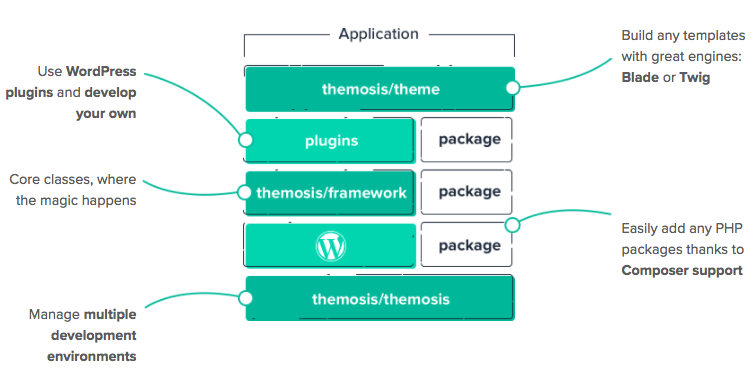
The official Themosis architecture diagram shows the basic idea clearly: the Themosis library sits at the core, then combines the WordPress core, the Themosis framework layer, WordPress plugins, and any third-party Composer packages into one application stack. On top of that stack, we can build WordPress themes that behave much more like full applications.
How the Themosis MVC framework works
Themosis can intercept normal WordPress routes or define custom routes and forward those requests to controllers. From there, models and views are used to build an application on top of a WordPress theme or plugin. If you do not intercept a route, WordPress still handles it with its default template resolution. If you do intercept it, the page is rendered using the template you specify. That balance between the default WordPress behavior and custom routing is one of the framework’s strengths.
The code below shows a quick example of custom routes in Themosis.
Route::get('users/{name}', function ($name) {
     // Get the user whose username is $name
     $user = Users::getByName($name);

    // Render the account/profile.blade.php template
    return view('account.profile', ['user' => $user]);
});

Route::get('home', function ($post, $query) {
    // Render the WordPress homepage with pages/home.blade.php
    return view('pages.home', [
        'posts' => $query->get_posts()
    ]);
});
A flexible choice of template systems
Themosis supports both Laravel’s Blade template engine and Twig. If you prefer, you can also skip template engines and write templates in plain PHP. The following example shows a Blade template snippet, and it works much like it would in Laravel itself.
@extends('layouts.main')

@section('content')
    <h1>账户</h1>
    <p>欢迎 {{ $name }}</p>
    @foreach($posts as $post)
        <h2>{{ $post->post_title }}</h2>
    @endforeach
@endsection
Object-oriented enhancements for WordPress features
Themosis includes helper classes that let us define custom post types, taxonomies, metaboxes, fields, admin pages, and settings in a much more object-oriented style. Compared with the low-level WordPress functions, that can feel clearer and more maintainable, though it does come with a learning curve. If you do not want to use those helpers, you can always fall back to native WordPress APIs.
// Register a post type
$books = PostType::make('books', 'Books', 'Book')->set();

// Add a custom metabox
Metabox::make('Details', $slug)->set([
    Field::text('isbn'),
    Field::collection('gallery')
]);

// Add a custom taxonomy
Taxonomy::make('authors', $slug, 'Authors', 'Author')->set();
Support for the huge Packagist ecosystem
Because Composer can be used to install PHP libraries, we can bring in almost any third-party package from Packagist to add features to the application. For example, the following command adds the Mailgun library.
$ composer require mailgun/mailgun-phpDatabase ORM support
Themosis includes Laravel’s Database component, but it does not ship with dedicated model support for the WordPress database itself. Since Composer support is built in, we can add that missing ORM layer through another package. A common option is Corcel, which provides Eloquent-style ORM support on top of WordPress data.
Getting started with Themosis Framework in WordPress development
The official Themosis website provides detailed documentation, and it is practical enough to follow the docs and start building with it step by step. Up to the time the source article was published, we had already used this framework in four WordPress theme projects, and it genuinely improved development efficiency for application-style work.