The Themosis Framework is an enterprise-level WordPress MVC development framework. The framework uses some components of Laravel (mainly Router, Container, Http, Event, View, File System, Database) to implement object-oriented WordPress application development, which can help us greatly improve the efficiency of WordPress application development. If we need to add more customized functions to WordPress, such as online purchasing, member center, and promotion rebates,CRM applicationWait, you can try some of this framework.
An introduction to Themosis Framework framework features
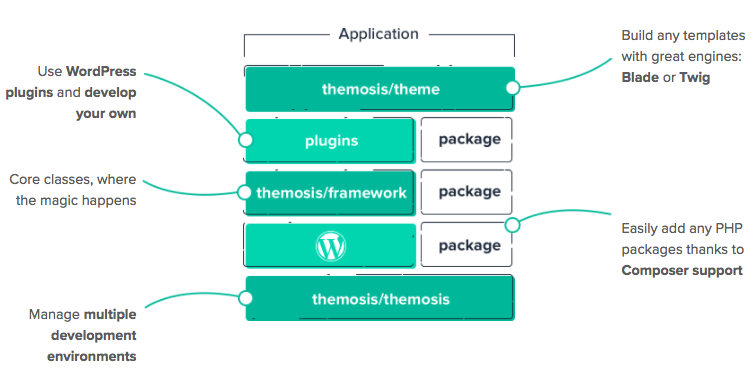
Let’s first take a look at the architecture diagram officially provided by the Themosis framework. As can be seen from the diagram, the Themosis library is the bottom layer of the entire framework. Then, based on the Themosis library, the WordPress core, Themosis Framework framework, WordPress plug-ins and third-party packages installed through Composer are organically combined together. Then, based on this combination,WordPress theme development. Together, these things are a WordPress application based on the Themosis framework.
Themosis MVC framework implementation principle
The Themosis framework intercepts WordPress default page routing or adds custom routing to forward user requests to controllers, and then combines models and views to build applications based on WordPress themes or plug-ins. It should be noted that if we do not intercept the WordPress default route through custom routing, the WordPress default route will still find the template and display it in its own default way. If it is intercepted, the WordPress page will display the page according to the template we specified. This feature takes into account WordPress default routing and templates, which is very convenient. We can quickly learn how to use custom routing in the Themosis framework through the following code.
Route::get('users/{name}', function ($name) {
     // 获取用户名为 $name 的用户,$name 变量是从 URL 中获取的
     $user = Users::getByName($name);

    // 使用 account/profile.blade.php 模版文件渲染页面
    return view('account.profile', ['user' => $user]);
});

Route::get('home', function ($post, $query) {
    // 使用 pages/home.blade.php 显示 WordPress 首页
    return view('pages.home', [
        'posts' => $query->get_posts()
    ]);
});
Freely selectable template system
The Themosis framework supports Laravel’s Blade template engine and Twig template engine. We can choose freely during development. If we don’t want to use a template engine, we can also directly use pure PHP to write templates. The following example is a code snippet for the Laravel Blade template engine, which can be used in the same way as in Laravel.
@extends('layouts.main')

@section('content')
    <h1>账户</h1>
    <p>欢迎 {{ $name }}</p>
    @foreach($posts as $post)
        <h2>{{ $post->post_title }}</h2>
    @endforeach
@endsection
Object-oriented WordPress feature enhancements
The Themosis framework allows us to use built-in WordPress function enhancement classes to quickly set up custom post types, custom taxonomies, metaboxes, custom fields, admin pages, settings, and more in an object-oriented way. Compared with WordPress’s built-in functions, it is much more convenient and clearer. Although it is easy to use, there is a certain learning cost. If you are not used to it, we can completely use WordPress to achieve the above customization.
// 添加文章类型
$books = PostType::make('books', 'Books', 'Book')->set();

// 添加自定义 Metabox
Metabox::make('Details', $slug)->set([
    Field::text('isbn'),
    Field::collection('gallery')
]);

// 添加自定义分类法
Taxonomy::make('authors', $slug, 'Authors', 'Author')->set();
Packagist supports massive third-party libraries
Because I canUse Composer to install PHP libraries, we can add any third-party PHP library in Pakagist to add functional support to our application. For example, add the Mailgun class to the framework through the following command.
$ composer require mailgun/mailgun-phpDatabase ORM support
Although the Themosis framework currently integrates Laravel’s Database component, it does not targetWordPress databaseAdd corresponding Model support. Because it is easy to use Composer to add third-party packages to the framework, we can useCorcelto add complete Eloquent ORM support to the framework.
Get started developing WordPress apps with Themosis Framework
Themosis official website provides us with detailedUse documentation, we can follow the official documentation step by step to start using the Themosis framework to develop WordPress applications. In fact, as of the publication of this article, we have developed 4 WordPress themes using this framework, which can indeed improve the efficiency of WordPress application development to a great extent.