WordPress stores the core data for each user in the wp_users table. Its role is similar to tables such as wp_posts and wp_comments: it holds the primary data that WordPress needs to access frequently.
But WordPress also stores related user information in a few other places, and understanding those relationships makes database work much easier.
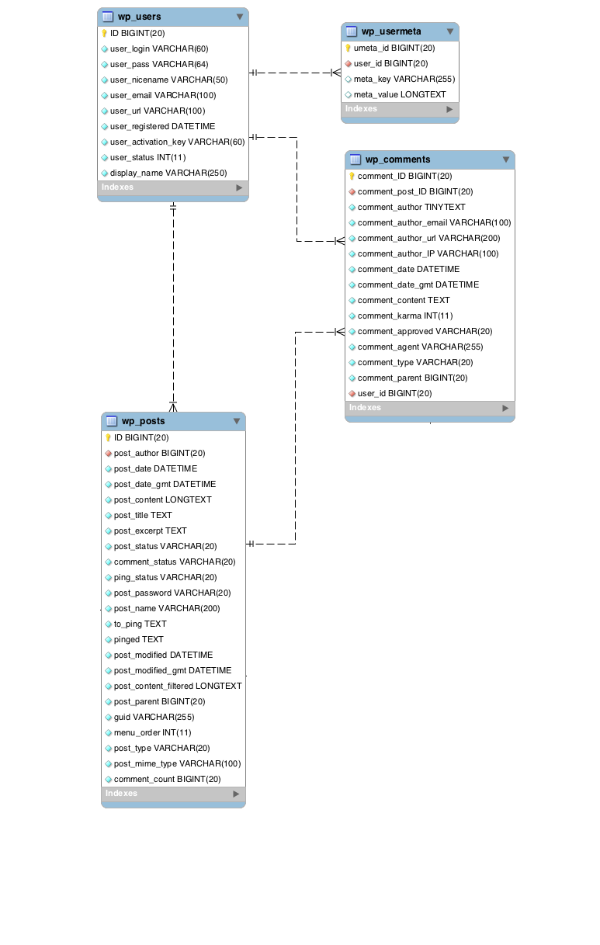
In addition to wp_users, two other tables may contain user-related data:
- Extra user attributes are stored in
wp_usermeta. - If anonymous visitors leave comments, some of their submitted identity data is stored in
wp_comments.
From there, the next step is understanding how to access and work with each layer of that data.
The wp_users table
The wp_users table stores the core data for each user. As the original article notes, most of its fields are either required, generated automatically, or needed frequently.
The only field that is not always required in the same way is user_url.
The user meta table
As with other WordPress data, information that is not accessed constantly is placed in wp_usermeta. This is where roles, capabilities, and many optional user settings live, such as admin color scheme or whether the admin toolbar should be shown.
When a theme or plugin needs to attach extra information to a user, it should use wp_usermeta instead of adding new columns to wp_users. The structure of wp_users may change with WordPress upgrades, while the meta table pattern is much more stable.
The wp_usermeta table includes the following important fields:
ID– auto-increment IDuser_id– the user ID that links back towp_usersmeta_key– the meta key namemeta_value– the meta value
If we need to create user meta data, WordPress provides add_user_meta():
add_user_meta( $user_id, $meta_key, $meta_value, $unique );The fourth parameter, $unique, is optional and indicates whether that meta key should be unique for the user.
After user meta has been stored, it can be retrieved with get_user_meta(). The original article points out that user meta deserves a dedicated explanation of its own because it is part of the broader WordPress metadata system.
How users relate to other WordPress content
Users connect to two main content types in WordPress: posts and comments. Every post has an author, and that relationship is represented by the post_author field in wp_posts, which stores the user ID of the author.
Comments do not always link back to wp_users. They only do so when the commenter is logged in, in which case the relationship is stored through the user_id field in wp_comments.
If the commenter is not logged in, the identifying information is stored directly in the comment row itself. That includes fields such as comment_author, comment_author_email, comment_author_url, and comment_author_IP.
Summary
Users are essential data in a WordPress site. Without users, there is no safe way to manage the site through the dashboard and no practical way to publish content.
WordPress stores core user data in wp_users, stores additional attributes in wp_usermeta, links users to posts through wp_posts, and links users to comments through wp_comments when appropriate.
Once that overall model is clear, both plugin development and database maintenance become much easier.