When people think about content in WordPress, they usually think of posts and pages. In reality, posts and pages are only two of the default content types in WordPress. In many real-world applications, those two content types alone are far from enough. Understanding content types and how they interact with each other helps us understand WordPress more deeply, and that in turn helps us write more advanced content queries when developing themes and plugins.
The main content types in WordPress
In WordPress, there are four major content types:
- Posts
- Comments
- Users
- Links
Of these, links are already a deprecated content type, so in practice we mostly need to understand only the first three.
Posts
Posts are the most important content type in the WordPress database. That can be a little confusing because the wp_posts table is used to describe many kinds of content, including posts, pages, custom post types, attachments, revisions, and menu items, while one of the default post types is also literally called “post.” In queries, that can make code look redundant even though it is correct:
'post_type' => 'post'
WordPress includes the following default post types:
- Post
- Page
- Attachment
- Revision
- Navigation menu item
As mentioned in the earlier database relationship article, posts can even establish relationships with themselves. Whether the admin interface supports that relationship depends on how the post type was registered. Pages support this by default, which is why you can assign parent pages when creating a page.
WordPress developers are usually very familiar with the first three post types and less familiar with the last two. Every revision is stored in the wp_posts table, and its parent post is the post itself. Navigation menu items are also stored as posts, but they use their own conversion logic when rendered.
We can also add custom post types as needed. Their behavior is similar to posts or pages, and whether they act more like posts or more like pages depends on the arguments used when registering them.
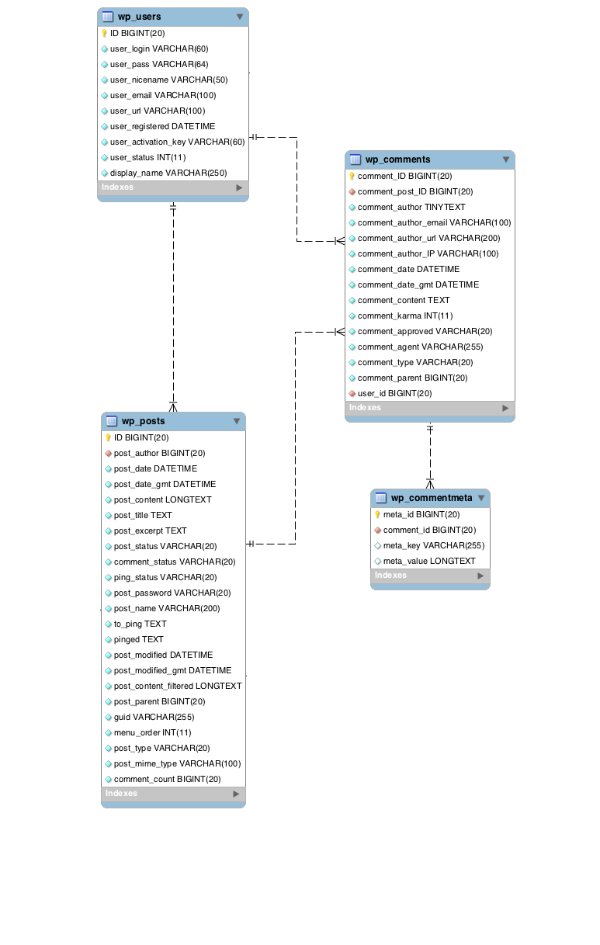
The chart below shows the wp_posts table and how it relates to other data.

Comments
Comments are stored in their own table, wp_comments. In that sense the structure is a bit similar to posts. Comment data can also be extended through the wp_commentmeta table, but comments are still their own content type and require their own set of fields.
Comments form a one-to-many relationship with posts, and they also relate to themselves through the comment_parent field so WordPress can distinguish top-level comments from replies. If the user is logged in, comment data may also connect to the wp_users table to identify who submitted the comment.
The chart below shows the wp_comments table and its relationships.
Users
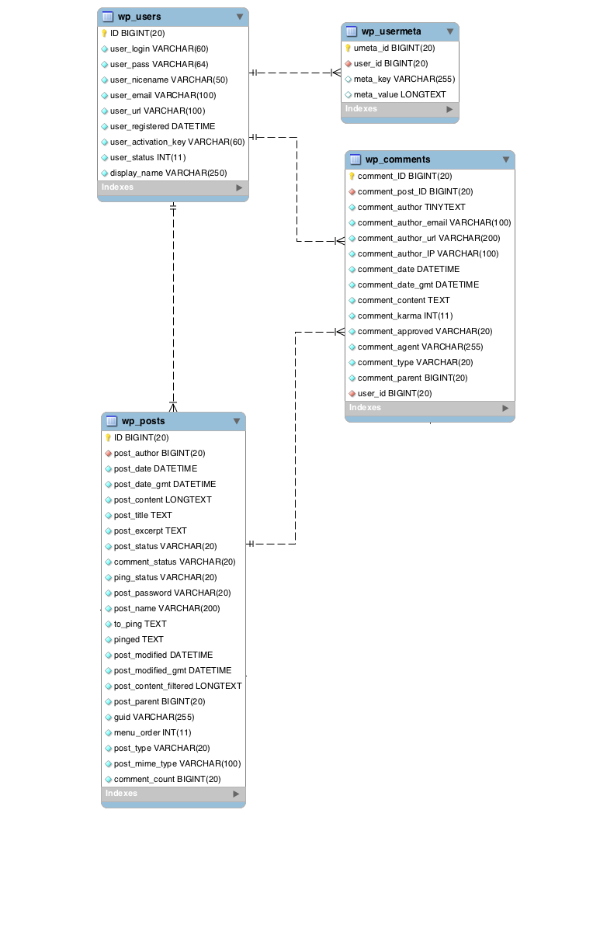
Users have their own data tables, wp_users and the metadata table wp_usermeta. At first glance, users seem very different from post-based content types, but if you think about it carefully, users are similar in many ways. Like posts, users can be queried, and they can be output as author archives or profile-like content that includes user information.
The user data structure is quite different from the structure used by posts or comments, so storing user data in a dedicated user table is much more reasonable.
The chart below shows the user tables and how they relate to other data.
Metadata for content types
Except for the deprecated links type, the content types above all have their own metadata:
- Posts:
post_meta - Comments:
comment_meta - Users:
user_meta
I will cover metadata separately in another article and explain what each type of metadata does and how it is used.
Summary
In summary, WordPress stores data through different content types and the relationships between those types. These content types do not only include posts and pages, but also custom post types, media items, revisions, and menu items.
Once we understand the different content types, how they work, and how they are similar and different from one another, we are in a much better position to build more powerful themes and plugins.