For friends who build foreign-trade websites with WordPress, the payment method they probably encounter most often is PayPal. WooCommerce supports PayPal by default, and it is very convenient to use. However, if you want to convert the foreign currency received in PayPal into RMB and withdraw it to a domestic bank account, the process is somewhat troublesome and the fees are relatively high.
Today I want to introduce Payoneer. As a payment tool for foreign-trade websites, it offers lower fees than PayPal and makes it much more convenient to withdraw funds to domestic bank accounts.
Register for Payoneer and Get Receiving Accounts
Using Payoneer is very simple. After registering on the official Payoneer website, the system automatically assigns several virtual bank accounts. We can use these bank accounts to receive payments from overseas clients just like local receiving accounts, and we can also use them to pay overseas bank accounts.
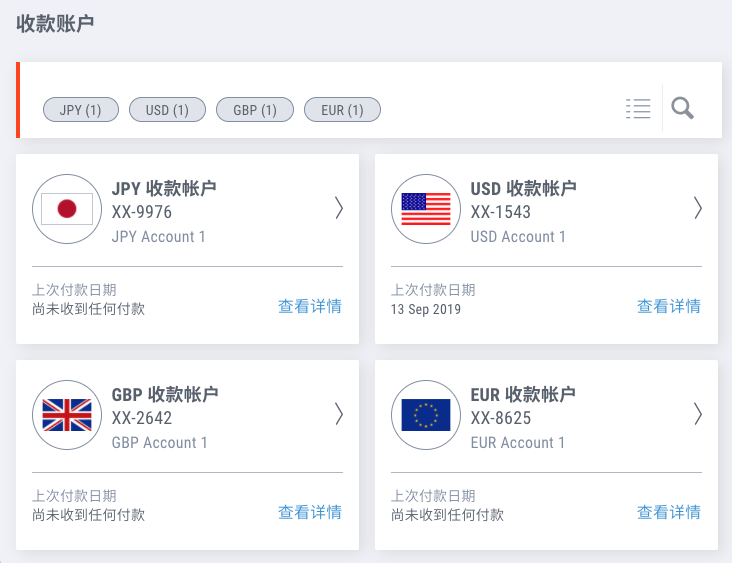
When clients remit funds to the accounts we specify, we can see the balance in the Payoneer dashboard. After that, we can withdraw the money directly to the domestic bank account linked to our Payoneer account.
Use a Payoneer Account to Receive Payments in WooCommerce
If we want to use it in WooCommerce, we can choose the bank transfer payment method in the WooCommerce payment settings and set the bank account assigned by Payoneer as the receiving account.
Unfortunately, Payoneer does not currently provide a payment API, so we cannot get the user’s payment result in real time the way we can with PayPal or Alipay. Hopefully this feature will be added in the future.
Withdraw PayPal Balance to a Domestic Bank Account Through Payoneer
If our website also accepts payments through PayPal, we can transfer the PayPal balance to Payoneer’s USD receiving account with no handling fee, and then withdraw it to a domestic bank account. Payoneer charges a 1.2% currency conversion fee. In September 2019, I withdrew PayPal funds through Payoneer once, and the money arrived in just three days, which was very fast.
Payoneer Physical Prepaid MasterCard
If needed, after the account receives 40 USD or the equivalent amount, we can also apply for a prepaid MasterCard, which is similar to a stored-value card. The balance on the card is the balance in your Payoneer account. At any ATM, store, or online shop that accepts MasterCard, we can use this card to make payments.
Payoneer’s role in cross-border e-commerce is to help us deal with banks. By using technology, it saves us the time cost of visiting a bank in person. Through Payoneer, we can sit at a computer, click a few times, and have several overseas receiving accounts. The funds we receive through Payoneer still go into bank accounts, so the overall security is also well protected.