Elementor Template Kit is a set of pre-configured website template packages that we can import directly into the Elementor editor. After importing, we no longer need to set up various parts of the website from scratch; instead, we directly apply the Elementor template kit’s design, quickly having a professional and beautiful website framework, and then fine-tune, replace website images, and upload text content based on this foundation.
A complete Elementor Template Kit usually includes the following content:
- Homepage, About Us, Services, Contact Us, and other multiple page templates.
- Global styles, such as typography (font, font size), color palettes, and button styles, ensuring the website style is consistent.
- Popups and header/footer templates.
- All necessary parts of the website, such as pricing tables, galleries, customer reviews, etc.
Where to Get Elementor Template Kits
Some themes optimized for Elementor will provide Elementor Template Kits. You can check if your theme provider offers them.
The Elementor official website also provides some introductory template kits, but the quantity is limited.
In addition, we can find and buy Elementor Template Kits from ThemeForest. ThemeForest provides a dedicated category where the number of template kits is very large, and the price is usually between $10-$30. We can find templates suitable for our website style from there.
How to Use Elementor Template Kits
In the WordPress dashboard, open the “Elementor → Tools → Website Templates” page, click the “Import” button, select the template kit zip package we downloaded, and import it after uploading.
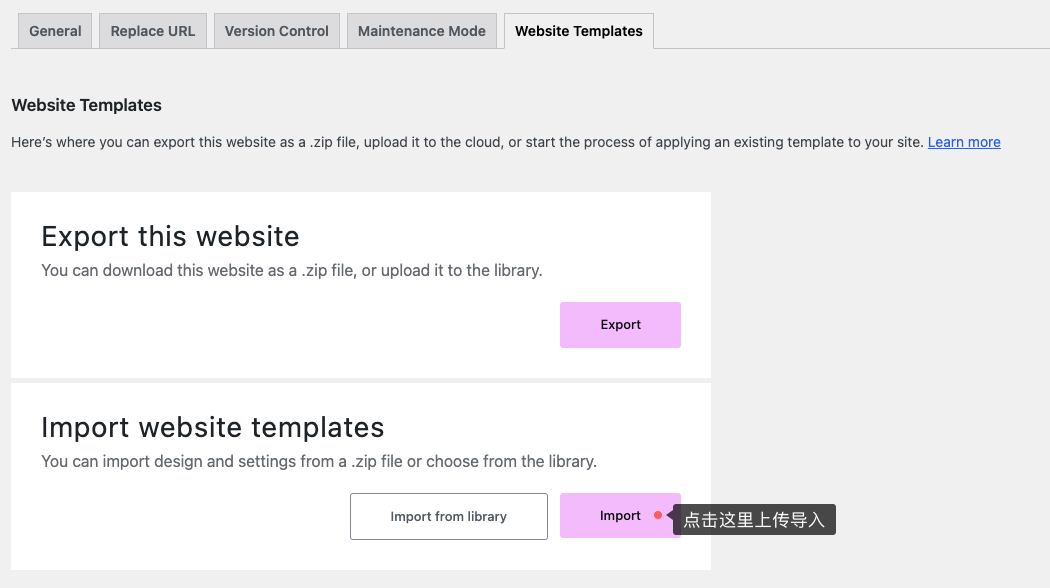
We see an “Export” button in the screenshot above. Using this feature, we can export our current website settings as a template kit to share with other websites or even submit to ThemeForest for sale.
More Questions About Elementor Template Kit
Yes, Elementor Template Kits usually need to be used with a specific or relatively new version of Elementor to ensure compatibility.
Most full-featured Elementor Template Kits require the Elementor Pro version because they use features exclusive to the Pro version, such as Theme Builder, Popup Builder, Forms, etc.
1. Compatibility: Before buying, be sure to read the product description to confirm if it is compatible with your Elementor version, if Elementor Pro is required, and if other plugins need to be installed.
2. Technical Support: High-quality Elementor Template Kits usually provide good technical support. When we encounter problems, we can directly contact the author for help.
In theory, it’s possible, but some template kits may contain external resources that could lead to loading failures or slow loading. Most of these resources are Google fonts. We can solve this problem by caching Google Fonts locally.
Elementor Template Kits are usually recommended for use with the Hello theme, which is lightweight. Most website styles and features are realized based on the Elementor plugin. Compared to customized themes, Elementor Template Kits are more lightweight and closer to a “no-code” website building method.
Elementor themes are usually customized WordPress themes that include some custom styles and features mainly implemented through code. They are relatively more flexible but also heavier.