Cloudflare is one of the most popular CDN providers, but some WordPress site owners run into the “Too many redirects” error after enabling it. In Chrome the error usually appears as ERR_TOO_MANY_REDIRECTS. This is essentially a redirect loop, and it is usually caused by incorrect SSL settings in Cloudflare.
Why Cloudflare causes too many redirects
After Cloudflare is enabled, visitors do not connect directly to the origin server first. They hit a nearby Cloudflare edge server, and Cloudflare then proxies the request back to the origin. That proxy process is usually referred to as origin fetch.
The redirect loop appears during that origin-fetch process, and the root cause is usually a mismatch between HTTP and HTTPS handling.
In the Cloudflare SSL settings there are four SSL modes. As shown below, Off means the site is accessed over HTTP, while the other modes involve HTTPS.
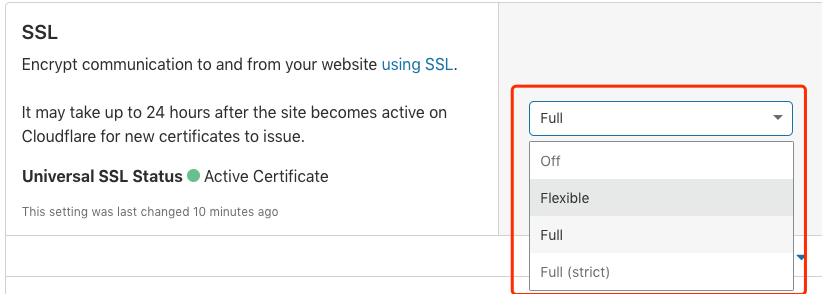
- Flexible: if the origin site does not have HTTPS configured, Cloudflare connects back to the origin over HTTP.
- Full: if the origin site supports HTTPS but the certificate is self-signed or does not match the domain, Cloudflare still connects over HTTPS but does not validate the certificate.
- Full (strict): if the origin site supports HTTPS and has a valid certificate, Cloudflare connects over HTTPS and validates the certificate on each request.
Once you understand what those modes do, the redirect loop becomes easy to explain. The issue usually requires two conditions:
- Cloudflare SSL is set to Flexible, so the CDN connects back to the origin over HTTP.
- The origin site supports HTTPS and redirects all HTTP requests to HTTPS.
At that point the loop is obvious: the visitor uses HTTPS to reach Cloudflare, Cloudflare uses HTTP to fetch the origin, and the origin immediately redirects HTTP back to HTTPS. That redirection happens over and over until the browser finally gives up and reports ERR_TOO_MANY_REDIRECTS.
How to fix the too-many-redirects problem in Cloudflare
Once you know the cause, the solution becomes clear. In practice, the following two approaches both solve the redirect loop problem:
- Choose Full or, preferably, Full (strict) in Cloudflare so the CDN also connects back to the origin over HTTPS.
- Or remove HTTPS support or HTTP-to-HTTPS redirection on the origin, so Cloudflare can safely fetch it over HTTP when using Flexible.
After changing the Cloudflare settings, it may take a few minutes to take effect. Clearing the browser cache can also help you confirm whether the problem is gone.
This issue is not unique to Cloudflare. Other CDN providers can trigger the same redirect loop if the protocol settings between the CDN and origin are mismatched. If you see a browser error about too many redirects after enabling a CDN, the first thing to inspect is how HTTPS is handled on both sides.